
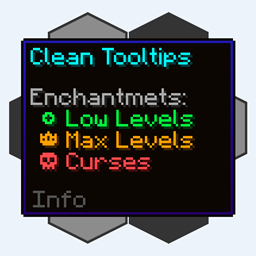
Minecraft 1.20.1, 1.21.10 کے لیے Clean Tooltips موڈ
Tooltips کو صاف اور یکساں شکل دے کر بہتر بنانا! Durability Tooltip اور مزید!
 NeoForge
 Fabric
 Forge
Clean Tooltips موڈ کے بارے میں
Clean Tooltips
کیا آپ نے کبھی محسوس کیا ہے کہ ڈیفالٹ ٹول ٹپس کو کچھ بہتر بنایا جا سکتا ہے؟ تو یہ بالکل وہی ہے جو آپ تلاش کر رہے ہیں۔
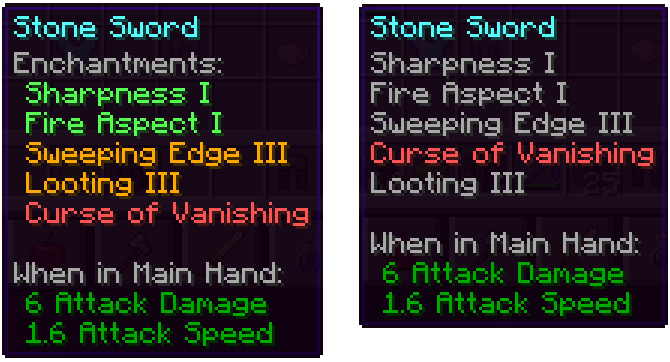
بنیادی طور پر یہ موڈ اس طریقے کو بدل دیتا ہے جس طرح enchantments ٹول ٹپ میں دکھائے جاتے ہیں:
- اب ان کی اپنی "Enchantents:" ذیلی قسم ہے
- رنگوں کی کوڈنگ تاکہ اچھے enchantments (سبز) اور curses (سرخ) کو آسانی سے الگ پہچانا جا سکے
- زیادہ سے زیادہ لیول کے enchantments سنہری رنگ میں دکھائے جائیں گے
- curses ہمیشہ فہرست کے آخر میں ترتیب دیے جاتے ہیں
موڈ انسٹال کرنے کے ساتھ: موڈ انسٹال کیے بغیر (Vanila):
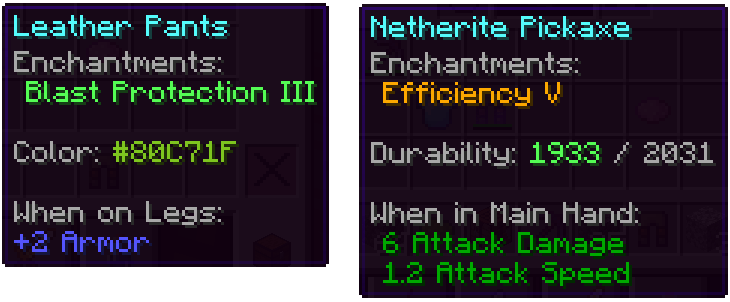
اس کے علاوہ، دیگر حصوں کو بھی بہتر بنایا گیا ہے:
- رنگے ہوئے آئٹمز پر رنگ کی لکیر اب اصل میں استعمال شدہ رنگ دکھاتی ہے
- خراب شدہ آئٹمز ٹول ٹپ میں اپنی باقی ماندہ durability دکھاتے ہیں
ہمارے پاس مستقبل کی اپ ڈیٹس کے لیے ٹول ٹپس کو بہتر بنانے کے بارے میں مزید بہت سے خیالات ہیں۔ نئی خصوصیات شامل کرنے کے علاوہ، اگلی اپ ڈیٹس میں بہت سے ترتیب دینے کے اختیارات بھی شامل کیے جائیں گے۔
Clean Tooltips کیسے انسٹال کریں
With Millida Launcher
Install Millida Launcher
The launcher is free: download it at millida.net/launcher and sign in with any nickname.
Click “Install” on this page
The launcher opens and installs the mod for Minecraft 1.20.1–1.21.10 on Fabric, Forge or NeoForge automatically.
Launch the game
A profile with it appears in the launcher: click “Play”.
Manually
Install Fabric, Forge or NeoForge
The loader must match the game version of the mod file, for example Minecraft 1.21.10. After installing it, a separate profile appears in your launcher.
Download the file for your version
In the version list above, pick the file clean_tooltips-1.1-neoforge-1.21.10.jar (24 KB) for your game version and loader.
Put it in the mods folder
The folder is inside .minecraft (Windows: %appdata%\.minecraft\mods). If it does not exist, create it.
Launch the loader profile
Open “Mods” in the main menu: Clean Tooltips should be in the list.
Minecraft 1.21.10 runs on Java 21: with a different Java version the game may close right after launch.
ورژنز
ڈیپنڈنسیز کے ساتھ
| Minecraft | لوڈر | فائل | تاریخ | اقدامات |
|---|---|---|---|---|
| 1.21.10 | NeoForge | clean_tooltips-1.1-neoforge-1.21.10.jar24.4 KB | ||
| 1.21.10 | Fabric | clean_tooltips-1.1-fabric-1.21.10.jar23.1 KB 3 | ||
| 1.20.1 | Forge | clean_tooltips-1.0-forge-1.20.1.jar25.8 KB 1 |
عمومی سوالات
Which Minecraft versions does Clean Tooltips work on?
There are files for 1.21.10, 1.20.1. The newest is 1.21.10.
Is Clean Tooltips for Forge or Fabric?
There are files for Fabric: 1.21.10, for Forge: 1.20.1 and for NeoForge: 1.21.10.
Does Clean Tooltips need other mods?
The author lists no required dependencies: the Fabric, Forge or NeoForge loader is enough.
Which Java does Clean Tooltips need?
Minecraft 1.21.10 runs on Java 21. If the game closes right after launch, the usual cause is the wrong Java version in the profile settings.
Where can I download Clean Tooltips safely?
On this page: the file clean_tooltips-1.1-neoforge-1.21.10.jar (24 KB) is stored on Millida’s server, with no link shorteners. SHA-1 checksum: 594541adddbc0d20e2361a8fef21b5ed960c2588.
ریویوز
Clean Tooltips کو ریٹ کرنے والے پہلے شخص بنیں


