
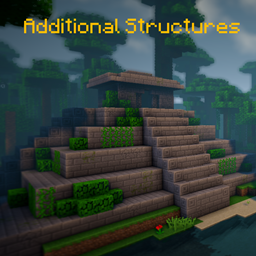
Minecraft 1.20.1, 1.12.2 کے لیے Additional Structures موڈ
250 سے زیادہ نئے اسٹرکچرز شامل کرتا ہے جو آپ کی دنیا میں مکمل طور پر ضم ہو جاتے ہیں!
 NeoForge
 Forge
Forge📖 تفصیل
یہ موڈ آپ کی دنیا کو وسیع کرنے کے لیے گیم میں تقریباً 250 نئی چھوٹی اور درمیانے سائز کی ساختوں کو شامل کرتا ہے!
- بایوم جنریشن موڈز کی حمایت کرتا ہے، جیسے Terralith، Traverse، Biomes O' Plenty، Biome Bundle اور مزید!
- Mystcraft انٹیگریشن (MC 1.12)
- ہر ساخت کی قسم کی اسپان ویلیوز کو تبدیل کرنے کے لیے کنفگ آپشنز کے ساتھ! (MC 1.12)
- /locate کمانڈ کے ساتھ کام کرتا ہے
- اپ ڈیٹ چیکر کے ساتھ
- اوورورلڈ اور اینڈ میں ونیلا اور موڈڈ بایومز میں مختلف ساختیں بنتی ہیں!
- کنفگ ڈیٹاپیک
1.18+ پر کچھ ساخت کی ویلیوز میں ترمیم یا تبدیلی کرنا چاہتے ہیں؟ یہاں ہے طریقہ!
یہاں آپ موجودہ ورژن کی تمام ساختیں تلاش کر سکتے ہیں!
کیا آپ Fabric یا Quilt استعمال کرتے ہیں؟ تو یہ ورژن استعمال کریں!
📷 پیشکش
🗃️ انحصارات
درکار:
- Magma Core [≥ MC 1.21.5]
- بنیادی کوڈ اور خصوصیات فراہم کرتا ہے جیسے اپ ڈیٹ چیکر
- CurseForge | Modrinth
معاون:
- Mystcraft [MC 1.12]
- AS ساختوں کی فیچر علامات شامل کی گئیں
- CurseForge | Modrinth
- Antique Atlas [≥ MC 1.21]
- نقشے پر کچھ ساختوں کے لیے میپ مارکر
- CurseForge | Modrinth
Additional Structures کیسے انسٹال کریں
With Millida Launcher
Install Millida Launcher
The launcher is free: download it at millida.net/launcher and sign in with any nickname.
Click “Install” on this page
The launcher opens and installs the mod for Minecraft 1.12–1.21.10 on Forge or NeoForge automatically.
Launch the game
A profile with it appears in the launcher: click “Play”.
Manually
Install Forge or NeoForge
The loader must match the game version of the mod file, for example Minecraft 1.21.10. After installing it, a separate profile appears in your launcher.
Download the file for your version
In the version list above, pick the file AdditionalStructures-1.21.10-(v.8.1.1-NEO).jar (1.5 MB) for your game version and loader.
Put it in the mods folder
The folder is inside .minecraft (Windows: %appdata%\.minecraft\mods). If it does not exist, create it.
Launch the loader profile
Open “Mods” in the main menu: Additional Structures should be in the list.
Minecraft 1.21.10 runs on Java 21: with a different Java version the game may close right after launch.
ورژنز
ڈیپنڈنسیز کے ساتھ
| Minecraft | لوڈر | فائل | تاریخ | اقدامات |
|---|---|---|---|---|
| 1.21.9 | NeoForge | AdditionalStructures v.8.1.1-NEO1.5 MB 1 | ||
| 1.20.2 | Forge | Additional Structures v.4.2.21.5 MB 24 | ||
| 1.12.1 | — | Additional Structures v.2.2.2782 KB 5 |
عمومی سوالات
Which Minecraft versions does Additional Structures work on?
There are files for 1.12–1.21.10, 12 versions in total. The newest is 1.21.10.
Is Additional Structures for Forge or Fabric?
There are files for Forge: 1.20–1.20.6 and for NeoForge: 1.21.9–1.21.10. There are no files for Fabric: a mod for another loader will not start.
Does Additional Structures need other mods?
The author lists no required dependencies: the Forge or NeoForge loader is enough.
Which Java does Additional Structures need?
Minecraft 1.21.10 runs on Java 21. If the game closes right after launch, the usual cause is the wrong Java version in the profile settings.
Where can I download Additional Structures safely?
On this page: the file AdditionalStructures-1.21.10-(v.8.1.1-NEO).jar (1.5 MB) is stored on Millida’s server, with no link shorteners. SHA-1 checksum: 05bfd35a858149e7e18e7eecd841f14dee9e504b.
ریویوز
Additional Structures کو ریٹ کرنے والے پہلے شخص بنیں


