

Minecraft 1.20.1, 1.21.1 کے لیے PackTimer ڈیٹا پیک
ٹائمر بہت سی خصوصیات اور سادہ انٹرفیس کے ساتھ، میں جلد ہی اس میں مزید خصوصیات شامل کروں گا™
- ڈاؤن لوڈز
- 2 ڈاؤن لوڈز
- ویوز
- 34 ویوز
- اپ ڈیٹ شدہ
- اپ ڈیٹ شدہ 04.10.2026
- 1.18 — 26.3
 ڈیٹا پیک
- کلائنٹ اور سرور
PackTimer
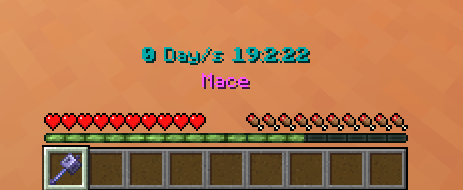
Update
If you update, run the function /function timer:update if there are any problems!

Features
- Timer with Day Counter
- Milliseconds Counter :D
- Easy to use
- English and german language options
- 16 different colors supported
- Simple to install and update

Tags
Disabling the interface:
/tag PLAYERNAME add timer.disable_interface
Disabling the timer:
/tag PLAYERNAME add timer.disable_timer
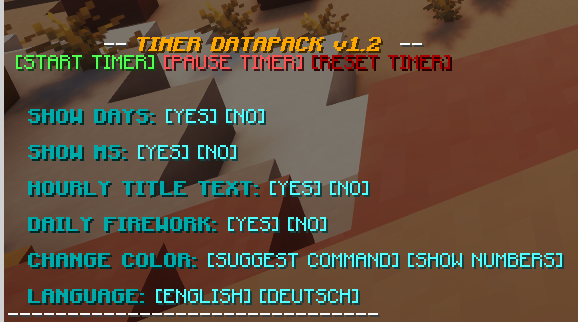
How to use
- Make sure you have commands enabled or have OP on a server.
- Type: /trigger timer.interface
- Change some settings or start the timer!
Installation
- Install the Datapack
(note: In Minecraft the Datapack may appear to be "unsupported", but it still works if you downloaded the correct version.)
- Make sure you have commands enabled
- Run the command /trigger timer.interface
PackTimer کیسے انسٹال کریں
With Millida Launcher
Install Millida Launcher
The launcher is free: download it at millida.net/launcher and sign in with any nickname.
Click “Install” on this page
The launcher opens and installs the data pack for Minecraft 1.18–26.3 automatically.
Launch the game
A profile with it appears in the launcher: click “Play”.
Manually
Download the archive
Pick the file PackTimer 1.2.6.zip (16 KB) for your game version.
New world: “Data Packs”
When creating a world, click “Data Packs”, drag the archive into the window, then move it to “Selected”.
Existing world: the datapacks folder
Put the archive into saves/<world>/datapacks and type /reload in game.
On a server
Archive goes into the server world’s datapacks
The world/datapacks folder on the server; players do not need to install anything.
Reload the data
Type /reload in the server console or restart the server.
Use the “To server” button
On Millida Hosting, the button at the top of the page uploads the file to your server and restarts it for you.
ورژنز
ڈیپنڈنسیز کے ساتھ
| Minecraft | لوڈر | فائل | تاریخ | اقدامات |
|---|---|---|---|---|
| 26.3 | ڈیٹا پیک | 26.316.1 KB 2 | ||
| 26.2 | ڈیٹا پیک | 26.216.1 KB | ||
| 26.1.2 | ڈیٹا پیک | 26.1.213 KB | ||
| 1.21.11 | ڈیٹا پیک | 1.21.1112.8 KB | ||
| 1.21.9 | ڈیٹا پیک | 1.21.914.6 KB | ||
| 1.21.6 | ڈیٹا پیک | 1.21.614.6 KB | ||
| 1.21.4 | ڈیٹا پیک | 1.21.414.6 KB | ||
| 1.21.4 | ڈیٹا پیک | 1.21.411 KB |
ریویوز
PackTimer کو ریٹ کرنے والے پہلے شخص بنیں


