

Minecraft 26.1.2 کے لیے Amethyst expansion ڈیٹا پیک
Amethys آرمر، مکمل ٹول سیٹ، نئے ہتھیار، 3 نئی ساختوں، اور بہت کچھ
- ویوز
- 24 ویوز
- اپ ڈیٹ شدہ
- اپ ڈیٹ شدہ 13.06.2026
- 1.21.6 — 26.1.2
 ڈیٹا پیک
- کلائنٹ اور سرور
💎 Amethyst Expansion
✨ Amethyst Expansion ENGLISH
Amethyst Expansion gives amethyst a real purpose in survival.
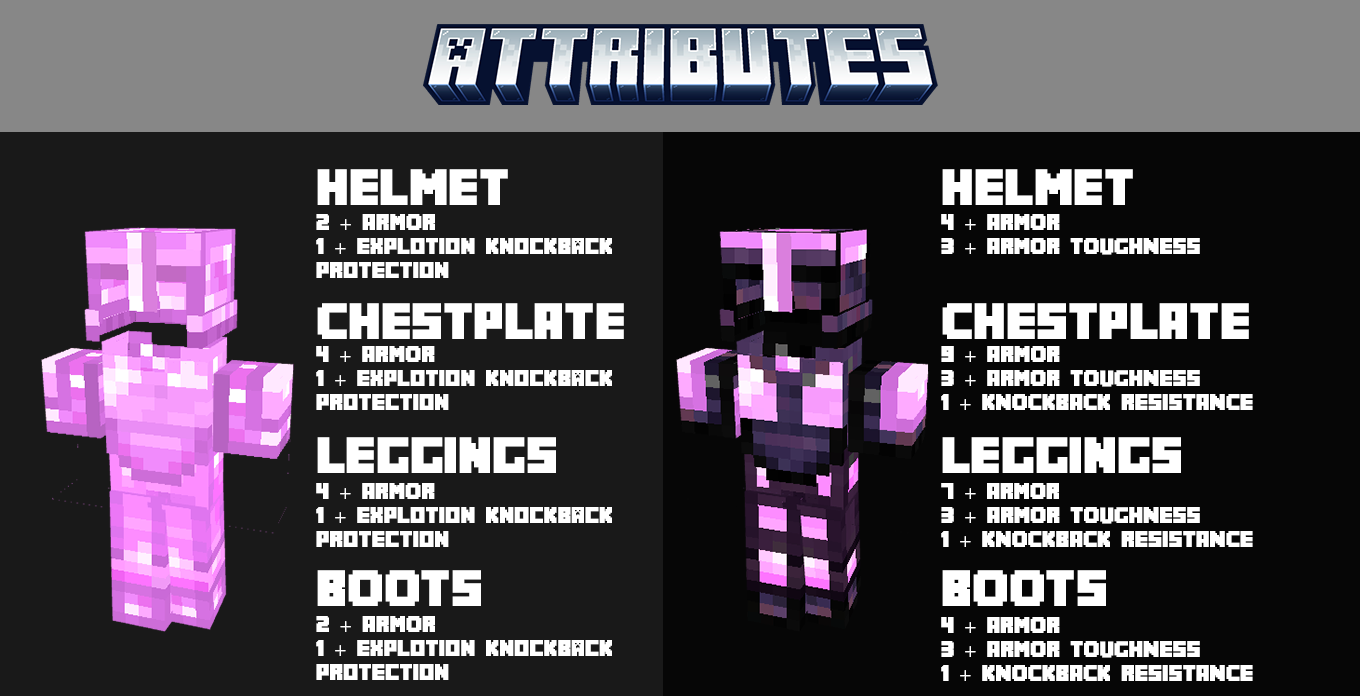
This datapack adds new amethyst gear, weapons, food, decoration, a custom enchantment, a collectible painting, and world generation with Amethyst Ruins to explore.
It is designed as a lightweight vanilla-friendly expansion that makes amethyst feel like a true progression material without changing the core feel of Minecraft.
Includes:
- New amethyst armor and tools
- Unique weapons and Dark Amethyst content
- Decorative blocks and panels
- Custom food and enchantment
- A custom painting
- Amethyst Ruins generated in the world
A simple, elegant expansion for players who want more content, more style, and more reasons to love amethyst.

✨ Amethyst Expansion ESPAÑOL
Amethyst Expansion le da a la amatista un propósito real en survival.
Este datapack añade nuevo equipo, armas, comida, decoración, un encantamiento personalizado, una pintura coleccionable y generación de mundo con Ruinas de Amatista para explorar.
Está diseñado como una expansión ligera y vanilla-friendly que hace que la amatista se sienta como un material de progresión real, sin cambiar la esencia de Minecraft.
Incluye:
- Nueva armadura y herramientas de amatista
- Armas únicas y contenido de Dark Amethyst
- Bloques decorativos y paneles
- Comida y encantamiento personalizados
- Una pintura personalizada
- Ruinas de Amatista generadas en el mundo
Una expansión simple y elegante para jugadores que quieren más contenido, más estilo y más razones para amar la amatista.

Amethyst expansion کیسے انسٹال کریں
With Millida Launcher
Install Millida Launcher
The launcher is free: download it at millida.net/launcher and sign in with any nickname.
Click “Install” on this page
The launcher opens and installs the data pack for Minecraft 1.21.6–26.1.2 automatically.
Launch the game
A profile with it appears in the launcher: click “Play”.
Manually
Download the archive
Pick the file AE20DP2026.1.2.zip (211 KB) for your game version.
New world: “Data Packs”
When creating a world, click “Data Packs”, drag the archive into the window, then move it to “Selected”.
Existing world: the datapacks folder
Put the archive into saves/<world>/datapacks and type /reload in game.
On a server
Archive goes into the server world’s datapacks
The world/datapacks folder on the server; players do not need to install anything.
Reload the data
Type /reload in the server console or restart the server.
Use the “To server” button
On Millida Hosting, the button at the top of the page uploads the file to your server and restarts it for you.
ورژنز
ڈیپنڈنسیز کے ساتھ
| Minecraft | لوڈر | فائل | تاریخ | اقدامات |
|---|---|---|---|---|
| 26.1 | ڈیٹا پیک | 26.1211 KB | ||
| 1.21.11 | ڈیٹا پیک | 1.21.11211 KB |
ریویوز
Amethyst expansion کو ریٹ کرنے والے پہلے شخص بنیں


