

 ڈیٹا پیک
Abyssaline Nether ڈیٹا پیک کے بارے میں
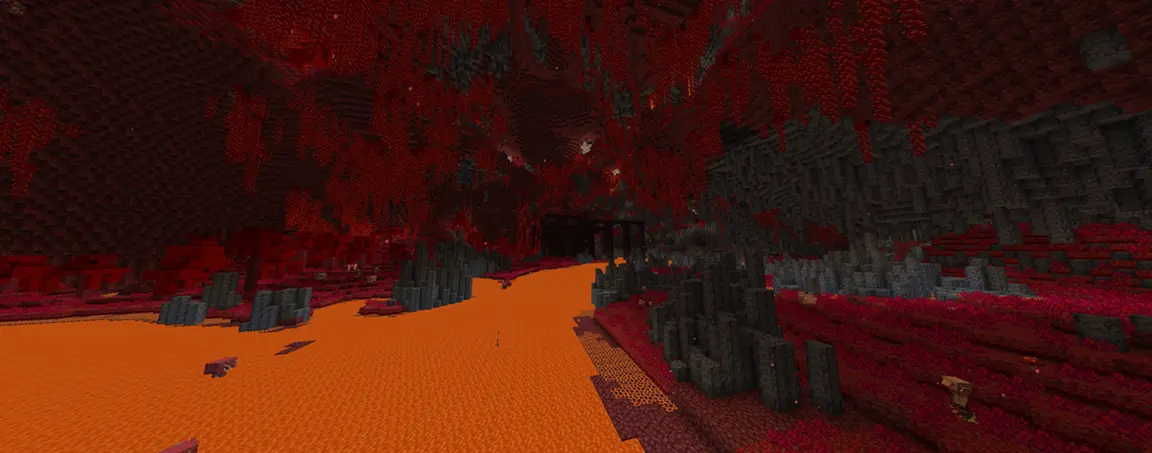
Abyssaline Nether is an overhaul to the generation of the nether that aims to make the dimension feel more coherent and immersive while preserving the claustrophobic, vertical feeling of the vanilla nether!

Features
Completely overhauled terrain generation
The default generation of the nether has been overhauled to now feature lava rivers (which can be great for riding striders), giant valley caves, claustrophobic cave networks and huge ravines. The terrain generation of the nether has also been increased to 256 blocks! (previously 128 blocks in height)
Revamped vanilla biomes
The vanilla nether biomes have been revamped to have their own distinguishing characteristics and a lot more detail.
New biomes
You can expect to find 7 new detailed biomes alongside the reworked vanilla biomes, which bring a newfound variety to the nether, while also not feeling too cluttered.

Recommendations
I highly recommend using mods such as C2ME and Noisium alongside Abyssaline Nether if you have slow chunk-generation speeds.
Compatibility
- Abyssaline Nether should work with most structure mods.
- Abyssaline Nether should not be used together with other biome datapacks or mods (such as Incendium or Biomes O’ Plenty).
Abyssaline Nether کیسے انسٹال کریں
With Millida Launcher
Install Millida Launcher
The launcher is free: download it at millida.net/launcher and sign in with any nickname.
Click “Install” on this page
The launcher opens and installs the data pack for Minecraft 1.20–1.21.11 automatically.
Launch the game
A profile with it appears in the launcher: click “Play”.
Manually
Download the archive
Pick the file abyssaline_nether 1.0.1 22.07.2026.zip (325 KB) for your game version.
New world: “Data Packs”
When creating a world, click “Data Packs”, drag the archive into the window, then move it to “Selected”.
Existing world: the datapacks folder
Put the archive into saves/<world>/datapacks and type /reload in game.
On a server
Archive goes into the server world’s datapacks
The world/datapacks folder on the server; players do not need to install anything.
Reload the data
Type /reload in the server console or restart the server.
Use the “To server” button
On Millida Hosting, the button at the top of the page uploads the file to your server and restarts it for you.
ورژنز
ڈیپنڈنسیز کے ساتھ
| Minecraft | لوڈر | فائل | تاریخ | اقدامات |
|---|---|---|---|---|
| 1.20.1 | ڈیٹا پیک | 1.20.1325 KB 2 |
عمومی سوالات
Which Minecraft versions does Abyssaline Nether work on?
There are files for 1.20–1.21.11, 19 versions in total. The newest is 1.21.11.
Does Abyssaline Nether work on a server?
Yes: the data pack goes into the datapacks folder of the server world, and players do not need to install anything.
Where can I download Abyssaline Nether safely?
On this page: the file abyssaline_nether 1.0.1 22.07.2026.zip (325 KB) is stored on Millida’s server, with no link shorteners. SHA-1 checksum: 09b6edd87f8fc121c307cc3940ceca54e8a8169f.
ریویوز
Abyssaline Nether کو ریٹ کرنے والے پہلے شخص بنیں


