
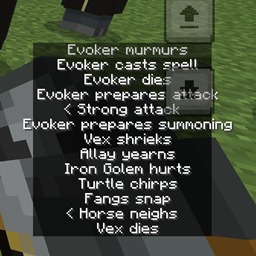
Minecraft 1.21.114 için Java Subtitles Kaynak paketi
Altyazıları Minecraft Java gibi yeniden konumlandırır
Java Subtitles kaynak paketi hakkında
This texture pack repositions the current Closed Caption feature recently added on Minecraft Preview 26.0.5 and moves it at the bottom left corner, similar to Minecraft Java.
This texture pack is only for Minecraft Preview 26.0.5 (as of Dec 11th) and may support upcoming stable/previews.
Java Subtitles nasıl kurulur
Install Millida Launcher
The launcher is free: download it at millida.net/launcher and sign in with any nickname.
Click “Install” on this page
The launcher opens and installs the resource pack for Minecraft 1.21.114 automatically.
Launch the game
A profile with it appears in the launcher: click “Play”.
Sürümler
Bağımlılıklarla
| Minecraft | Yükleyici | Dosya | Tarih | İşlemler |
|---|---|---|---|---|
| 1.21.114 | — | JavaSubtitles_0.2.mcpack59.1 KB |
SSS
Which Minecraft versions does Java Subtitles work on?
Only Minecraft 1.21.114: there are no files for other versions.
How do I download Java Subtitles?
With Millida Launcher: it installs Java Subtitles into a modpack by itself, for the right game version and loader. The launcher is free.
Yorumlar
Java Subtitles için ilk puanı sen ver



