

Minecraft 1.20.1, 1.21.1 için GUI Kaynak paketi
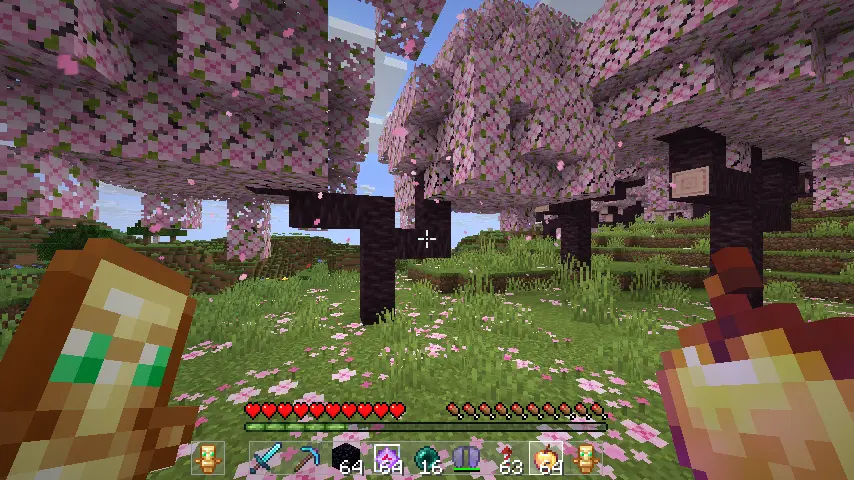
1.20 - 26.2 sürümleri için minimalist ve görüşü engellemeyen şeffaf ve net GUI. Yalnızca arayüzü değiştirir, simgeleri değiştirmez...
- indirme
- 6 indirme
- görüntülenme
- 27 görüntülenme
- Güncellendi
- Güncellendi 01.10.2026
- 1.20 — 26.2
 Vanilla oyun
- İstemci
Transparent and Clear GUI
Description
GUI by Chronicaly is a refined PvP-focused resource pack interface built for players who want a clean, no-distraction experience. Designed with clarity and simplicity in mind, this pack replaces Minecraft’s default interface with a sleek, performance-friendly layout—perfect for competitive and casual players alike.
- Minimalistic menus, buttons, and hotbar
- Streamlined inventory for fast looting and crafting
- Optimized visuals for duels, UHC, and fast-paced PvP
- Soft neutral tones that are easy on the eyes
- Complements any pack focused on PvP or Vanilla style

Features
- Fully redesigned GUI and HUD (inventory, chests, settings, etc.)
- Clean hotbar, health, armor, and status indicators
- Perfect pairing for custom PvP textures or vanilla visuals

Installation Guide
- Download the .zip file
- Move it into your .minecraft/resourcepacks folder
- Open Minecraft → Options → Resource Packs
- Enable GUI in resourcepacks
Feedback & Community
Have suggestions, bug reports, or want to chat with other players using the pack? Join the community here: https://discord.gg/factory
GUI nasıl kurulur
With Millida Launcher
Install Millida Launcher
The launcher is free: download it at millida.net/launcher and sign in with any nickname.
Click “Install” on this page
The launcher opens and installs the resource pack for Minecraft 1.20–26.2 automatically.
Launch the game
A profile with it appears in the launcher: click “Play”.
Manually
Download the archive
Pick the file GUI.zip (319 KB) for your game version. No need to unpack it.
Put it in the resourcepacks folder
The easiest way: “Options”, then “Resource Packs”, then “Open Pack Folder”, and drag the archive there.
Enable the pack
In the same window, move the pack to the right-hand “Selected” column and click “Done”.
Sürümler
Bağımlılıklarla
| Minecraft | Yükleyici | Dosya | Tarih | İşlemler |
|---|---|---|---|---|
| 26.2 | — | 26.2319 KB | ||
| 1.21.11 | — | 1.21.11319 KB 6 | ||
| 1.21.8 | — | 1.21.8319 KB | ||
| 1.21.5 | — | 1.21.5319 KB | ||
| 1.21.5 | — | 1.21.53.1 MB | ||
| 1.21.4 | — | 1.21.43.1 MB | ||
| 1.21.4 | — | 1.21.43.1 MB | ||
| 1.21.4 | — | 1.21.43 MB |
SSS
Which Minecraft versions does GUI work on?
There are files for 1.20–26.2, 20 versions in total. The newest is 26.2.
Does GUI need mods?
No, the resource pack works in the plain game without loaders: put it into the resourcepacks folder and enable it in the options.
Where can I download GUI safely?
On this page: the file GUI.zip (319 KB) is stored on Millida’s server, with no link shorteners. SHA-1 checksum: 53f42f8c985f1c50ddc402fd8abb5286cfd979f2.
Yorumlar
GUI için ilk puanı sen ver



