

End Visual Dimension kaynak paketi hakkında
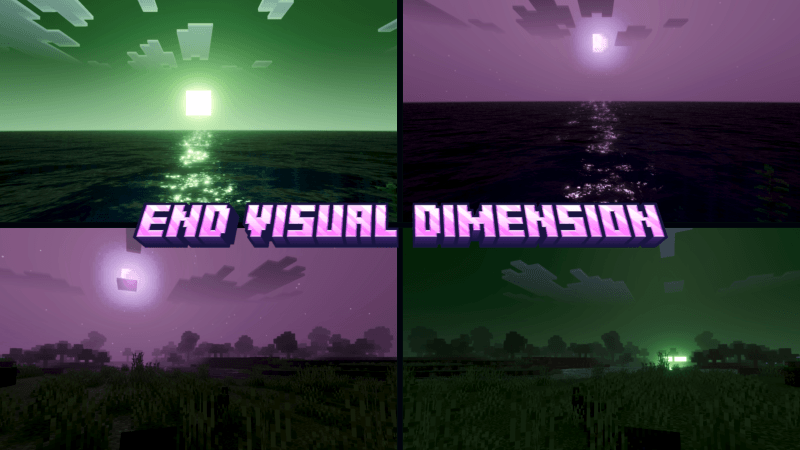
End Visual Dimension makes your world feel more dynamic and immersive with a unique End Dimension style. This shader transforms the atmosphere with mysterious purple skies, glowing lighting, and dramatic visual effects inspired by the End.
The shader enhances sunlight, moonlight, and water reflections while adding soft fog and smooth color transitions between time periods. The result is a world that feels darker, more mystical, and visually striking.

With its End-themed atmosphere, oceans, plains, and landscapes gain a surreal and otherworldly look, making exploration feel more cinematic and immersive. End Visual Dimension is perfect for players who want a unique visual experience inspired by the mysterious beauty of the End.
This shader will enhance your visuals. It is equipped with PBR, ACE tone mapping, white balance temperature, and complex midtones.
(All photos can be checked in the media or below)

End Visual Dimension nasıl kurulur
With Millida Launcher
Install Millida Launcher
The launcher is free: download it at millida.net/launcher and sign in with any nickname.
Click “Install” on this page
The launcher opens and installs the resource pack for Minecraft 26.10–26.30 automatically.
Launch the game
A profile with it appears in the launcher: click “Play”.
Manually
Download the archive
Pick the file End Visual Dimension 1.5.mcpack (276 KB) for your game version. No need to unpack it.
Put it in the resourcepacks folder
The easiest way: “Options”, then “Resource Packs”, then “Open Pack Folder”, and drag the archive there.
Enable the pack
In the same window, move the pack to the right-hand “Selected” column and click “Done”.
Sürümler
Bağımlılıklarla
| Minecraft | Yükleyici | Dosya | Tarih | İşlemler |
|---|---|---|---|---|
| 26.10 | — | End Visual Dimension 1.5276 KB |
SSS
Which Minecraft versions does End Visual Dimension work on?
There are files for 26.30, 26.20, 26.10. The newest is 26.30.
Where can I download End Visual Dimension safely?
On this page: the file End Visual Dimension 1.5.mcpack (276 KB) is stored on Millida’s server, with no link shorteners. SHA-1 checksum: 0e872133dccce8afb021fa845a7c0294dc876139.
Yorumlar
End Visual Dimension için ilk puanı sen ver


