
Minecraft 1.20.1, 1.21.1 için Xray entities shaders
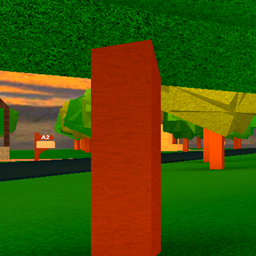
Bu mod paketi varlıkları görmeni sağlar ve su dışında hiçbir blok görünmez, dikkat et kod yazmayı bilmiyorum bu yüzden gemini'ye bıraktım ve şimdi belirli bir yöne bakarsan garip bir sarı daire var
Xray entities shaders shader'ları hakkında
This shader is about seeing entities only and water and maybe lava. i can't code to make a shader so i let gemini cook but it didn't. i am sorry if you get annoyed by the yellow oval gemini is really stupid. you can't see any blocks.
Xray entities shaders nasıl kurulur
With Millida Launcher
Install Millida Launcher
The launcher is free: download it at millida.net/launcher and sign in with any nickname.
Click “Install” on this page
The launcher opens and installs the shaders for Minecraft 1.19.2–26.2 automatically.
Launch the game
A profile with it appears in the launcher: click “Play”.
Manually
Install Iris or OptiFine
Without a shader mod the game cannot see shaders. Install it for the same Minecraft version.
Download the shader archive
Pick the file MyCustomShader (2).zip (2 KB) and do not unpack it.
Put it in the shaderpacks folder
“Options”, then “Video Settings”, then “Shader Packs”, then “Open Shader Pack Folder”, and drag the archive there.
Select the shaders
In the same window, click the pack name and “Apply”.
Sürümler
Bağımlılıklarla
| Minecraft | Yükleyici | Dosya | Tarih | İşlemler |
|---|---|---|---|---|
| 1.21 | — | MyCustomShader (2).zip2.4 KB 6 |
SSS
Which Minecraft versions does Xray entities shaders work on?
There are files for 1.19.2–26.2, 24 versions in total. The newest is 26.2.
Where can I download Xray entities shaders safely?
On this page: the file MyCustomShader (2).zip (2 KB) is stored on Millida’s server, with no link shorteners. SHA-1 checksum: b7dec5a462e9252c9f5a151c15387e24dc1a8e77.
Yorumlar
Xray entities shaders için ilk puanı sen ver


