

Minecraft 1.20.1, 1.21.1 için Bloop Shaders
İyi görselleri korurken maksimum hızı hedefleyen bir shader. Düşükten yüksek seviye bilgisayarlara kadar ölçeklenebilir.
- indirme
- 81 indirme
- görüntülenme
- 237 görüntülenme
- Güncellendi
- Güncellendi 04.09.2026
- 1.16 — 26.1.2
 Fabric
- İstemci
ABOUT BLOOP
Bloop is a Minecraft shader designed to deliver excellent graphics while maximizing performance.
Perfectly scalable, it offers smooth gameplay on low-end PCs and higher graphics options for more powerful systems, from integrated graphics to an RTX 3090.
Enjoy an enhanced visual experience without compromising on frame rates.
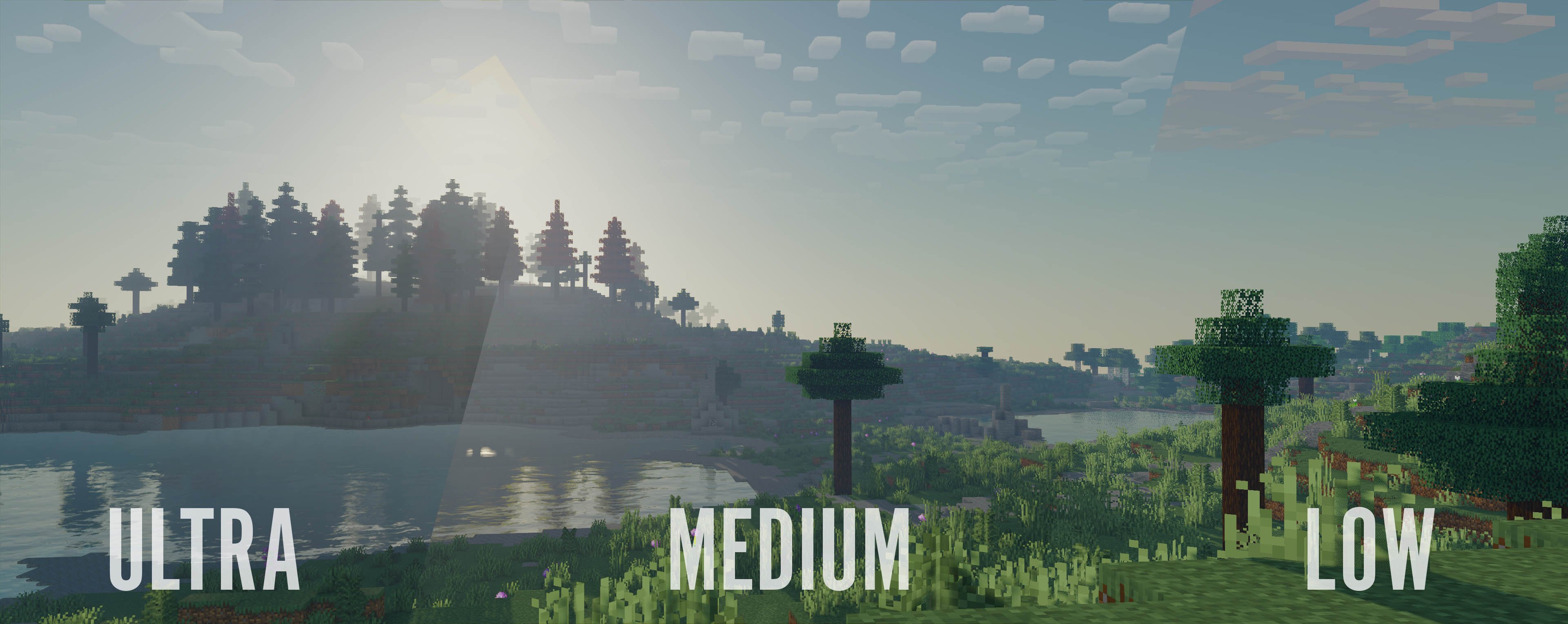
This shader includes:
- Performance oriented profiles and simple settings
- Realtime Shadows with simple and advanced shadow filtering
- Distant Horizons support, Including Shadows
- Physics Mod support
- Floodfill lighting
- Advanced and Simple AO
- Full LabPBR compatibility
- POM and Material SSR
- Volumetric Light and Mist
- cloud and contact shadows
- Bloom
- Depth of field
- Volumetric and vanilla cloud support
- Custom tonemapping
- TAA with support for anti ghosting on entities
- Support for various modded blocks
and a lot more

Performance Comparison
Performance Table
Ryzen 9 7900X with Integrated Graphics at 1080p, Render distance 8
┌──────────────────────────┬──────────────────────┬───────────┬───────────────┬───────────────────┬─────────┐ │ Shader │ Preset │ Shadows │ Shadow Range │ Shadow Resolution │ FPS │ ├──────────────────────────┼──────────────────────┼───────────┼───────────────┼───────────────────┼─────────┤ │ No shaders │ NA │ NA │ NA │ NA │ 180 fps │ ├──────────────────────────┼──────────────────────┼───────────┼───────────────┼───────────────────┼─────────┤ │ Bloop │ Lowest │ Yes │ 8 chunks │ 1024 px │ 45 fps │ │ │ Low │ Yes │ 8 chunks │ 1024 px │ 40 fps │ │ │ Med Low │ Yes │ 10 chunks │ 1024 px │ 30 fps │ │ │ Medium │ Yes │ 10 chunks │ 2048 px │ 20 fps │ │ │ Med High │ Yes │ 16 chunks │ 2048 px │ 15 fps │ │ │ High │ Yes │ 16 chunks │ 4096 px │ 10 fps │ │ │ Ultra │ Yes │ 16 chunks │ 4096 px │ 5 fps │ ├──────────────────────────┼──────────────────────┼───────────┼───────────────┼───────────────────┼─────────┤ │ Makeup UltraFast │ shadowless low │ No │ NA │ NA │ 60 fps │ │ │ shadowless Medium │ No │ NA │ NA │ 40 fps │ │ │ shadowless High │ No │ NA │ NA │ 30 fps │ │ │ Low │ Yes │ NA │ NA │ 25 fps │ │ │ Medium │ Yes │ NA │ NA │ 23 fps │ │ │ High │ Yes │ NA │ NA │ 20 fps │ ├──────────────────────────┼──────────────────────┼───────────┼───────────────┼───────────────────┼─────────┤ │ Bliss │ Default │ Yes │ 8 chunks │ 2084 px │ 10 fps │ ├──────────────────────────┼──────────────────────┼───────────┼───────────────┼───────────────────┼─────────┤ │ Complementary reimagined │ Potato │ No │ NA │ NA │ 20 fps │ ├──────────────────────────┼──────────────────────┼───────────┼───────────────┼───────────────────┼─────────┤ │ Potato Shaders │ NA │ No │ NA │ NA │ 25 fps │ ├──────────────────────────┼──────────────────────┼───────────┼───────────────┼───────────────────┼─────────┤ │ RenderPearl │ Lowest │ Yes │ 2 chunks │ 512px │ 55 fps │ │ │ lower │ Yes │ 6 chunks │ 512px │ 40 fps │ │ │ Low │ Yes │ 8 chunks │ 1024 px │ 35 fps │ │ │ medium │ Yes │ 10 chunks │ 2048 px │ 20 fps │ │ │ high │ Yes │ 10 chunks │ 2048 px │ 15 fps │ ├──────────────────────────┼──────────────────────┼───────────┼───────────────┼───────────────────┼─────────┤ │ Aurora │ Default │ No │ NA │ NA │ 20 fps │ ├──────────────────────────┼──────────────────────┼───────────┼───────────────┼───────────────────┼─────────┤ │ Mellow │ Low │ No │ NA │ NA │ 100 fps │ │ │ fancy │ No │ NA │ NA │ 70 fps │ │ │ fabulous │ No │ NA │ NA │ 50 fps │ └──────────────────────────┴──────────────────────┴───────────┴───────────────┴───────────────────┴─────────┘

Bloop Shaders nasıl kurulur
With Millida Launcher
Install Millida Launcher
The launcher is free: download it at millida.net/launcher and sign in with any nickname.
Click “Install” on this page
The launcher opens and installs the shaders for Minecraft 1.16–26.1.2 automatically.
Launch the game
A profile with it appears in the launcher: click “Play”.
Manually
Install Iris
Without a shader mod the game cannot see shaders. Install it for the same Minecraft version.
Download the shader archive
Pick the file Bloop-1.8.0-Alpha-3.zip (4.5 MB) and do not unpack it.
Put it in the shaderpacks folder
“Options”, then “Video Settings”, then “Shader Packs”, then “Open Shader Pack Folder”, and drag the archive there.
Select the shaders
In the same window, click the pack name and “Apply”.
Sürümler
Bağımlılıklarla
| Minecraft | Yükleyici | Dosya | Tarih | İşlemler |
|---|---|---|---|---|
| 1.17.1 | Iris | 1.17.14.5 MB 80 | ||
| 26.1 | Iris | 26.14.5 MB | — | |
| 1.21.11 | Iris | 1.21.114.5 MB | — | |
| 1.21.1 | Iris | 1.21.14.5 MB | — | |
| 1.21 | Iris | 1.214.5 MB | — | |
| 1.20.1 | Iris | 1.20.14.5 MB | — | |
| 1.19.2 | Iris | 1.19.24.5 MB | — | |
| 1.18.2 | Iris | 1.18.24.5 MB | — |
SSS
Which Minecraft versions does Bloop Shaders work on?
There are files for 1.16–26.1.2, 38 versions in total. The newest is 26.1.2.
What do I need to run Bloop Shaders?
Shaders are loaded through Iris: without it the game cannot see them.
How do I download Bloop Shaders?
With Millida Launcher: it installs Bloop Shaders into a modpack by itself, for the right game version and loader. The launcher is free.
Yorumlar
Bloop Shaders için ilk puanı sen ver


