
Minecraft için PlayerStatusSigns Eklenti
Kimin çevrimiçi ve çevrimdışı olduğunu size söyleyen bir tabela olsun
PlayerStatusSigns plugin'i hakkında
PlayerStatusSigns - Have a sign tell you who is on and off Version: v0.4.1
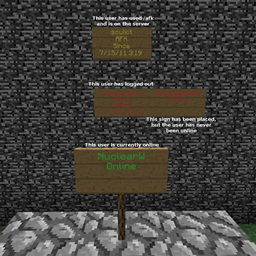
PlayerStatusSigns (PSS) lets users create signs that will change when players log in, our, or go /afk.
PSS supports language translation: Simply edit the "lang" file to change anything PSS says..
PSS has been translated into French, Brazilian Portuguese, Dutch, Spanish, and Polish.
- Download French lang file. - Thanks to @andreblue
- Download Brazilian Portuguese lang file. - Thanks to @Swish
- Download Dutch lang file. - Thanks to @Plancker
- Download German lang file. - Thanks to @DerET
- Download Spanish lang file. - Thanks to kevdama
- Download Polish lang file. - Thanks to @TGF (Also, check out TGF's readme for PSS, it puts me to shame for not having made one at all!)
PSS supports and is tested with PermissionsEx. PSS also supports default Bukkit Permissions! And will support any permissions plugin that does the same. PSS also tentatively supports Permissions 2.7.4 and 3.1.x, but is not tested against these.
Usernames 15 or 16 characters in length will not be colored in order to fit them on the sign.
To create a PSS sign: You must first have the appropriate permission (if a permissions plugin is being used), or have ops (if a permissions plugin is not being used).
Simply create a sign with "[PSS]" (without quotes) in the first line, and a player name in the second. If that player is currently online, you may use partial name matching, if they are not you must spell their exact name out completely and caps-correct.
A visual explanation
If you translate this plugin I would be very grateful if you would send me your lang file so that I may share it with others in this post.
Features:
- Create signs to show when a player is on or off.
- Signs also track users who use /afk and have permission to do so.
- Supports translation.
- Supports PermissionsEx, Permission 2/3, Bukkit Permissions, and defaults to OP
Commands:
- /afk (on|off) - Sets the signs of the player who uses this command to show AFK, or Online.
- /pss <option> - Debugging/admin command use following for <option>
options
- save - Saves the current signs in memory to the signs file.
- load - Loads from the signs file and over-writes the current signs in memory.
- check - Runs through all signs in memory and removes any signs that are now missing.
- dump - Prints a lovely chat spam representation of the current signs in memory.
Permissions:
- pss.* - Allows access to all pss commands
- pss.create.* - Implies pss.create and pss.create.other
- pss.create - Needed to create a PSS sign for one's self
- pss.create.other - Needed to create a PSS sign for any player
- pss.afk - Needed to use /afk
- pss.admin - Needed to use the /pss command
PSS was suggested by @Parrothead
PlayerStatusSigns nasıl kurulur
A server on Paper or Spigot
The plugin runs on the server core; players do not need to install anything.
File goes into the plugins folder
Download the file PlayerStatusSigns.jar (17 KB) and put it into the server’s plugins folder.
Restart the server
On startup the plugin creates its own settings folder in plugins.
Use the “To server” button
On Millida Hosting, the button at the top of the page uploads the file to your server and restarts it for you.
Sürümler
Bağımlılıklarla
| Minecraft | Yükleyici | Dosya | Tarih | İşlemler |
|---|---|---|---|---|
| — | — | v0.616.8 KB |
SSS
Do players need to install PlayerStatusSigns?
No, the plugin goes only on the server, into the plugins folder: players do not need to download anything.
Where can I download PlayerStatusSigns safely?
On this page: the file PlayerStatusSigns.jar (17 KB) is stored on Millida’s server, with no link shorteners. SHA-1 checksum: 386ff1fca2f4ffa1fa7b452484b380b43e5b8691.
Yorumlar
PlayerStatusSigns için ilk puanı sen ver


