
Minecraft için Planetoids Eklenti
Gezegenlerle dolu bir dünya oluşturur
Planetoids plugin'i hakkında
Planetoids - Generates a world full of planets: Version: v1.4.2 Release
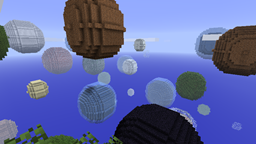
Planetoids, by default, creates a new world (called "Planetoids", if you fail to make a settings file) that uses my custom generator class to create a world full of "planets", which are spherical objects of varying size that have a "shell" of one block type, and a "core" of another. Planetoids can also be configured to work with multi-world management plugins, serving as a chunk generator for worlds that you create.
I got the idea from the Planetoids Map Generator, but I have no affiliation with the author of that tool.
Features:
- Configurable core and shell blocks, with percentage chance
- Optional floor, with configurable block type and height
- Optional single-block bedrock floor below that (to hold liquid floors)
- Can lock it to nighttime only
- Can disable weather, monsters, animals
- Reads world height from server.properties. Only seems to work up to 256.
Download Planetoids Installation and Troubleshooting
A default config is created if you don't use the one from the zip, inside plugins/Planetoids. If you want to customize it before the spawn area generates (highly recommended), make sure you edit the one from the zip and put it in the right place. If you're going to use Planetoids with a multi world management plugin, I suggest you set 'autocreateworld' to FALSE, or Planetoids will make a world for itself automatically.
Notes (Read this before asking questions please!) Screenshots Changelog/Planned Features Source Code on Github
Planetoids nasıl kurulur
A server on Paper or Spigot
The plugin runs on the server core; players do not need to install anything.
File goes into the plugins folder
Download the file Planetoids.zip (13 KB) and put it into the server’s plugins folder.
Restart the server
On startup the plugin creates its own settings folder in plugins.
Use the “To server” button
On Millida Hosting, the button at the top of the page uploads the file to your server and restarts it for you.
Sürümler
Bağımlılıklarla
| Minecraft | Yükleyici | Dosya | Tarih | İşlemler |
|---|---|---|---|---|
| — | — | Planetoids.jar v1.4.212.9 KB | ||
| — | — | Planetoids.jar v1.4.0 (Beta)30.7 KB |
SSS
Do players need to install Planetoids?
No, the plugin goes only on the server, into the plugins folder: players do not need to download anything.
Where can I download Planetoids safely?
On this page: the file Planetoids.zip (13 KB) is stored on Millida’s server, with no link shorteners. SHA-1 checksum: 179e86617dd5811b33fe4df5eb163c06132d3ece.
Yorumlar
Planetoids için ilk puanı sen ver



