
Minecraft için Item Renamer Eklenti
Eşya Yeniden Adlandırıcı
Item Renamer plugin'i hakkında
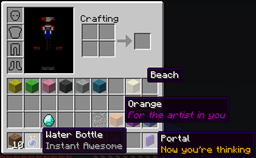
Tired of blocks called Sand? Want your enderpearls to say Grenade instead? Want to add extra lines of text below item names? Do all that and more with ItemRenamer. You can create your own custom item names for all items in your server, but still let users rename with an anvil. You can create your very own language pack!
Installation
- Download ProtocolLib and put it in your plugins folder
- Place ItemRenamer.jar in your plugins folder, on server start the configuration will be generated
- Test out the example config by setting your world to run the example pack, to see how it works
- Go crazy and make your own language pack
Developer Build
Development builds of this project can be acquired at the provided continuous integration server. These builds have not been approved by the BukkitDev staff. Use them at your own risk. Jenkins server
For developers
ItemRenamer 2.0.0 contains a fully-fledged API. Click here for more information.
Configuration
Default configuration can be found here.
Config Default Ranges Description
autoupdate true [true/false] Will remind you when a new version is available
creativedisable true [true/false] Will disable ItemRenamer while you're in creative mode
worlds.<worldname> Pack name Will set this world to run the pack you put here
packs.<packname>.<itemid>.<data>.name Any string Will rename itemid:data to your string
packs.<packname>.<itemid>.all.name Any string Will rename all itemid data values to your string
packs.<packname>.<itemid>.other.name Any string Will rename all unset itemid data values to your string
packs.<packname>.<itemid>.<data>.name Any string Will add your name to itemid:data
packs.<packname>.<itemid>.<data>.lore Any string Will add your lore list to itemid:data
packs.<packname>.<itemid>.<first>-<last>.name Any string Will add your name to every itemid with a data value of the give range.
packs.<packname>.<itemid>.<first>-<last>.lore Any string Will add your lore list to every itemid with a data value of the give range.
packs.<packname>.<itemid>.all.lore Any string Will add your lore list to all itemid data values
packs.<packname>.<itemid>.other.lore Any string Will add your lore list to all unset itemid data values
- Note: place lore in [square brackets] OR on seperate lines starting with a dash -
Player-specific packs
If you want to customize the renamer pack for a specific group of players, regardless of world, you may use the player info itempack along with the desired renamer pack. This feature requires Vault and a permission/chat plugins that supports player info.
This can be done as follows with PermissionEx:
users: Player: group: - Members options: itempack: none
Usage
It's possible to configure ItemRenamer without ever having to touch the configuration file or deal with the more complicated (but powerful) commands. Simply select an item you want to rename, and type the following:
/renamer select hand
That will select your current item's ID and durability (except for armor and tools), along with any enchantments, potion/fireworks effect, etc. Then use set name and add lore to rename the item and every other like it on the server:
/renamer set name Nameless Tool /renamer add lore Unknown Artifact
This will automatically be applied to the current world you're in. Use "renamer set pack" to apply it to a different item pack, or teleport to the world with the item pack you want to rename.
Commands
- Change whether or not to automatically check for updates:
/renamer set setting autoupdate [true|false]
- Get what item pack has been assigned to a particular world:
/renamer get world [world_name]
- Assign an item pack to the given world:
/renamer set world [world_name] [pack_name]
- Add a new item pack:
/renamer add pack [pack_name]
- Delete an item pack:
/renamer delete pack [pack_name]
- Select a item pack to use for all subsequent commands:
/renamer select pack [pack_name]
- Rename all items similar to the one the player currently is holding:
/renamer select hand
- Deselect the current item pack, going back to manually typing it:
/renamer select none
- Get the rename rule for a particular item:
/renamer get item [pack_name] [itemID] [all|other|0-32767]
- Set the name of an item(s) matching a single or multiple damage values:
/renamer set name [pack_name] [itemID] [all|other|0-32767] [0-32767] [name (with spaces)]
- Add a new lore line to an item(s) matching a single or multiple damage values:
/renamer add lore [pack_name] [itemID] [all|other|0-32767] [0-32767] [lore (with spaces)]
- Remove all the existing lores for a particular set of items:
/renamer delete lore [pack_name] [itemID] [all|other|0-32767] [0-32767]
- Add a new enchantment to a set of items: /renamer add enchantment [pack_name] [itemID] [all|other|0-32767] [0-32767] [enchantment_name] [level]
- Remove an existing enchantment for a set of items: /renamer remove enchantment [pack_name] [itemID] [all|other|0-32767] [0-32767] [enchantment_name] [level]
- Reload configuration:
/renamer reload
- Save configuration now instead of during server shutdown:
/renamer save
All commands default to OP, but also have permissions.
Modify enchantments
It is also possible to add or remove existing enchantments to any given item. The easiest method is to mark the item you want to modify in your hotbar, and type the following command:
/renamer select hand /renamer add enchantment NO_ATTRIBUTES 1
Every vanilla enchantment is supported:
- Bow: POWER, PUNCH, INFINITY, FLAME
- Weapon: SHARPNESS, BANE_OF_ARTHROPODS, SMITE, FIRE_ASPECT, KNOCKBACK, LOOTING, UNBREAKING
- Tool: FORTUNE, EFFICIENCY, UNBREAKING, SILK_TOUCH
- Armor: RESPIRATION, PROTECTION, BLAST_PROTECTION, FEATHER_FALLING, FIRE_PROTECTION, PROJECTILE_PROTECTION, THORNS, AQUA_AFFINITY
There's also three custom enchantments:
- GLOW 1: Preserve the enchantment glow with no visible enchantment name
- NO_ATTRIBUTES 1: Remove all the attribute lines introduced in 1.6.1 and 1.6.2.
- NO_DURABILITY 0: Remove any visible durability on the item. Switch out 0 with any other number to force a durability value.
Permissions
itemrenamer.config.get — read-only access to configs itemrenamer.config.set — can edit configs or reload from disk itemrenamer.update — gets a notification when update is ready, and can use update command
Notes
- Join us on irc at: irc://esper.net/ItemRenamer
- Items in the creative menu are only client-side, and thus cannot be renamed by this plugin. But creative players will see their items renamed in the main inventory bar.
- This plugin doesn't actually edit any items, they just appear renamed .. if you were to suddenly stop using this plugin all items should go back to normal
- If a player renames an item in an anvil, that name should take precedence over the ItemRenamer one
- When setting lore in game make sure to wrap the text in square brackets, each line separated by a comma, and enclosed in quotes if it contains special characters
Sourcecode
Access the source code via GitHub: https://github.com/meiskam/ItemRenamer
Item Renamer nasıl kurulur
A server on Paper or Spigot
The plugin runs on the server core; players do not need to install anything.
File goes into the plugins folder
Download the file ItemRenamer-2.2.0.jar (194 KB) and put it into the server’s plugins folder.
Restart the server
On startup the plugin creates its own settings folder in plugins.
Use the “To server” button
On Millida Hosting, the button at the top of the page uploads the file to your server and restarts it for you.
Sürümler
Bağımlılıklarla
| Minecraft | Yükleyici | Dosya | Tarih | İşlemler |
|---|---|---|---|---|
| — | — | ItemRenamer 2.2.0194 KB |
SSS
Where can I download Item Renamer safely?
On this page: the file ItemRenamer-2.2.0.jar (194 KB) is stored on Millida’s server, with no link shorteners. SHA-1 checksum: 71df55103e7d36312f3abb781ded44a9b0a9a7bd.
Yorumlar
Item Renamer için ilk puanı sen ver



