

Minecraft için Gravestone Eklenti
Bir oyuncunun ölüm konumunda bir mezar taşı oluşturur.
Gravestone plugin'i hakkında
Constructs an inscribed gravestone, with a buried inventory chest, wherever a player dies.
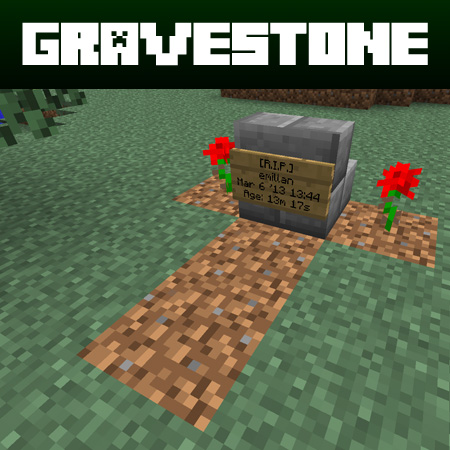
Features
- Generates a gravestone at the location of a player's death.
- The gravestone will generate an inscription displaying the player's name, date of death and game session time.
- A "Treasure Chest" will generate beneath the grave containing the deceased player's inventory and armor items.
- Gravestone elements will only replace "natural" blocks such as dirt, sand, grass, gravel, netherrack, etc. This may be turned off in config.yml.
- Acts as a useful indicator, especially in SMP games, where players may gain better knowledge of exploration attempts and history within the game.
- Configurable options, Permissions and WorldGuard support.
Change Log | Configs | Permissions | Media

Configs
Use config.yml to apply custom settings to available Gravestone options.
Option Default Description
enable-white-list false Use this to activate the white-list.txt. Once active, only usernames listed here will be granted gravestones upon death.
only-build-grave-on-natural-material true Grave sections will only render-replace "natural" materials such as dirt, sand, grass, gravel, netherrack, etc. Set to false to allow grave blocks to replace any material.
enable-fancy-grave true Enables a "fancy grave" which adds dirt and roses around gravestone. Setting this to false will generate a "basic" grave consisting of only a gravestone with sign.
create-buried-inventory-chest true Enables the creation of the buried inventory "treasure chest". Set this to false if you don't want this feature.
display-date-time-of-death true Displays the date and time of a player's death.
fancy-grave-material dirt Material used around a fancy grave.
allow-unlimited-graves-per-player true Default is true to allow for unlimited graves per player. When set to false, a player's prior grave will disappear and the area's original contents will be restored. If the player's grave block has been altered after construction then the prior grave blocks will not be reset. This avoids the potential for griefing.
grave-stone-material smooth stairs Used to set material used for gravestone.
enable-grave-lightning-effect true Lightning effect upon grave when player dies. Set to false to turn off.
enable-fancy-grave-side-decor true Turns on the side decor for a fancy grave.
fancy-grave-side-decor red rose Sets the decor used for the side decor of a fancy grave.
only-build-grave-if-player-has-inventory true Only build grave if player has an inventory. Set to false to turn off.
allow-grave-in-normal-world true Enables grave creation in the overworld.
allow-grave-in-nether true Enables grave creation in the Nether.
allow-grave-in-end true Enables grave creation in the End.
white-list.txt
Use white-list.txt to limit grave creation to certain players. Note: Set enable-white-list: true in config.yml to enable the white list.
black-list.txt
Use black-list.txt to deny grave creation for certain players.
Permissions
permissions: gravestone.*: description: Permissions for Gravestone. children: gravestone.grave: true gravestone.gravestone: true gravestone.gravestone.info: true gravestone.grave: default: true description: Player permission for construction of a grave. gravestone.gravestone: default: true description: The default gravestone command. gravestone.gravestone.info: default: true description: Provides info about the Gravestone plugin.
"Fancy" Grave
"Fancy" Grave with Buried Treasure Chest
"Basic" Grave
Change Log | Configs | Permissions | Media
Also check out my Prayer Plugin and Minecraft Pocket Reference!
Gravestone nasıl kurulur
A server on Paper or Spigot
The plugin runs on the server core; players do not need to install anything.
File goes into the plugins folder
Download the file Gravestone.jar (17 KB) and put it into the server’s plugins folder.
Restart the server
On startup the plugin creates its own settings folder in plugins.
Or use the “To hosting” button
On Millida Hosting, the button at the top of the page uploads the file to your server and restarts it for you.
Sürümler
Bağımlılıklarla
| Minecraft | Yükleyici | Dosya | Tarih | İşlemler |
|---|---|---|---|---|
| — | — | Gravestone v1.0.917.1 KB |
SSS
Do players need to install Gravestone?
No, the plugin goes only on the server, into the plugins folder: players do not need to download anything.
Where can I download Gravestone safely?
On this page: the file Gravestone.jar (17 KB) is stored on Millida’s server, with no link shorteners. SHA-1 checksum: 231ec9316ac828ce0d0efcd1e23aa957f2e76f4e.
Yorumlar
Gravestone için ilk puanı sen ver


