
Minecraft için Colored Signs Eklenti
Kullanımı kolay oyun içi tabela düzenleyici
COLOREDSIGNS
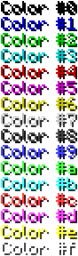
ColoredSigns is a plugin that allows for players with a permission add color on signs in-game. I know many of these plugins already exist but if you're just looking for a plugin to do this simple task you can check out mine. All you need to do is the following, Download the .jar and put in your plugins folder and reload/restart the server. After that you need to have the permission "coloredsigns.format" and place down a sign and put the character you defined in the config.yml (Default: &) and any color-code.
FEATURES
- Lightweight
- Easy to use
PERMISSION
coloredsigns.format: Get color on signs.
DONATE
MILESTONES
- 50,000 downloads ✔
- 75,000 downloads ✔
- 100,000 downloads ✔
- 150,000 downloads ✔
- 200,000 downloads ✔
- 300,000 downloads ✔
- 400,000 downloads ✖
300,000 downloads!
TODO
If you have any suggestions leave them below.
TUTORIAL
Big thanks to @zalex12 (YouTube channel link)
Colored Signs nasıl kurulur
A server on Paper or Spigot
The plugin runs on the server core; players do not need to install anything.
File goes into the plugins folder
Download the file ColoredSigns.jar (16 KB) and put it into the server’s plugins folder.
Restart the server
On startup the plugin creates its own settings folder in plugins.
Or use the “To hosting” button
On Millida Hosting, the button at the top of the page uploads the file to your server and restarts it for you.
Sürümler
Bağımlılıklarla
| Minecraft | Yükleyici | Dosya | Tarih | İşlemler |
|---|---|---|---|---|
| — | — | ColoredSigns v4.2515.6 KB |
Yorumlar
Colored Signs için ilk puanı sen ver


