
Minecraft 1.9 için ArmorHUD Eklenti
ArmorHUD
ArmorHUD
Description
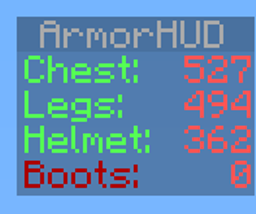
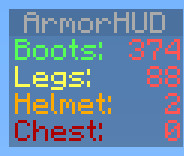
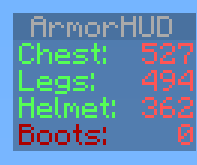
ArmorHUD is a plugin that provides on screen information of your armor durability. This plugin has a soft dependency for Vault. If you do not wish to use permissions set the permission-system option in the Config file to none. This allows everyone on your server to use ArmorHUD.
Setup
- Download the .jar
- Copy it to your plugins folder
- Start the server
- Optional: Set up permissions
Permissions
Permission Description
armorhud.use Gives the player permission to use ArmorHUD
armorhud.reload Gives the player permission to use the /armorhud reload command
Commands
Command Description
/armorhud on Activate the ArmorHUD
/armorhud off Deactivate the ArmorHUD
/armorhud alert Activate the ArmorHUD in Alert mode, only armor below 10% durability will show up
/armorhud auto Activate the ArmorHUD in Automatic mode, the HUD will only show up if you are wearing any armor
/armorhud reload Reloads both ArmorHUD config files. Operator status or armorhud.reload permission required for access to this command
Config
-config.yml
Config option Parameters Description
compatibility-mode: true/false Set this to true to allow this plugin to work alongside with other scoreboard plugins not using the sidebar slot
permission-system: none/bukkit/vault Set this to vault or bukkit to use a permission system. If set to none (default) all players will be allowed to use ArmorHUD
startup-mode: 'off'/'on'/alert/auto You can determin here what mode should be the default ArmorHUD mode for connecting players. Use apostrophes if you use the 'off' or 'on' parameter
startup-message: true/false This allows you to disable messages from ArmorHUD on player joins when you have ArmorHUD configured to start for connecting players (startup-mode).
percentage: true/false Set this to true to display armor durability in percentages
fixed-position: true/false Set this to true to display the hud values in a fixed position (img)
blocked-worlds: worldname1, worldname2, etc. Any worlds listed here will prevent ArmorHUD from working there
Language Config
-language.yml
Helmet: <Custom helmet name>
Chest: <Custom chest name>
Legs: <Custom legs name>
Boots: <Custom boots name>
YouTube
Plugin showcase of ArmorHUD v1.0.
MCStats Metrics
MCStats collects data such as which bukkit or ArmorHUD version you are running. You can find more info here: http://mcstats.org/learn-more/. Do you want to opt-out? Go to the PluginMetrics folder. In the config.yml there set opt-out to true.
Feedback
Any feedback is appreciated. Please make sure to use the Ticket System if you are reporting a bug. Thanks!
If you enjoy this plugin feel free to show your appreciation: :')
ArmorHUD nasıl kurulur
A server on Paper or Spigot
The plugin runs on the server core for Minecraft 1.9; players do not need to install anything.
File goes into the plugins folder
Download the file ArmorHUD.jar (54 KB) and put it into the server’s plugins folder.
Restart the server
On startup the plugin creates its own settings folder in plugins.
Use the “To server” button
On Millida Hosting, the button at the top of the page uploads the file to your server and restarts it for you.
Minecraft 1.9 runs on Java 8: with a different Java version the game may close right after launch.
Sürümler
Bağımlılıklarla
| Minecraft | Yükleyici | Dosya | Tarih | İşlemler |
|---|---|---|---|---|
| 1.9 | — | ArmorHUD v1.1253.6 KB |
Yorumlar
ArmorHUD için ilk puanı sen ver



