

 NeoForge
 Forge
 Fabric
Wabbanode Companion modu hakkında
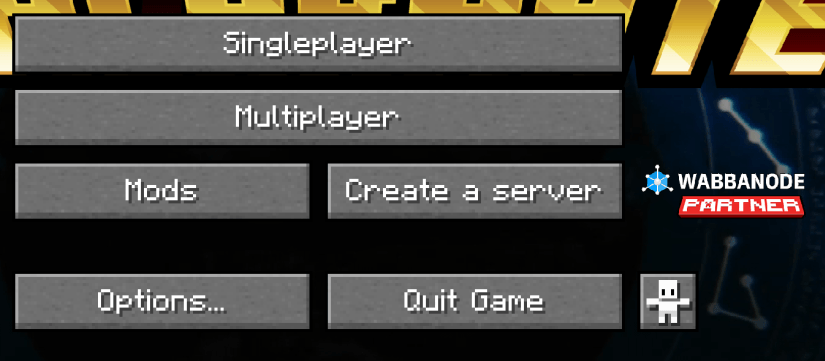
The Wabbanode Companion Mod is a lightweight client-side utility that adds a customizable button and logo to the Minecraft title screen.
Partners can configure the button text, destination link, and whether or not to display the Wabbanode logo.
This mod is designed to provide quick, in-game access to Wabbanode’s partner links without affecting gameplay.
Features:
- Customizable button text and clickable link on the title screen in config/wabbanode/config.json
- Optional display of the Wabbanode logo.
- Fully client-side with no gameplay changes.
- Intended specifically for Wabbanode partners; players can remove the mod from their packs at any time if they don't wish to see the branding.
Ideal for Wabbanode customers and affiliates who want easy access to the Wabbanode site directly from their Minecraft client.
Setup:
- Drag-and-drop the correct version of the mod into your mods folder.
- Create the config/wabbanodecompanion/config.json file and populate it with your unique link e.g.
{ "link": "<your unique affiliate link>", "displayLogo": true }
Once configured, you'll see the button on your main menu screen.
Wabbanode Companion nasıl kurulur
With Millida Launcher
Install Millida Launcher
The launcher is free: download it at millida.net/launcher and sign in with any nickname.
Click “Install” on this page
The launcher opens and installs the mod for Minecraft 1.20.1–1.21.1 on Fabric, Forge or NeoForge automatically.
Launch the game
A profile with it appears in the launcher: click “Play”.
Manually
Install Fabric, Forge or NeoForge
The loader must match the game version of the mod file, for example Minecraft 1.21.1. After installing it, a separate profile appears in your launcher.
Download the file for your version
In the version list above, pick the file wabbanode-companion-neoforge-1.21.1-1.0.1.jar (28 KB) for your game version and loader.
Put it in the mods folder
The folder is inside .minecraft (Windows: %appdata%\.minecraft\mods). If it does not exist, create it.
Launch the loader profile
Open “Mods” in the main menu: Wabbanode Companion should be in the list.
Minecraft 1.21.1 runs on Java 21: with a different Java version the game may close right after launch.
Sürümler
Bağımlılıklarla
| Minecraft | Yükleyici | Dosya | Tarih | İşlemler |
|---|---|---|---|---|
| 1.21.1 | NeoForge | Wabbanode Companion 1.0.1 [NEOFORGE]28 KB | ||
| 1.20.1 | Forge | Wabbanode Companion 1.0.1 [FORGE]28.7 KB | ||
| 1.20.1 | Fabric | Wabbanode Companion 1.0.1 [FABRIC]28.2 KB |
SSS
Which Minecraft versions does Wabbanode Companion work on?
There are files for 1.21.1, 1.20.1. The newest is 1.21.1.
Is Wabbanode Companion for Forge or Fabric?
There are files for Fabric: 1.20.1, for Forge: 1.20.1 and for NeoForge: 1.21.1.
Does Wabbanode Companion need other mods?
The author lists no required dependencies: the Fabric, Forge or NeoForge loader is enough.
Which Java does Wabbanode Companion need?
Minecraft 1.21.1 runs on Java 21. If the game closes right after launch, the usual cause is the wrong Java version in the profile settings.
Where can I download Wabbanode Companion safely?
On this page: the file wabbanode-companion-neoforge-1.21.1-1.0.1.jar (28 KB) is stored on Millida’s server, with no link shorteners. SHA-1 checksum: 637fd047dc95fadda4b851b47e86aed91286f9c5.
Yorumlar
Wabbanode Companion için ilk puanı sen ver


