
Minecraft 1.20.1, 1.21.5 için Transparent Mod
Kaynak paketlerinin belirli varlıkların saydamlığı desteklemesini sağlar.
 Fabric
 Quilt
Quilt NeoForge
 Forge
ForgeTransparent modu hakkında
Transparent, kaynak paketlerinin belirli varlıklara şeffaf (veya yarı saydam) pikselli dokular vermesini sağlar. Kullanmak için modu kurmanız ve desteklenen varlıklardan birine şeffaf bir doku veren bir kaynak paketi kullanmanız veya oluşturmanız yeterlidir.
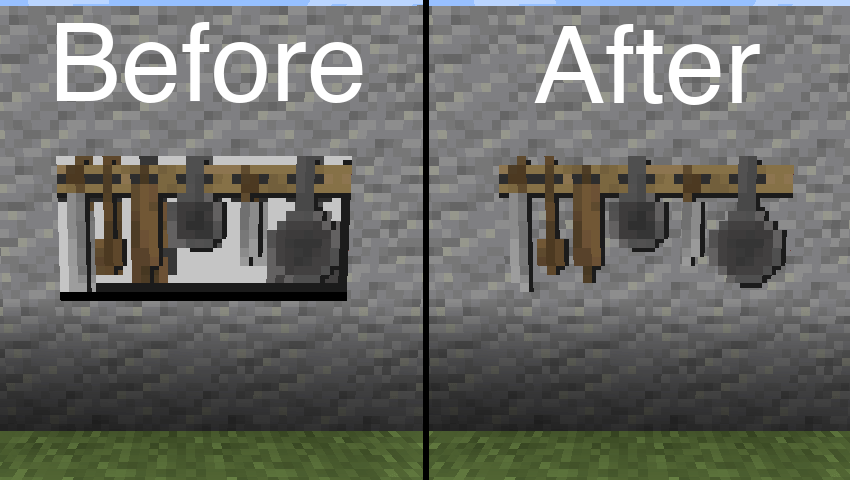
Yukarıdaki görselde kullanılan kaynak paketi: BwW Texturepack.
Paintings++ Modunu resmi olarak destekler!
Desteklenen Varlıklar
- Zırh Standı (1.19.4+)
- End Kristali
- End Kristali Işını (1.21+)
- Eşya Çerçevesi
- Tablo
- Oyuncu Pelerini (1.21+)
- Oyuncu Zırhı (1.21+)
- Fener Işını (varsayılan olarak devre dışı)
Bu mod tarafından başka bir varlığın desteklenmesini istiyorsanız, lütfen Discord veya GitHub Issues üzerinden bana bildirin.
Yapılandırma
Varsayılan yapılandırmayı değiştirmek için, aşağıdaki json dosyası içeriğini kaynak paketinizde /assets/transparent/transparent.json konumunda bulunan bir dosyaya yapıştırın.
{ "armorstand": true, "beaconbeam": false, "endcrystal": true, "endcrystalbeam": true, "itemframe": true, "painting": true, "playercape": true, "playerarmor": true }
Herhangi bir sorunu GitHub üzerinden bildirin. Discord'da transparent kanalında sohbet edin.
Modlarımın geliştirilmesini Ko-fi üzerinden destekleyin.
Transparent nasıl kurulur
With Millida Launcher
Install Millida Launcher
The launcher is free: download it at millida.net/launcher and sign in with any nickname.
Click “Install” on this page
The launcher opens and installs the mod for Minecraft 1.20.1–1.21.5 on Fabric, Forge, NeoForge or Quilt automatically.
Launch the game
A profile with it appears in the launcher: click “Play”.
Manually
Install Fabric, Forge, NeoForge or Quilt
The loader must match the game version of the mod file, for example Minecraft 1.21.5. After installing it, a separate profile appears in your launcher.
Download the file for your version
In the version list above, pick the file transparent-fabric-21.5.0.jar (35 KB) for your game version and loader.
Put it in the mods folder
The folder is inside .minecraft (Windows: %appdata%\.minecraft\mods). If it does not exist, create it.
Launch the loader profile
Open “Mods” in the main menu: Transparent should be in the list.
Minecraft 1.21.5 runs on Java 21: with a different Java version the game may close right after launch.
Sürümler
Bağımlılıklarla
| Minecraft | Yükleyici | Dosya | Tarih | İşlemler |
|---|---|---|---|---|
| 1.21.5 | Fabric, Quilt | [Fabric 1.21.5] v21.5.035.3 KB | ||
| 1.21.5 | NeoForge | [NeoForge 1.21.5] v21.5.033.6 KB | ||
| 1.20.6 | Forge | [Forge 1.20.6] v20.6.125.8 KB | ||
| 1.20.1 | Quilt | [Quilt 1.20.1] v8.0.129.4 KB |
SSS
Which Minecraft versions does Transparent work on?
There are files for 1.21.5, 1.20.6, 1.20.1. The newest is 1.21.5.
Is Transparent for Forge or Fabric?
There are files for Fabric: 1.21.5, for Forge: 1.20.6, for NeoForge: 1.21.5 and for Quilt: 1.20.1–1.21.5.
Does Transparent need other mods?
The author lists no required dependencies: the Fabric, Forge, NeoForge or Quilt loader is enough.
Which Java does Transparent need?
Minecraft 1.21.5 runs on Java 21. If the game closes right after launch, the usual cause is the wrong Java version in the profile settings.
Where can I download Transparent safely?
On this page: the file transparent-fabric-21.5.0.jar (35 KB) is stored on Millida’s server, with no link shorteners. SHA-1 checksum: b1ad3807de859e41029047644e38377a0f023716.
Yorumlar
Transparent için ilk puanı sen ver


