

Minecraft 1.20.4 için The Guild Mod
Görevler, keşifler ve maceralar sizi bekliyor!
- görüntülenme
- 9 görüntülenme
- Güncellendi
- Güncellendi 18.10.2026
- 1.17.1 — 1.20.4
 Fabric
Introduction
Welcome to The Guild, a quest mod inspired by Bountiful.
Have you ever wanted to go on an adventure? Or maybe you're more inclined for a stable life? Either way The Guild has got you covered!
Choose between 15 different professions (7 available at the moment) and embark on a journey of questing!
This mod adds quests to the game.
Ok, but what are quests?
A quest is a set of randomly generated tasks usually accompanied by a corresponding reward based on said tasks.
Quests are highly customizable through datapacks, with a solid base of defaults so you can start adventuring out of the box.
Getting started
To start, find a Guild Master in a plains village, and buy a Profession Licence.
Here's The Guild, a build found mainly in plains villages and more rarely in other ones. Here you can buy Professions Licences to start accepting quests or to expand your choices.
Quests screen
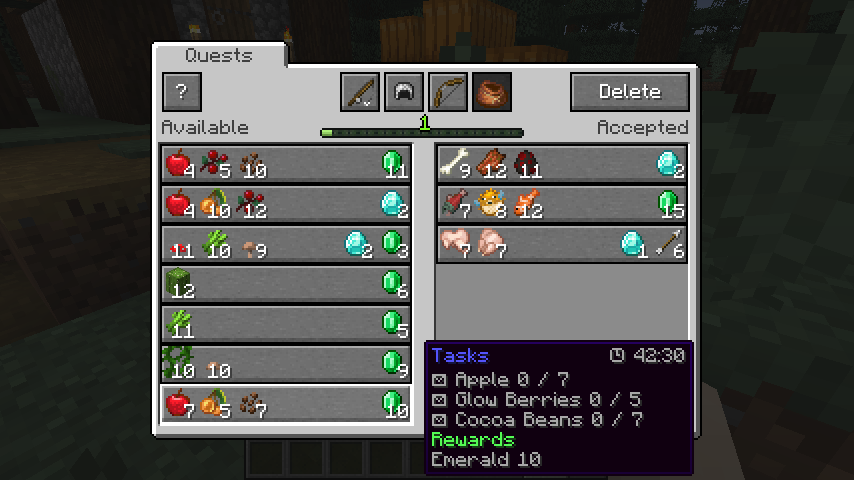
Obtaining and using a licence will unlock the entire Questing system. To open the Quests Screen press the Guild Screen Key (J by default).
The Quests Screen showing available quests (on the left) and accepted quests (on the right). Professions are also visible on the top.
Datapack guide
Customizing quests is easy, you can follow the guide here to create your own quests datapacks in minutes!
https://github.com/Fulmineo64/Guild/tree/master/examples/datapacks
Is there gonna be a Forge version?
No, but you can download the Bountiful mod which offers many of the functionalities.
Discord
You can discuss, suggest new features and get previews of my mods on my Discord server!
Have fun living your adventures!
The Guild nasıl kurulur
With Millida Launcher
Install Millida Launcher
The launcher is free: download it at millida.net/launcher and sign in with any nickname.
Click “Install” on this page
The launcher opens and installs the mod for Minecraft 1.17.1–1.20.4 on Fabric automatically.
Launch the game
A profile with it appears in the launcher: click “Play”.
Manually
Install Fabric
The loader must match the game version of the mod file, for example Minecraft 1.20.4. After installing it, a separate profile appears in your launcher.
Download the file for your version
In the version list above, pick the file guild-fabric-0.4.10.jar (1.3 MB) for your game version.
Put it in the mods folder
The folder is inside .minecraft (Windows: %appdata%\.minecraft\mods). If it does not exist, create it.
Launch the loader profile
Open “Mods” in the main menu: The Guild should be in the list.
Minecraft 1.20.4 runs on Java 17: with a different Java version the game may close right after launch.
Sürümler
Bağımlılıklarla
| Minecraft | Yükleyici | Dosya | Tarih | İşlemler |
|---|---|---|---|---|
| 1.20.4 | Fabric | [Fabric 1.20.4] The Guild 0.4.101.3 MB | ||
| 1.17.1 | Fabric | [Fabric 1.17.1] The Guild 0.0.5322 KB |
SSS
Which Minecraft versions does The Guild work on?
There are files for 1.20.4, 1.17.1. The newest is 1.20.4.
Is The Guild for Forge or Fabric?
Only for Fabric: 1.17.1–1.20.4. There are no files for Forge or NeoForge: a mod for another loader will not start.
Does The Guild need other mods?
The author lists no required dependencies: the Fabric loader is enough.
Which Java does The Guild need?
Minecraft 1.20.4 runs on Java 17. If the game closes right after launch, the usual cause is the wrong Java version in the profile settings.
Where can I download The Guild safely?
On this page: the file guild-fabric-0.4.10.jar (1.3 MB) is stored on Millida’s server, with no link shorteners. SHA-1 checksum: f40de2048626b6afaeda482d76c759c6eb5c59d9.
Yorumlar
The Guild için ilk puanı sen ver


