
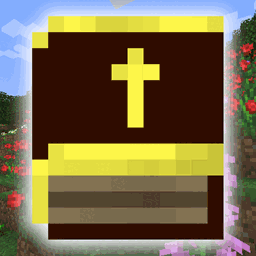
Minecraft 1.19.2, 26.2 için The Bible Mod
İncil'in tamamının CPDV çevirisini bir eşya olarak ekler.
 NeoForge
 Fabric
 Forge
ForgeThe Bible modu hakkında

- LMB = Next chapter
- RMB = Previous chapter
- LMB + Middle Mouse = Next book
- RMB + Middle Mouse = Previous book
- Mouse 4 and 5 can also navigate books

- RMB opens the interface
- RMB can heal certain (base game) mobs back into their original form
- Hitting a monster will burn their flesh. Deals bonus damage if the monster is fire resistant. Also deals a small part of max health as damage
- Hitting a non-monster will heal them

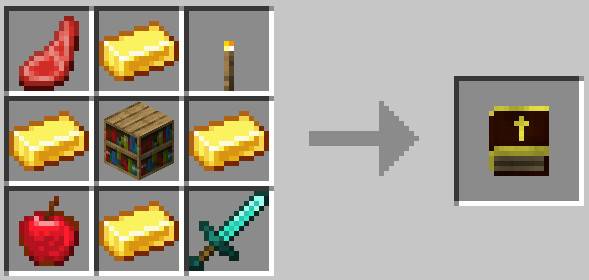

- Ronald L. Conte Jr - creation of the CPDV https://www.sacredbible.org/catholic/
- Starbound - original base of book texture
- Freef - coding and re-texture

Want to see my mods for other games? Click here!
Also available on modrinth

The Bible nasıl kurulur
With Millida Launcher
Install Millida Launcher
The launcher is free: download it at millida.net/launcher and sign in with any nickname.
Click “Install” on this page
The launcher opens and installs the mod for Minecraft 1.6.4–26.2 on Fabric, Forge or NeoForge automatically.
Launch the game
A profile with it appears in the launcher: click “Play”.
Manually
Install Fabric, Forge or NeoForge
The loader must match the game version of the mod file, for example Minecraft 26.2. After installing it, a separate profile appears in your launcher.
Download the file for your version
In the version list above, pick the file freefbible-NEOFORGE-26.2-1.0.0.jar (1.5 MB) for your game version and loader.
Put it in the mods folder
The folder is inside .minecraft (Windows: %appdata%\.minecraft\mods). If it does not exist, create it.
Launch the loader profile
Open “Mods” in the main menu: The Bible should be in the list.
Sürümler
Bağımlılıklarla
| Minecraft | Yükleyici | Dosya | Tarih | İşlemler |
|---|---|---|---|---|
| 1.6.4 | Forge | freefbible-FORGE-1.6.4-1.0.0.jar1.5 MB | ||
| 1.19.2 | Fabric | freefbible-FABRIC-1.19.2-1.0.0.jar1.5 MB | ||
| 26.2 | NeoForge | freefbible-NEOFORGE-26.2-1.0.0.jar1.5 MB |
SSS
Which Minecraft versions does The Bible work on?
There are files for 26.2, 1.19.2, 1.6.4. The newest is 26.2.
Is The Bible for Forge or Fabric?
There are files for Fabric: 1.19.2, for Forge: 1.6.4 and for NeoForge: 26.2.
Does The Bible need other mods?
The author lists no required dependencies: the Fabric, Forge or NeoForge loader is enough.
How do I download The Bible?
With Millida Launcher: it installs The Bible into a modpack by itself, for the right game version and loader. The launcher is free.
Yorumlar
The Bible için ilk puanı sen ver


