
Minecraft 1.18.2 için Simple Shops Mod
Basit ve kolay oyuncu dükkanları ile yaratıcı dükkanlar ekler!
- görüntülenme
- 8 görüntülenme
- Güncellendi
- Güncellendi 17.10.2026
- 1.18.2
 Forge
Forge
Simple Shops modu hakkında
Simple Shops Mod
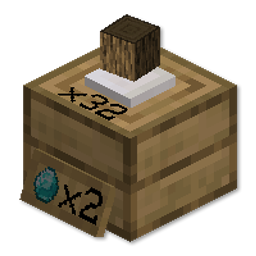
Bu mod, Oyuncu Dükkanları ve Yaratıcı Dükkanları ekler
kurulumu ve kullanımı çok kolay!
Dükkanı basitçe üretin ve yere yerleştirin.
Fiyatı belirlemek için bir eşyayla sağ tıklayın,
ve satmak için birkaç eşya koymak üzere tekrar sağ tıklayın.
Onu herhangi bir yerde bırakabilirsiniz, çünkü başka hiçbir oyuncu onu kıramaz!
Kârınızı daha sonra sol tıklayarak toplayabilirsiniz.
Dükkanınızı kırmak isterseniz, eğilirken sol tıklayarak yapabilirsiniz.
Güncellemeler:
Artık daha fazla stok koymak için boş elle sağ tıklayabilirsiniz!
Dükkanınıza bir Stok Görüntüleyici de ekleyebilirsiniz! Özelleştirilebilir renklerle birlikte!
Aşağıdaki eğitim videosuna göz atın!
Discord'a katılmaktan ve fikirlerinizi ve geri bildirimlerinizi paylaşmaktan çekinmeyin!
BISECT HOSTING tarafından desteklenmektedir. Minecraft sunucu barındırma deneyiminizi olabildiğince kolay ve uygun fiyatlı hale getirmeye adanmıştır. "wolforce" koduyla herhangi bir oyun sunucusu için ilk ayınızda %25 indirim kazanın.
MCTCG Mega Builds Simple Shops Player Tabs Support me!
Hearth Well Vaultopic Mechanics Pristeel Groves Miner Golems
Simple Shops nasıl kurulur
With Millida Launcher
Install Millida Launcher
The launcher is free: download it at millida.net/launcher and sign in with any nickname.
Click “Install” on this page
The launcher opens and installs the mod for Minecraft 1.18.2 on Forge automatically.
Launch the game
A profile with it appears in the launcher: click “Play”.
Manually
Install Forge
The loader must match the game version of the mod file, for example Minecraft 1.18.2. After installing it, a separate profile appears in your launcher.
Download the file for your version
In the version list above, pick the file simpleshops-1.2.2.jar (148 KB) for your game version.
Put it in the mods folder
The folder is inside .minecraft (Windows: %appdata%\.minecraft\mods). If it does not exist, create it.
Launch the loader profile
Open “Mods” in the main menu: Simple Shops should be in the list.
Minecraft 1.18.2 runs on Java 17: with a different Java version the game may close right after launch.
Sürümler
Bağımlılıklarla
| Minecraft | Yükleyici | Dosya | Tarih | İşlemler |
|---|---|---|---|---|
| 1.18.2 | Forge | simpleshops-1.2.2.jar148 KB |
SSS
Which Minecraft versions does Simple Shops work on?
Only Minecraft 1.18.2: there are no files for other versions.
Is Simple Shops for Forge or Fabric?
Only for Forge: 1.18.2. There are no files for Fabric or NeoForge: a mod for another loader will not start.
Does Simple Shops need other mods?
The author lists no required dependencies: the Forge loader is enough.
Which Java does Simple Shops need?
Minecraft 1.18.2 runs on Java 17. If the game closes right after launch, the usual cause is the wrong Java version in the profile settings.
Where can I download Simple Shops safely?
On this page: the file simpleshops-1.2.2.jar (148 KB) is stored on Millida’s server, with no link shorteners. SHA-1 checksum: 6da213f138d70bcaf06b6d4723b4c7fb852b5d18.
Yorumlar
Simple Shops için ilk puanı sen ver


