

Minecraft 1.20.1, 1.19.2 için Quests Additions (Forge) Mod
FTB quests modu için bir eklenti. Temel modda eksik olan bazı görev ve ödül türlerini ekler. (Yerleştir, Kır, Tekrarlanabilir ve Yapı Oluştur)
- indirme
- 6 indirme
- görüntülenme
- 22 görüntülenme
- Güncellendi
- Güncellendi 23.10.2026
- 1.19.2 — 1.20.1
 Forge
Forge
Quests Additions (Forge) modu hakkında
An addon for the FTB quests mod. It adds some tasks and rewards (currently 7 tasks and 3 rewards) that are missing in the base mod.
You can also make your quests repeatable!
Fabric version: https://www.curseforge.com/minecraft/mc-mods/quests-additions-fabric
Quest parameters
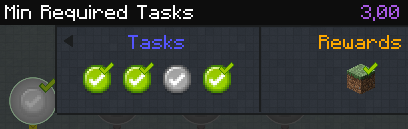
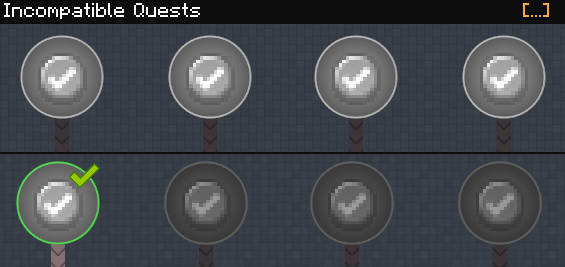
Secret quests are hidden until completed.
Quests can now be set as repeatable!
Tasks
Place block
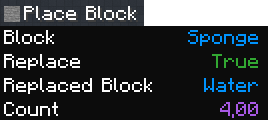
Block: This is the block to place.
Count: How many blocks you have to place.
Replace: Set to true if you have to replace a specific block. Replaced Block: The block to be replaced if Replace is set to true.
Break block
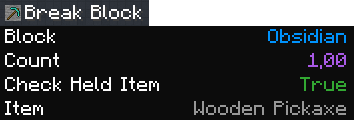
Block: This is the block to break. Count: How many blocks you have to break. Check Held Item: Set to true if you have to use a specific item. Item: The item you have to held if Check Held Item is set to true.
Create structure
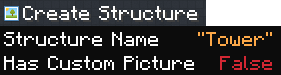
Structure Name: The name of the structure. This name corresponds to the .nbt file inside the quests_structures folder (in your .minecraft/instance folder). To create this .nbt file, you can use the vanilla structure blocks (https://minecraft.fandom.com/wiki/Structure_Block)
Has Custom Picture: Set to true if there's a resource pack with a custom picture for this structure. (in assets/questsadditions/textures/structure_icons/<name>.png)
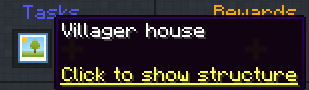
The player can click on the task to show the structure to build. Right clicking on a block locks the preview location and you can start building! (This shows a red overlay if a block is misplaced)
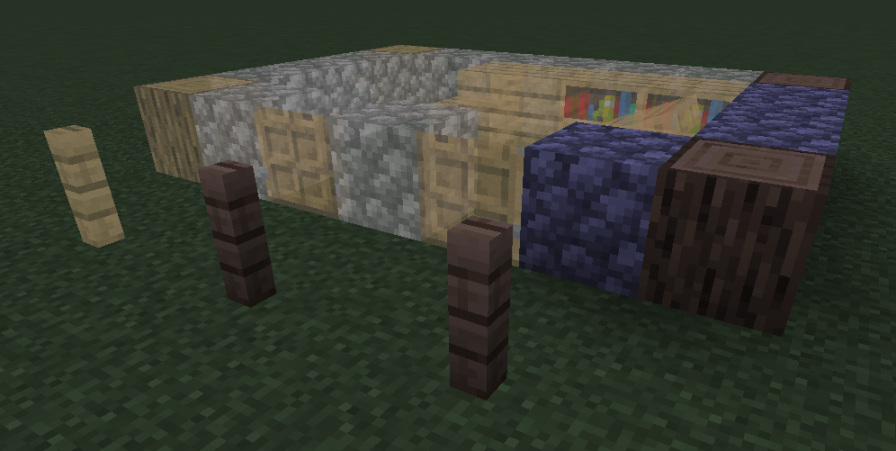
Then you can click again on the task to submit the build for validation.
Advanced Entity Kill
Same as the Entity Kill task type but it also checks entity's NBT and player's held item.
Use Block
Useful for tasks like placing an Eye of ender into an End Portal Frame, taking water from a cauldron using an empty bottle, opening a chest, ...
Reach Day
Completed once the player reached the given day (as you can see using /time query day).
Timer
Completed once the given time (in seconds) has elapsed. (Can't be bypassed by sleeping or something. This uses the computer time or the internal game clock, depending on task config)
Interaction
Player NBT
Rewards
Repeatable rewards [Deprecated]
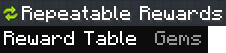
Reward Table: The reward table to be used. Claiming this reward will claim all rewards in the reward table then reset the quest progress.
Random Repeatable reward [Deprecated]
Same as Random Reward but repeatable.
Choice Repeatable reward [Deprecated]
Same as Choice Reward but repeatable.
Quests Additions (Forge) nasıl kurulur
With Millida Launcher
Install Millida Launcher
The launcher is free: download it at millida.net/launcher and sign in with any nickname.
Click “Install” on this page
The launcher opens and installs the mod for Minecraft 1.19.2–1.20.1 on Forge automatically.
Launch the game
A profile with it appears in the launcher: click “Play”.
Manually
Install Forge
The loader must match the game version of the mod file, for example Minecraft 1.20.1. After installing it, a separate profile appears in your launcher.
Download the file for your version
In the version list above, pick the file questsadditions-1.4.7.jar (109 KB) for your game version.
Put it in the mods folder
The folder is inside .minecraft (Windows: %appdata%\.minecraft\mods). If it does not exist, create it.
Launch the loader profile
Open “Mods” in the main menu: Quests Additions (Forge) should be in the list.
Minecraft 1.20.1 runs on Java 17: with a different Java version the game may close right after launch.
Sürümler
Bağımlılıklarla
| Minecraft | Yükleyici | Dosya | Tarih | İşlemler |
|---|---|---|---|---|
| 1.20.1 | Forge | questsadditions-1.20-1.4.7.jar109 KB 5 | ||
| 1.19.2 | Forge | questsadditions-1.19.2-1.4.0.jar110 KB 1 |
SSS
Which Minecraft versions does Quests Additions (Forge) work on?
There are files for 1.20.1, 1.19.2. The newest is 1.20.1.
Is Quests Additions (Forge) for Forge or Fabric?
Only for Forge: 1.19.2–1.20.1. There are no files for Fabric or NeoForge: a mod for another loader will not start.
Does Quests Additions (Forge) need other mods?
The author lists no required dependencies: the Forge loader is enough.
Which Java does Quests Additions (Forge) need?
Minecraft 1.20.1 runs on Java 17. If the game closes right after launch, the usual cause is the wrong Java version in the profile settings.
Where can I download Quests Additions (Forge) safely?
On this page: the file questsadditions-1.4.7.jar (109 KB) is stored on Millida’s server, with no link shorteners. SHA-1 checksum: 789aeefff75e389bd311cff9ccfe422493dfe694.
Yorumlar
Quests Additions (Forge) için ilk puanı sen ver


