
Minecraft 1.20.1, 1.16.5 için Progressive Bosses Mod
Wither ve Ender Dragon'un daha güçlü versiyonlarını çağırın
- indirme
- 7 indirme
- görüntülenme
- 23 görüntülenme
- Güncellendi
- Güncellendi 17.10.2026
- 1.16 — 1.20.1
 Forge
Forge
Progressive Bosses modu hakkında
Fabric sürümü için [Fabric] Progressive Bosses sayfasına bakın (bunun benimle bir bağlantısı yoktur, lütfen sorunları geliştiriciye bildirin)
Bu mod InsaneLib gerektirir
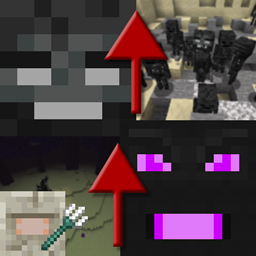
Bu mod, Wither ve Ender Dragon'un daha güçlü bir versiyonunu çağırmanıza izin vererek onları daha zor hale getirir. Ayrıca Elder Guardian dövüşünü de zorlaştırır.
Zorluk, boss'un etrafındaki oyunculara göre uyarlanır.
- Daha fazla can: onlar boss ... neden birkaç vuruşta ölsünler ki?
- Yeni yetenekler: Wither Charging veya Dragon'un kristalleri yeniden doğurması gibi
- Yardımcılar: hem Dragon hem de Wither'ın yardımcıları var
- Kafesli kristaller: kristallerin etrafında daha fazla kafes belirecek ve bazı kristaller kulelerin içinde doğacak
- Daha hızlı Acidball ve Skull: kaçınmak daha zor
- Elder Guardian dövüşü daha zor ve gerçek bir ödülle!
- Birçok birçok hata düzeltmesi: Mojang artık oyunun hayatta kalma yönünü umursamıyor
- Ve çok çok daha fazlası! Bu sadece kule buzdağının görünen kısmı.
Daha yeni sürümleri erken denemek ve herkese açık sunucuda oynamak için patreon olun.
Diğer projelerime göz atın!
Modpack İzinleri
Modpack'ler için ne isterseniz yapın, ister herkese açık ister özel olsunlar!
Mod Yeniden Yüklemelerini Durdurun
Bu modu Curseforge veya Modrinth dışında başka bir web sitesinden indirmeyin. Kötü amaçlı yazılım olabilir ve bilgisayarınıza zarar verebilir. Daha fazla bilgi için https://stopmodreposts.org adresini kontrol edin.
Progressive Bosses nasıl kurulur
With Millida Launcher
Install Millida Launcher
The launcher is free: download it at millida.net/launcher and sign in with any nickname.
Click “Install” on this page
The launcher opens and installs the mod for Minecraft 1.16–1.20.1 on Forge automatically.
Launch the game
A profile with it appears in the launcher: click “Play”.
Manually
Install Forge
The loader must match the game version of the mod file, for example Minecraft 1.20.1. After installing it, a separate profile appears in your launcher.
Download the file for your version
In the version list above, pick the file progressivebosses-4.3.12.jar (999 KB) for your game version.
Put it in the mods folder
The folder is inside .minecraft (Windows: %appdata%\.minecraft\mods). If it does not exist, create it.
Launch the loader profile
Open “Mods” in the main menu: Progressive Bosses should be in the list.
Minecraft 1.20.1 runs on Java 17: with a different Java version the game may close right after launch.
Sürümler
Bağımlılıklarla
| Minecraft | Yükleyici | Dosya | Tarih | İşlemler |
|---|---|---|---|---|
| 1.20.1 | Forge | 4.3.12999 KB 7 | ||
| 1.20.1 | Forge | 4.3.3990 KB | ||
| 1.20.1 | Forge | 4.3.1959 KB | ||
| 1.16.3 | — | [1.16.x] Progressive Bosses 2.2.068 KB |
SSS
Which Minecraft versions does Progressive Bosses work on?
There are files for 1.16–1.20.1, 7 versions in total. The newest is 1.20.1.
Is Progressive Bosses for Forge or Fabric?
Only for Forge: 1.20.1. There are no files for Fabric or NeoForge: a mod for another loader will not start.
Does Progressive Bosses need other mods?
The author lists no required dependencies: the Forge loader is enough.
Which Java does Progressive Bosses need?
Minecraft 1.20.1 runs on Java 17. If the game closes right after launch, the usual cause is the wrong Java version in the profile settings.
Where can I download Progressive Bosses safely?
On this page: the file progressivebosses-4.3.12.jar (999 KB) is stored on Millida’s server, with no link shorteners. SHA-1 checksum: 5ec938a9e975ec49ae461d6ca1dd6e798a1d0dbc.
Yorumlar
Progressive Bosses için ilk puanı sen ver


