

Minecraft 1.20.1, 1.21.1 için Productive Trees Mod
Üretilebilir ağaç türleri
 NeoForge
 Forge
ForgeProductive Trees modu hakkında
Minecraft için 'Productive Trees' moduyla tanışın; Forestry'deki ağaç yetiştirme mini oyununun manevi devamı niteliğinde. Bu modla artık ağaç yetiştirme sanatıyla uğraşabilir, farklı ağaç türlerini çapraz tozlaştırarak benzersiz melez çeşitler yetiştirebilirsiniz. 160'tan fazla yeni benzersiz odun seti koleksiyonuyla sıkıcı eski vanilla ağaçlarının odunlarıyla inşa yapma günleri geride kaldı.
Productive Trees ile güzel odun türleri elde etmek için ağaçları stratejik olarak yetiştirme gücüne sahipsiniz. Birçok heyecan verici olasılığı keşfetmek ve açığa çıkarmak için çeşitli kombinasyonları deneyin. Sadece nadir odun sağlamakla kalmayıp aynı zamanda lezzetli meyveler veya kuruyemişler de veren bir ağaç hasat ettiğinizi hayal edin!
Ormancılık becerilerinizi geliştirin, kendi benzersiz ağaç türlerinizi yaratın ve oyun içi dünyanızı özel olarak yetiştirilmiş harikaların serpilip geliştiği bir ekosisteme dönüştürün. Productive Trees modunu bugün indirin ve Minecraft'ın uçsuz bucaksız pikselli manzaralarında ağaçsal yenilik dolu bir yolculuğa çıkın.
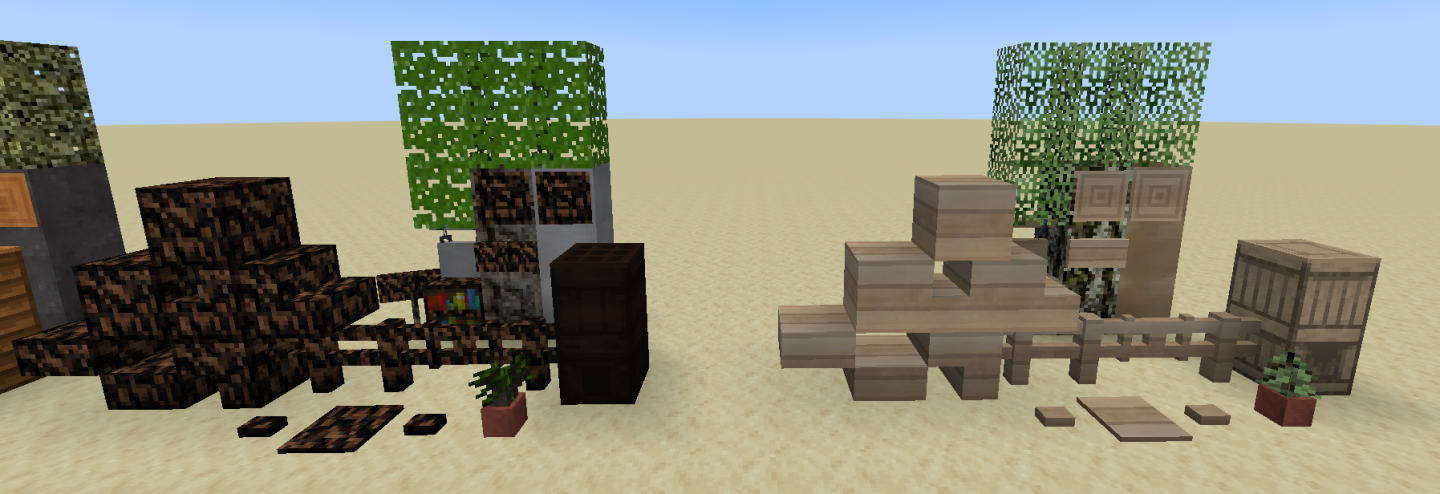
Bu mod beta aşamasındadır ve henüz tamamlanmamıştır. Eksik olan dikkate değer şeyler arasında ağaç özellikleri (büyüdüklerinde nasıl göründükleri) yer alıyor.
Yardıma ihtiyacınız olursa ya da uğrayıp dokuları övmek isterseniz bir discord sunucusu var.
"O kadar çok odun var ki tıbbi yardım arayacaksınız" - isimsiz
Productive Trees nasıl kurulur
With Millida Launcher
Install Millida Launcher
The launcher is free: download it at millida.net/launcher and sign in with any nickname.
Click “Install” on this page
The launcher opens and installs the mod for Minecraft 1.20.1–1.21.1 on Forge or NeoForge automatically.
Launch the game
A profile with it appears in the launcher: click “Play”.
Manually
Install Forge or NeoForge
The loader must match the game version of the mod file, for example Minecraft 1.21.1. After installing it, a separate profile appears in your launcher.
Download the file for your version
In the version list above, pick the file productivetrees-1.21.1-1.1.1.jar (13 MB) for your game version and loader.
Put it in the mods folder
The folder is inside .minecraft (Windows: %appdata%\.minecraft\mods). If it does not exist, create it.
Launch the loader profile
Open “Mods” in the main menu: Productive Trees should be in the list.
Minecraft 1.21.1 runs on Java 21: with a different Java version the game may close right after launch.
Sürümler
Bağımlılıklarla
| Minecraft | Yükleyici | Dosya | Tarih | İşlemler |
|---|---|---|---|---|
| 1.21.1 | NeoForge | productivetrees-1.21.1-1.1.1.jar13.4 MB 2 | ||
| 1.21.1 | NeoForge | productivetrees-1.21.1-0.6.0.jar3.2 MB | ||
| 1.20.1 | NeoForge, Forge | productivetrees-1.20.1-0.2.6.jar14 MB | ||
| 1.20.1 | NeoForge, Forge | productivetrees-1.20.1-0.1.0.jar13.3 MB |
SSS
Which Minecraft versions does Productive Trees work on?
There are files for 1.21.1, 1.20.1. The newest is 1.21.1.
Is Productive Trees for Forge or Fabric?
There are files for Forge: 1.20.1 and for NeoForge: 1.20.1–1.21.1. There are no files for Fabric: a mod for another loader will not start.
Does Productive Trees need other mods?
The author lists no required dependencies: the Forge or NeoForge loader is enough.
Which Java does Productive Trees need?
Minecraft 1.21.1 runs on Java 21. If the game closes right after launch, the usual cause is the wrong Java version in the profile settings.
Where can I download Productive Trees safely?
On this page: the file productivetrees-1.21.1-1.1.1.jar (13 MB) is stored on Millida’s server, with no link shorteners. SHA-1 checksum: 33b7f304e4e13297fdbbef4822f8b178d73868cc.
Yorumlar
Productive Trees için ilk puanı sen ver


