
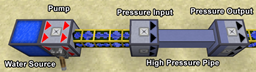
Features
- Transfer any amount of fluid
- Unlimited input/output
- Works with all forge fluids and all pipe/tanks from other mods
- Can transfer multiple liquids on the same pipe
- Filtering by fluid type on input and outputs
- Multiple inputs and outputs on the same pipe
- Smart distribution between valid outputs
- Fully supports Forge Multipart (1.7.2+ versions)
- Multiblock Free Form Tanks
- Handy Hand Pumps and Canisters
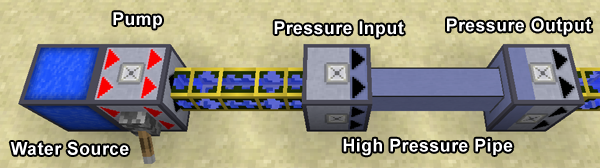
Requirements
- Minecraft 1.7.10
- Forge 10.13.0.1180 +
- BdLib (latest release)
Blocks
- High Pressure Input
- Accepts fluids from pipes on the back (brighter side without arrows)
- Connects to a pressure pipe on the front (darker side with arrows)
- Will only accept fluids if a valid output is connected with a high pressure pipe
- If multiple outputs are connected - will do it’s best to distribute the fluid evenly
- High Pressure Output
- Connects to a pressure pipe on the back (darker side without arrows)
- Outputs fluids into pipes/tanks on the front (brighter side with arrows)
- High Pressure Piping
- Connects outputs and inputs
- Can be layed in any shape, loops and intersections will not cause problems
- High Pressure Pump
- Pumps fluids between tanks, pipes or High Pressure Inputs
- Will pump as much fluid as possible per tick
- Needs redstone signal to activate
- Infinite Water Source
- Exactly what it says on the tin
- Is really infinite for all intents and purposes
- Water can be piped out using a High Pressure Pump or pipes from other mods
Filtering
Inputs, Outputs and Pipes can have filters set, to set a filter - right click with a bucket (or any other valid container) filled with the fluid. To remove a filter - right click with an empty bucket in your hand.
Open Source
The mod is licensed under the MMPL-1.0, the source code is available on GitHub. Yes this means you have permission to add it to any public or private mod pack.
Pressure Pipes nasıl kurulur
With Millida Launcher
Install Millida Launcher
The launcher is free: download it at millida.net/launcher and sign in with any nickname.
Click “Install” on this page
The launcher opens and installs the mod for Minecraft 1.7.10–1.12.2 automatically.
Launch the game
A profile with it appears in the launcher: click “Play”.
Manually
Download the file for your version
In the version list above, pick the file pressure-1.3.1.9-mc1.12.2.jar (1.3 MB) for your game version.
Put it in the mods folder
The folder is inside .minecraft (Windows: %appdata%\.minecraft\mods). If it does not exist, create it.
Launch the loader profile
Open “Mods” in the main menu: Pressure Pipes should be in the list.
Minecraft 1.12.2 runs on Java 8: with a different Java version the game may close right after launch.
Sürümler
Bağımlılıklarla
| Minecraft | Yükleyici | Dosya | Tarih | İşlemler |
|---|---|---|---|---|
| 1.12.1 | — | Pressure Pipes 1.3.1.9 (MC 1.12.2)1.3 MB | ||
| 1.12.1 | — | Pressure Pipes 1.3.1.6 (MC 1.12.1)1.3 MB | ||
| 1.7.10 | — | pressure-1.3.0.fix1-mc1.7.10.jar1.4 MB |
SSS
Which Minecraft versions does Pressure Pipes work on?
There are files for 1.12.2, 1.12.1, 1.12, 1.7.10. The newest is 1.12.2.
Which Java does Pressure Pipes need?
Minecraft 1.12.2 runs on Java 8. If the game closes right after launch, the usual cause is the wrong Java version in the profile settings.
Where can I download Pressure Pipes safely?
On this page: the file pressure-1.3.1.9-mc1.12.2.jar (1.3 MB) is stored on Millida’s server, with no link shorteners. SHA-1 checksum: 5a067d4b289f50c9b3915bb1c69ffdb65eac5078.
Yorumlar
Pressure Pipes için ilk puanı sen ver


