

Minecraft 1.20.1, 1.21.1 için Portable Crafting Mod
Üretim istasyonlarını (tezgahlar, demircilik, örsler, taş kesiciler vb.) doğrudan envanterinizden kullanın.
 Fabric
 NeoForge
 Quilt
Quilt Forge
ForgePortable Crafting modu hakkında
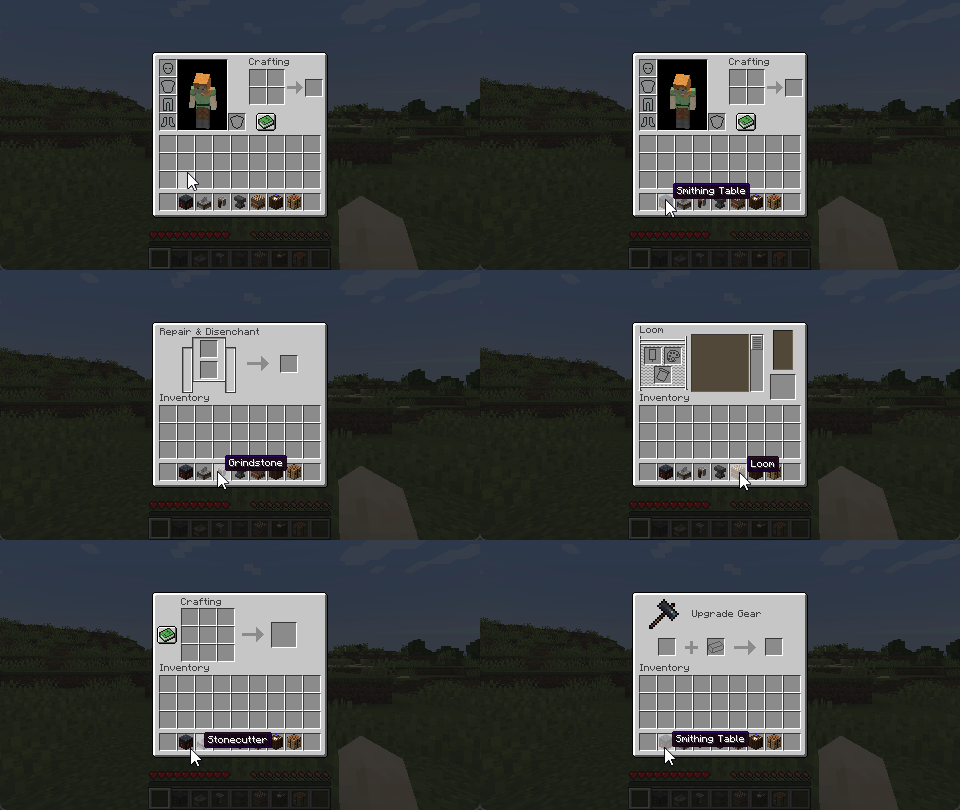
Open crafting screens from your inventory.
Works server-side, with extra polish when installed on the client.
Requires Connector and FFAPI on (neo)forge.

Server Features
- Open workstation blocks by right-clicking them in the inventory (or using them from the hotbar)
- Supports crafting, smithing, stonecutting, grinding, looms, cartography tables, and anvils by default
- Supports all vanilla and most modded non-container workstations via the config (see below)

Mixed-Side Features
- Opening workstations is seamless, with no ping-dependent "ghost pickup" while the screen is loading
- Quickly open your crafting table via a hotkey (Default: v)
- Swap to portable workstations using Inventory Tabs
Modpack Configuration
You add and change which workstations are portable via config/portable_crafting.toml.
Blocks must open the specified screen handler on use, or this will not work.
[blockItemScreens] "minecraft:crafting_table" = "minecraft:crafting" "...block_item" = "...screen_handler"
[blockItemTags] "c:player_workstations/crafting_tables" = "minecraft:crafting_table" "...item_tag" = "...block_item_from_above"
Modded non-container workstations that use vanilla code conventions will work. Others crash, so test as you go.
The config is synchronised to the client when mixed-side to display tabs and apply seam-hiding changes.
Incompatible Blocks
Don't file issues for modded workstations! We can't fix them on our side.
To function as portable workstations, blocks must:
- Have no state/container, i.e. items cannot be left in them
- Override getMenuProvider / createScreenHandlerFactory to open their screen
- Have a screen that doesn't rely on the existence of a block at the position provided at any time
- Have a screen that can be uniquely identified by a screen handler type
Afterword
All mods are built on the work of many others.
This mod specifically is inspired by a similar feature from Svenhjol's Charm - one of the few implementations of portable crafting grids that didn't introduce new items at the time.
We made this mod for Tinkerer's Quilt - our modpack about ease of play and vanilla content.
Tinkerer's: Quilt - Smithing - Origins - Statures - HUD
Loveletters: Tabs - Atlas - Portable Crafting - Drogstyle
Others: Switchy - Crunchy - Starcaller
Portable Crafting nasıl kurulur
With Millida Launcher
Install Millida Launcher
The launcher is free: download it at millida.net/launcher and sign in with any nickname.
Click “Install” on this page
The launcher opens and installs the mod for Minecraft 1.18.2–1.21.1 on Fabric, Forge, NeoForge or Quilt automatically, together with its dependencies: Fabric API.
Launch the game
A profile with it appears in the launcher: click “Play”.
Manually
Install Fabric, Forge, NeoForge or Quilt
The loader must match the game version of the mod file, for example Minecraft 1.21.1. After installing it, a separate profile appears in your launcher.
Download the file for your version
In the version list above, pick the file portable-crafting-3.0.5+1.21.jar (307 KB) for your game version and loader.
Put it in the mods folder
The folder is inside .minecraft (Windows: %appdata%\.minecraft\mods). If it does not exist, create it. Required dependencies go there too: Fabric API.
Launch the loader profile
Open “Mods” in the main menu: Portable Crafting should be in the list.
On a server
A server on Fabric, Forge, NeoForge or Quilt
The mod only works on a server with the same loader and game version, for example 1.21.1.
File goes into the server’s mods folder
Stop the server, put the mod file into the mods folder and start the server again.
Use the “To server” button
On Millida Hosting, the button at the top of the page uploads the file to your server and restarts it for you.
Minecraft 1.21.1 runs on Java 21: with a different Java version the game may close right after launch.
Sürümler
Bağımlılıklarla
| Minecraft | Yükleyici | Dosya | Tarih | İşlemler |
|---|---|---|---|---|
| 1.21.1 | Fabric, NeoForge, Quilt | 1.21.1307 KB | ||
| 1.21.1 | Fabric, NeoForge, Quilt | 1.21.1307 KB | ||
| 1.18.2 | Fabric, Quilt | 1.18.2305 KB | ||
| 1.19.2 | Fabric, Quilt | 1.19.2305 KB | ||
| 1.20.1 | Fabric, Forge, Quilt | 1.20.1306 KB | ||
| 1.21.1 | Fabric, NeoForge, Quilt | 1.21.1305 KB | ||
| 1.18.2 | Fabric, Quilt | 1.18.2305 KB | ||
| 1.19.2 | Fabric, Quilt | 1.19.2305 KB |
Çalışması için gerekenler
- Fabric APIzorunlu
- Dependencyisteğe bağlı
- Dependencyisteğe bağlı
SSS
Which Minecraft versions does Portable Crafting work on?
There are files for 1.18.2–1.21.1, 8 versions in total. The newest is 1.21.1.
Is Portable Crafting for Forge or Fabric?
There are files for Fabric: 1.18.2–1.21.1, for Forge: 1.19.3–1.20.1, for NeoForge: 1.21–1.21.1 and for Quilt: 1.18.2–1.21.1.
What does Portable Crafting need to work?
Required: Fabric API. Without it the mod will not start: dependencies go into the same mods folder. Optional: Dependency.
Does Portable Crafting work on a server?
Yes. Portable Crafting works both in singleplayer and on a server.
Which Java does Portable Crafting need?
Minecraft 1.21.1 runs on Java 21. If the game closes right after launch, the usual cause is the wrong Java version in the profile settings.
Where can I download Portable Crafting safely?
On this page: the file portable-crafting-3.0.5+1.21.jar (307 KB) is stored on Millida’s server, with no link shorteners. SHA-1 checksum: 749b7816e70dbb16970ee0d4a90ce5dc1d7e6727.
Yorumlar
Portable Crafting için ilk puanı sen ver


