
 NeoForge
 Forge
ForgePlonk modu hakkında
1.7.10, 1.12.2, 1.14.4, 1.15.2, 1.16.5, 1.18.2, 1.19.2, 1.19.4, 1.20.1, 1.21.1, 26.1.x sürümlerinde mevcuttur (Dosyalar (yukarıda) > Tümünü Gör > Oyun Sürümü). Desteklenen sürümler kalın yazılmıştır (ancak mantıklı olduğu ölçüde diğer sürümleri de desteklemeye çalışacağım).
Bir bloğa bakarken P tuşuna basarak eşyaları yerleştirin. Sneak + P ile hepsini döndürün. Sneak + Use ile eşyayı döndürün. (Ellerinizin boş olması gerekir)
- Not (1.16.4+ için): Plonk tarafından kullanılan P tuşu Social Interactions Screen tuşuyla çakışıyor, bu yüzden birini veya diğerini değiştirmeniz gerekecek!
Bu modu herhangi bir modpack'te kullanmakta özgürsünüz (sormanıza gerek yok!).
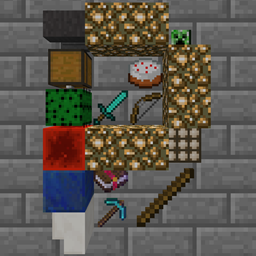
Place Item tuşunu (varsayılan olarak P) kullanarak herhangi bir bloğun yanına en fazla 4 stack eşya yerleştirin. (Her stack'in maksimum boyutu yapılandırılabilir ve StackUp'ı destekler!)
Eşyalar tek tek 16 farklı yöne döndürülebilir (boş ellerle Sneak + Sağ Tık).
Eşyaların tüm karosu bir bütün olarak 4 farklı yöne döndürülebilir (boş ellerle Sneak + Place Item tuşu).
Eşyalar otomasyonla çıkarılabilir ancak yerleştirilemez.
Artık akışkanlar tarafından sürüklenip götürülemez. Yerleştirilen eşyalar sıvılar tarafından sürüklenip götürülebilir. Su basabilir (MC1.16.3+ itibarıyla).
Yapılandırma: config/plonk.cfg (mc 1.13 öncesi) veya [save folder]/serverconfig/plonk-server.toml (mc 1.13 sonrası)
Yerleştirilen eşyaların görünümü ve mekanikler şu anda değişebilir.
Bu video çok eski
Bilinen hatalar:
Üçüncü şahıs kamerası blokla çarpışıyor (yalnızca 1.7.10 ve 1.12.2). MineCraft'a üçüncü şahıs ışın izlemesinin geçmesine nasıl izin verileceğinden emin değilim (1.13+ RayTraceContext.Visual'a sahiptir) Yarı saydam eşyalar (örneğin Boyalı Cam) arkalarındaki diğer yarı saydam şeylerin düzgün oluşturulmamasına neden olur. (mc 1.16 öncesi)
Plonk nasıl kurulur
With Millida Launcher
Install Millida Launcher
The launcher is free: download it at millida.net/launcher and sign in with any nickname.
Click “Install” on this page
The launcher opens and installs the mod for Minecraft 1.18–26.1.2 on Forge or NeoForge automatically.
Launch the game
A profile with it appears in the launcher: click “Play”.
Manually
Install Forge or NeoForge
The loader must match the game version of the mod file, for example Minecraft 26.1.2. After installing it, a separate profile appears in your launcher.
Download the file for your version
In the version list above, pick the file plonk-26.1.2-10.0.10-neo.jar (162 KB) for your game version and loader.
Put it in the mods folder
The folder is inside .minecraft (Windows: %appdata%\.minecraft\mods). If it does not exist, create it.
Launch the loader profile
Open “Mods” in the main menu: Plonk should be in the list.
Sürümler
Bağımlılıklarla
| Minecraft | Yükleyici | Dosya | Tarih | İşlemler |
|---|---|---|---|---|
| 26.1 | NeoForge | plonk-26.1.2-10.0.10-neo.jar162 KB | ||
| 26.1 | NeoForge | plonk-26.1.1-10.0.8-neo.jar162 KB | ||
| 1.20.1 | NeoForge, Forge | plonk-1.20.1-10.0.5-forge.jar148 KB | ||
| 1.18.1 | Forge | plonk-1.18.1-10.0.1.jar147 KB |
SSS
Which Minecraft versions does Plonk work on?
There are files for 1.18–26.1.2, 7 versions in total. The newest is 26.1.2.
Is Plonk for Forge or Fabric?
There are files for Forge: 1.18–1.20.1 and for NeoForge: 1.20–26.1.2. There are no files for Fabric: a mod for another loader will not start.
Does Plonk need other mods?
The author lists no required dependencies: the Forge or NeoForge loader is enough.
Where can I download Plonk safely?
On this page: the file plonk-26.1.2-10.0.10-neo.jar (162 KB) is stored on Millida’s server, with no link shorteners. SHA-1 checksum: 4c8d57969618899ad01a7f182a680245070bcd7d.
Yorumlar
Plonk için ilk puanı sen ver


