
Minecraft 1.19.3 için No Enchant Cap Mod
Büyücülüğün bazı yönlerini geliştiren basit bir mod.
 Fabric
 Quilt
Quilt Forge
ForgeNo Enchant Cap modu hakkında
About:
No Enchant Cap enhances the vanilla enchanting system in a few ways:
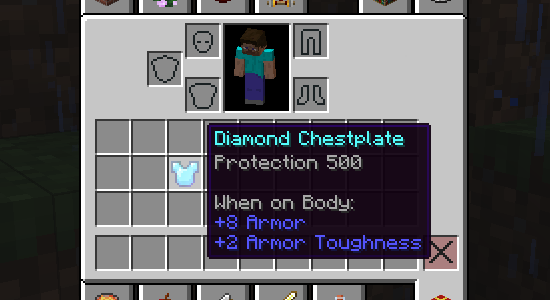
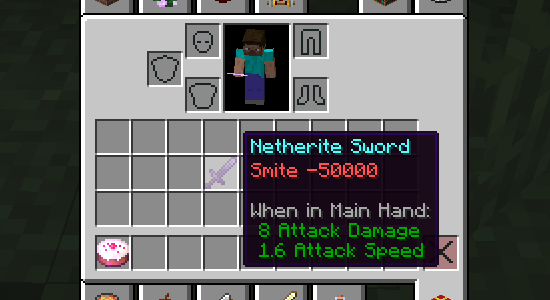
Enchantments over level 10 or below level 1 will display their level correctly.
Anvils will no longer give the "Too Expensive" limit.
No Enchant Cap also provides a selection of gamerules which allow you to customize your enchanting experience.
You can mix any enchantments on the same item. (Off by default).
You can put any enchantment on any item. (Off by default).
Anvils can go above the usual max level of an enchantment. (Off by default).
Repair costs of items on anvils doesn't increase. (On by default).
Experience costs are done more fairly at high levels. (On by default).
Interested in hosting a server for any of my mods?
Be sure to go with Bloom Host at:
Buying a server using this link supports me directly!
No Enchant Cap nasıl kurulur
With Millida Launcher
Install Millida Launcher
The launcher is free: download it at millida.net/launcher and sign in with any nickname.
Click “Install” on this page
The launcher opens and installs the mod for Minecraft 1.19.3 on Fabric, Forge or Quilt automatically.
Launch the game
A profile with it appears in the launcher: click “Play”.
Manually
Install Fabric, Forge or Quilt
The loader must match the game version of the mod file, for example Minecraft 1.19.3. After installing it, a separate profile appears in your launcher.
Download the file for your version
In the version list above, pick the file noenchantcap-fabric-1.19.3-2.2.6.jar (93 KB) for your game version and loader.
Put it in the mods folder
The folder is inside .minecraft (Windows: %appdata%\.minecraft\mods). If it does not exist, create it.
Launch the loader profile
Open “Mods” in the main menu: No Enchant Cap should be in the list.
Minecraft 1.19.3 runs on Java 17: with a different Java version the game may close right after launch.
Sürümler
Bağımlılıklarla
| Minecraft | Yükleyici | Dosya | Tarih | İşlemler |
|---|---|---|---|---|
| 1.19.3 | Fabric, Quilt | noenchantcap-fabric-1.19.3-2.2.6.jar92.7 KB | ||
| 1.19.3 | Forge | noenchantcap-forge-1.19.3-2.2.6.jar43.8 KB |
SSS
Which Minecraft versions does No Enchant Cap work on?
Only Minecraft 1.19.3: there are no files for other versions.
Is No Enchant Cap for Forge or Fabric?
There are files for Fabric: 1.19.3, for Forge: 1.19.3 and for Quilt: 1.19.3. There are no files for NeoForge: a mod for another loader will not start.
Does No Enchant Cap need other mods?
The author lists no required dependencies: the Fabric, Forge or Quilt loader is enough.
Which Java does No Enchant Cap need?
Minecraft 1.19.3 runs on Java 17. If the game closes right after launch, the usual cause is the wrong Java version in the profile settings.
Where can I download No Enchant Cap safely?
On this page: the file noenchantcap-fabric-1.19.3-2.2.6.jar (93 KB) is stored on Millida’s server, with no link shorteners. SHA-1 checksum: e0f8f7fc36799a26f1368093477f63cec5472bcb.
Yorumlar
No Enchant Cap için ilk puanı sen ver


