
Minecraft 1.20.1, 1.21.1 için Multi-Piston Mod
Çok yönlü Piston Bloğu
 NeoForge
 Forge
ForgeMulti-Piston modu hakkında
Multi-piston, ayrıca minecolonies, structurize, blockout ve armory oluşturan ve bakımını yapan Ldt-team tarafından oluşturulan bir moddur.
Multi-piston, oyuna tanımlanmış bir yönden herhangi bir bloğu emmenizi ve tanımlanabilir hız ve menzille herhangi bir yöne tükürmenizi sağlayan bir multipiston bloğu ekler
Tarif:
Yatay:
Dikey:
Köprü:
Yapılandırma:
SSS:
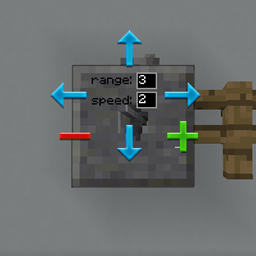
GUI nasıl çalışır?
- GUI'yi açmak için bloğa sağ tıklayın.
- Giriş yönüne sağ tıklayın ve çıkış yönüne sol tıklayın
- Menzili ve hızı düzenleyin, escape düğmesiyle GUI'den çıkın.
Menzili nasıl artırabilirim?
- Maksimum menzil 10'dur, farklı bir blok türüne ulaşana kadar
Hızı artırabilir miyim?
- Yalnızca 3'e kadar, gelecekte daha fazlasını destekleyebilir.
Sesi değiştirebilir miyim?
- Gelecekte de eklenebilir.
Redstone ile çalışır mı?
- Evet, normal pistonlar gibi düğmeler, kollar ve herhangi bir redstone girişiyle çalışır.
Multi-Piston nasıl kurulur
With Millida Launcher
Install Millida Launcher
The launcher is free: download it at millida.net/launcher and sign in with any nickname.
Click “Install” on this page
The launcher opens and installs the mod for Minecraft 1.18.2–1.21.1 on Forge or NeoForge automatically.
Launch the game
A profile with it appears in the launcher: click “Play”.
Manually
Install Forge or NeoForge
The loader must match the game version of the mod file, for example Minecraft 1.21.1. After installing it, a separate profile appears in your launcher.
Download the file for your version
In the version list above, pick the file multipiston-1.2.58-1.21.1.jar (33 KB) for your game version and loader.
Put it in the mods folder
The folder is inside .minecraft (Windows: %appdata%\.minecraft\mods). If it does not exist, create it.
Launch the loader profile
Open “Mods” in the main menu: Multi-Piston should be in the list.
Minecraft 1.21.1 runs on Java 21: with a different Java version the game may close right after launch.
Sürümler
Bağımlılıklarla
| Minecraft | Yükleyici | Dosya | Tarih | İşlemler |
|---|---|---|---|---|
| 1.20.1 | Forge | multipiston-1.20-0.0.47-snapshot.jar38.6 KB 6 | ||
| 1.21 | NeoForge | multipiston-1.2.58-1.21.1.jar33.3 KB 7 | ||
| 1.21 | NeoForge | multipiston-1.2.55-1.21.1-snapshot.jar32.6 KB | ||
| 1.20.1 | NeoForge, Forge | multipiston-1.20-1.2.43-RELEASE.jar37.8 KB | ||
| 1.20.4 | NeoForge | multipiston-1.20.4-1.2.37-ALPHA-universal.jar33 KB | ||
| 1.20.1 | Forge | multipiston-1.20-1.2.32-ALPHA.jar37.8 KB | ||
| 1.18.2 | — | multi-piston-1.18.2-1.2.13-ALPHA.jar50.1 KB |
SSS
Which Minecraft versions does Multi-Piston work on?
There are files for 1.21.1, 1.21, 1.20.4, 1.20.1, 1.20, 1.18.2. The newest is 1.21.1.
Is Multi-Piston for Forge or Fabric?
There are files for Forge: 1.20–1.20.1 and for NeoForge: 1.20–1.21.1. There are no files for Fabric: a mod for another loader will not start.
Does Multi-Piston need other mods?
The author lists no required dependencies: the Forge or NeoForge loader is enough.
Which Java does Multi-Piston need?
Minecraft 1.21.1 runs on Java 21. If the game closes right after launch, the usual cause is the wrong Java version in the profile settings.
Where can I download Multi-Piston safely?
On this page: the file multipiston-1.2.58-1.21.1.jar (33 KB) is stored on Millida’s server, with no link shorteners. SHA-1 checksum: 2b63be739da24247328e4052ec91c928230d0390.
Yorumlar
Multi-Piston için ilk puanı sen ver


