

Minecraft 1.20.1, 1.21.1 için Mob Catcher Mod
Yaratıkları yakalamak için bir eşya ve onları uzaktan yakalamak için bir fırlatıcı ekler
 NeoForge
 Fabric
 Forge
ForgeMob Catcher modu hakkında
This mod adds a Mob Capturing Device and a Mob Capturing Device Launcher.
The capturing device can be right clicked on most entities to capture them inside, right click again to release them.
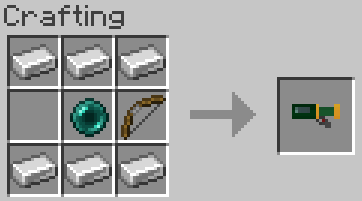
The capturing device launcher can be used to capture or release mobs from afar. It has a capturing, and a releasing mode, indicated by the tooltip.
And before you ask, yes it does work on endermen.
While in capturing mode, the launcher will attempt to fire any unused capturing devices that you have. When an entity is struck, it is removed from the world and placed inside if it is valid for capturing. If no entity is found then it drops as an item.
In release mode, the launcher will fire any filled devices from inside the inventory into the world. Whether it hits an entity or a block, it will spawn the mob with all of it's saved data.
Recipes
Mob Capturing Device:
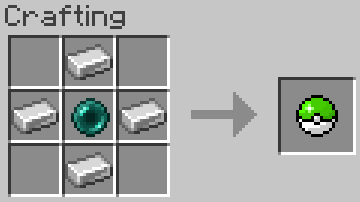
Mob Capturing Device Launcher:
Quick Demo:
Also works with Dispensers
Contact info
Need a custom mod? Just want to chat? Have a complex issue needing additional discussion? Join the Discord
Mob Catcher nasıl kurulur
With Millida Launcher
Install Millida Launcher
The launcher is free: download it at millida.net/launcher and sign in with any nickname.
Click “Install” on this page
The launcher opens and installs the mod for Minecraft 1.16.5–1.21.1 on Fabric, Forge or NeoForge automatically.
Launch the game
A profile with it appears in the launcher: click “Play”.
Manually
Install Fabric, Forge or NeoForge
The loader must match the game version of the mod file, for example Minecraft 1.21.1. After installing it, a separate profile appears in your launcher.
Download the file for your version
In the version list above, pick the file mobcatcher-neoforge-1.21.1-1.jar (43 KB) for your game version and loader.
Put it in the mods folder
The folder is inside .minecraft (Windows: %appdata%\.minecraft\mods). If it does not exist, create it.
Launch the loader profile
Open “Mods” in the main menu: Mob Catcher should be in the list.
Minecraft 1.21.1 runs on Java 21: with a different Java version the game may close right after launch.
Sürümler
Bağımlılıklarla
| Minecraft | Yükleyici | Dosya | Tarih | İşlemler |
|---|---|---|---|---|
| 1.21.1 | NeoForge | mobcatcher-neoforge-1.21.1-1.jar43.4 KB | ||
| 1.21.1 | Fabric | mobcatcher-fabric-1.21.1-1.jar28.6 KB | ||
| 1.20.1 | Forge | mobcatcher-1.20.1-0.jar33 KB | ||
| 1.16.5 | — | mobcatcher-3.2.jar23.4 KB |
SSS
Which Minecraft versions does Mob Catcher work on?
There are files for 1.21.1, 1.20.1, 1.16.5. The newest is 1.21.1.
Is Mob Catcher for Forge or Fabric?
There are files for Fabric: 1.21.1, for Forge: 1.20.1 and for NeoForge: 1.21.1.
Does Mob Catcher need other mods?
The author lists no required dependencies: the Fabric, Forge or NeoForge loader is enough.
Which Java does Mob Catcher need?
Minecraft 1.21.1 runs on Java 21. If the game closes right after launch, the usual cause is the wrong Java version in the profile settings.
Where can I download Mob Catcher safely?
On this page: the file mobcatcher-neoforge-1.21.1-1.jar (43 KB) is stored on Millida’s server, with no link shorteners. SHA-1 checksum: 3de10f983fabfa0f15b3a730779a9a9bae5bb164.
Yorumlar
Mob Catcher için ilk puanı sen ver


