

Minecraft 1.20.1, 1.21.1 için Loading Backgrounds Mod
Bu mod ile Minecraft oyunlarının yükleme ekranlarının arka planını özelleştirebilecek, her tür özelleştirilebilir görseli yerleştirebileceksiniz.
 NeoForge
 Fabric
 Forge
ForgeLoading Backgrounds modu hakkında
With this mod you will be able to customize the background of the loading screens of the Minecraft games, placing any type of customizable image.
It is recommended for all those creators of modpacks who want to give a better sensation to their contents, loading images of the modpack and placing them as background.
Do you need a server to play with your friends?
For exceptional server hosting services, look no further than BisectHosting. Of course, you can install all the mods or modpacks you want, and their support team is always available to help you.
With the code "Lupin" you will get a 25% discount! Click here!
To add background images, you'll want to create a resource pack with the folder /assets/minecraft/textures/gui/backgrounds/ and put .png image files in there. Ideally you'd name them image1.png, image2.png, image3.png, etc. You can include background images in any resource pack and easily pack them in with any other resources.
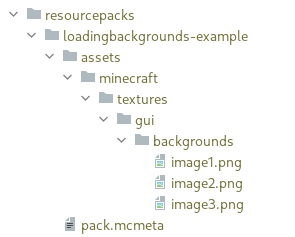
It is essential to place the pack.mcmeta. Create a notepad with that name and put the following text:
{ "pack": { "pack_format": 15, "description": "Loading Backgrounds images" } }
Also, you can look at this resourcepack as an example.
Does it work on servers?
### Sure! Remember that the best way to play with mods and friends is with BisectHosting, and by clicking on this link you can get a 25% discount.
Can this mod be used in modpacks?
### Of course! As long as it is published only on Modrinth or CurseForge. Uploading it to any other platform would be violating our rights and is not allowed at all.
However, we are really grateful if you consider adding it to your Modrinth or CurseForge modpack. If you need any small changes or have any questions, contact us!
Loading Backgrounds nasıl kurulur
With Millida Launcher
Install Millida Launcher
The launcher is free: download it at millida.net/launcher and sign in with any nickname.
Click “Install” on this page
The launcher opens and installs the mod for Minecraft 1.20–26.1.2 on Fabric, Forge or NeoForge automatically, together with its dependencies: Architectury API.
Launch the game
A profile with it appears in the launcher: click “Play”.
Manually
Install Fabric, Forge or NeoForge
The loader must match the game version of the mod file, for example Minecraft 26.1.2. After installing it, a separate profile appears in your launcher.
Download the file for your version
In the version list above, pick the file loadingbackgrounds-neoforge-mc26.1.2-1.8.1.jar (55 KB) for your game version and loader.
Put it in the mods folder
The folder is inside .minecraft (Windows: %appdata%\.minecraft\mods). If it does not exist, create it. Required dependencies go there too: Architectury API.
Launch the loader profile
Open “Mods” in the main menu: Loading Backgrounds should be in the list.
Loading Backgrounds works on the player’s side only: there is no need to install it on a server.
Sürümler
Bağımlılıklarla
| Minecraft | Yükleyici | Dosya | Tarih | İşlemler |
|---|---|---|---|---|
| 26.1.2 | NeoForge | 26.1.254.7 KB | ||
| 26.1.2 | Fabric | 26.1.255.2 KB | ||
| 1.21.4 | NeoForge | 1.21.4170 KB | ||
| 1.21.4 | Fabric | 1.21.4170 KB | ||
| 1.21.4 | Forge | 1.21.4170 KB | ||
| 1.21.1 | NeoForge | 1.21.1169 KB 1 | ||
| 1.21.1 | Fabric | 1.21.1168 KB | ||
| 1.20.4 | Forge | 1.20.4170 KB 1 |
Çalışması için gerekenler
- Architectury APIzorunlu
SSS
Is Loading Backgrounds for Forge or Fabric?
There are files for Fabric: 1.20–26.1.2, for Forge: 1.20–1.21.4 and for NeoForge: 1.20.2–26.1.2.
Do I need to install Loading Backgrounds on a server?
No. Loading Backgrounds works on the player’s side only: there is no need to install it on a server.
Where can I download Loading Backgrounds safely?
On this page: the file loadingbackgrounds-neoforge-mc26.1.2-1.8.1.jar (55 KB) is stored on Millida’s server, with no link shorteners. SHA-1 checksum: 1ccf29c3ee78d3ceec51c0e8e856d40bbb55d5d0.
Yorumlar
Loading Backgrounds için ilk puanı sen ver


