

Minecraft 1.20.1, 1.21.1 için Jade 🔍 Mod
Baktığınız şey hakkında bilgi gösterir. (Minecraft 1.16+ için Hwyla/Waila çatalı)
 NeoForge
 Fabric
 Quilt
 Forge
Jade 🔍
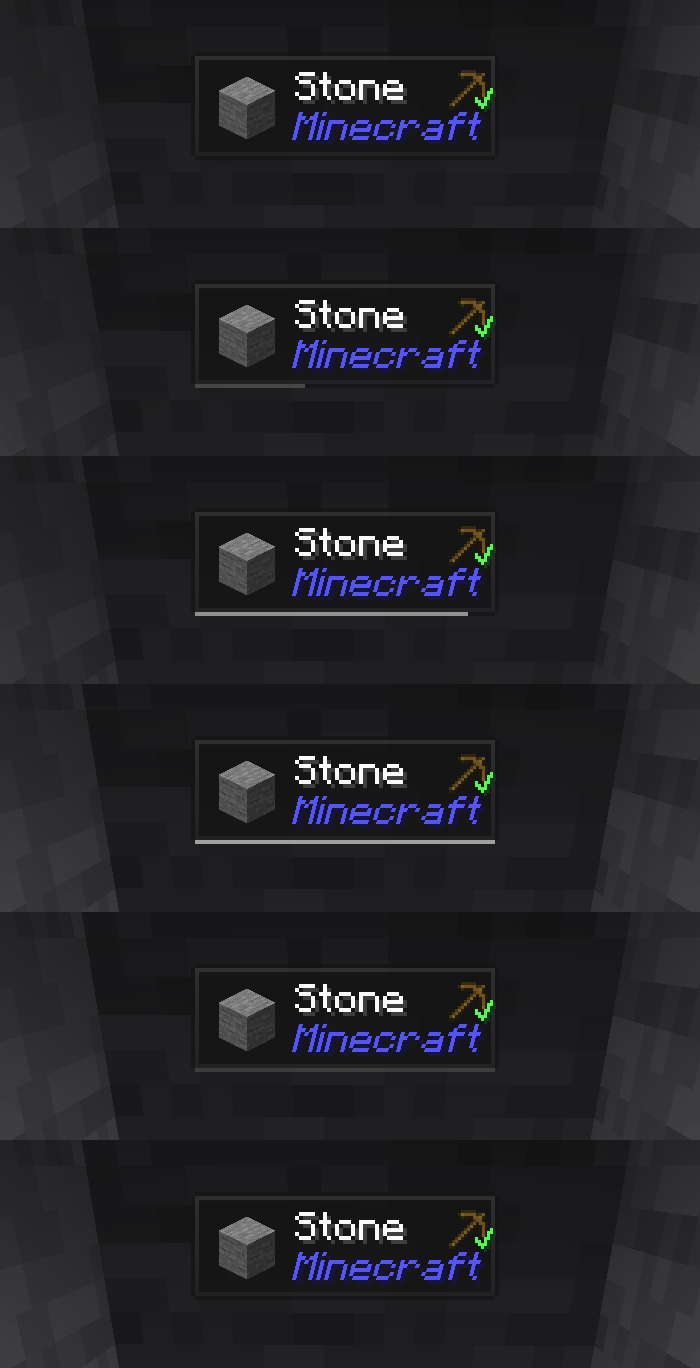
Jade, bilgi HUD modudur - modern Minecraft sürümleri için Hwyla/Waila. Daha iyi kullanıcı deneyimi ve API için tasarlanmıştır.
Jade yalnızca istemci tarafına kurulabilir. Ancak birçok özellik sunucu tarafında Jade gerektirir. (eşya depolama, demleme standı yakıt miktarı, arı kovanındaki arılar...)
Mod entegrasyonu için Jade Addons'u deneyin: NeoForge Fabric

Tuşlar (varsayılan):
- Keypad 0: Yapılandırma ekranını aç
- Keypad 1: Kaplamayı aç/kapat
- Keypad 2: Sıvı gösterimini aç/kapat
- Keypad 3: Tarifleri göster (JEI gerektirir)
- Keypad 4: Kullanımları göster (JEI gerektirir)
- Keypad 5: Hedefi seslendir

Hwyla'ya kıyasla dikkate değer değişiklikler:
- API yeniden tasarımı
- Daha fazla vanilla eklentisi
- Daha yüksek yapılandırılabilirlik
- Daha iyi erişilebilirlik
Orijinal Hwyla projesinin gerektirdiği üzere Jade, Creative Commons Attribution-NonCommercial-ShareAlike 4.0 International (CC BY-NC-SA 4.0) lisansını kullanır.
Jade 🔍 nasıl kurulur
With Millida Launcher
Install Millida Launcher
The launcher is free: download it at millida.net/launcher and sign in with any nickname.
Click “Install” on this page
The launcher opens and installs the mod for Minecraft 1.16–26.3 on Fabric, Forge, NeoForge or Quilt automatically, together with its dependencies: Fabric API.
Launch the game
A profile with it appears in the launcher: click “Play”.
Manually
Install Fabric, Forge, NeoForge or Quilt
The loader must match the game version of the mod file, for example Minecraft 26.3. After installing it, a separate profile appears in your launcher.
Download the file for your version
In the version list above, pick the file Jade-mc26.3-NeoForge-26.3.5.jar (1.0 MB) for your game version and loader.
Put it in the mods folder
The folder is inside .minecraft (Windows: %appdata%\.minecraft\mods). If it does not exist, create it. Required dependencies go there too: Fabric API.
Launch the loader profile
Open “Mods” in the main menu: Jade 🔍 should be in the list.
On a server
A server on Fabric, Forge, NeoForge or Quilt
The mod only works on a server with the same loader and game version, for example 26.3.
File goes into the server’s mods folder
Stop the server, put the mod file into the mods folder and start the server again.
Use the “To server” button
On Millida Hosting, the button at the top of the page uploads the file to your server and restarts it for you.
Sürümler
Bağımlılıklarla
| Minecraft | Yükleyici | Dosya | Tarih | İşlemler |
|---|---|---|---|---|
| 26.1.2 | NeoForge | 26.1.21005 KB 7 | ||
| 26.3 | NeoForge | 26.31 MB 22 | ||
| 26.3 | Fabric, Quilt | 26.31 MB 668 | ||
| 26.3 | NeoForge | 26.31 MB 1 | ||
| 26.3 | Fabric, Quilt | 26.31 MB | ||
| 26.3 | Fabric, Quilt | 26.31 MB | ||
| 26.3 | Fabric, Quilt | 26.31 MB | ||
| 26.3 | NeoForge | 26.31007 KB |
Çalışması için gerekenler
- Fabric APIzorunlu
- Just Enough Items (JEI)isteğe bağlı
Buna ihtiyaç duyan içerikler
Yorumlar
Jade 🔍 için ilk puanı sen ver


