
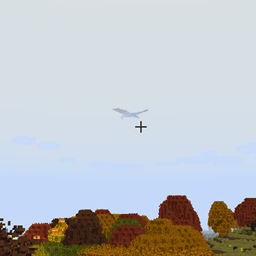
Minecraft 1.12.2 için ISeeDragons Mod
RLCraft ve Ice and Fire'ın eski sürümlerinde ejderha oluşturma mesafesini düzeltir
- indirme
- 1 indirme
- görüntülenme
- 6 görüntülenme
- Güncellendi
- Güncellendi 18.10.2026
- 1.12.2
 Forge
Forge
ISeeDragons modu hakkında
ISeeDragons Tamam... RLCraft'taki ejderhalar zor... Ama oyuncudan sadece 64+ blok uzaklaştığında etkinleşen kişisel bir görünmezlik cihazına sahip olmaları şart mı?!
Bu mod, Ice and Fire 1.7.1'deki (eski bir sürüm) bazı önemli hataları düzeltir, Ice and Fire 1.8.x ile kullanılması tanımsız davranışlara (hatalar, çökmeler vb.) neden olabilir! RLCraft modpaketinde kullanılmak üzere tasarlanmıştır!
Özellikler:
- Ice and Fire ejderha görüş mesafesini düzeltir (yapılandırılabilir, diğer modlu varlıklarla da çalışabilir)
- Ice and Fire ejderhalarının vurulduğunda uyanmamasını düzeltir
- Oyuncuların shift/iniş ile bir ejderhanın çenesinden kaçabilmesini düzeltir
- Ice and Fire deniz yılanı zırhı onarımını düzeltir
- Dragonbone Axe'i düzeltir
- Gecikmeyi önlemek için ejderhaların blok kırmasından çıkan parçacıkları azaltır (yapılandırılabilir)
- Ice and Fire eşyaları için OreDictionary girdilerini yeniden ekler (Ice and Fire hâlâ günlüğü spam'liyor, YAPILACAK: günlük spam'ini de kaldır)
- Zaten bir onarım eşyası olmayan araçlar için özel onarım eşyaları ayarlanabilir (yapılandırılabilir)
- Eşyalara ölümsüz düşmanlara karşı özel ek hasar verilebilir (yapılandırılabilir)
Bu mod hem istemciye hem de sunucuya kurulmalıdır, ancak düzeltmelerin çoğu yalnızca sunucuya kurulduğunda da çalışacaktır (istemci kurulumu kesin bir gereklilik değildir).
RLCraft modpaketi: https://www.curseforge.com/minecraft/modpacks/rlcraft Ice and Fire modu: https://www.curseforge.com/minecraft/mc-mods/ice-and-fire-dragons
Bu modu kurmak için jar dosyasını Minecraft örnek klasörünüzün mods klasörüne yerleştirin. Minecraft örnek klasörünün konumu kullandığınız başlatıcıya göre değişir!
Kaynak Kodu: https://github.com/xcube16/ISeeDragons
ISeeDragons nasıl kurulur
With Millida Launcher
Install Millida Launcher
The launcher is free: download it at millida.net/launcher and sign in with any nickname.
Click “Install” on this page
The launcher opens and installs the mod for Minecraft 1.12.2 on Forge automatically.
Launch the game
A profile with it appears in the launcher: click “Play”.
Manually
Install Forge
The loader must match the game version of the mod file, for example Minecraft 1.12.2. After installing it, a separate profile appears in your launcher.
Download the file for your version
In the version list above, pick the file ISeeDragons-1.2.1.jar (64 KB) for your game version.
Put it in the mods folder
The folder is inside .minecraft (Windows: %appdata%\.minecraft\mods). If it does not exist, create it.
Launch the loader profile
Open “Mods” in the main menu: ISeeDragons should be in the list.
Minecraft 1.12.2 runs on Java 8: with a different Java version the game may close right after launch.
Sürümler
Bağımlılıklarla
| Minecraft | Yükleyici | Dosya | Tarih | İşlemler |
|---|---|---|---|---|
| 1.12.2 | Forge | ISeeDragons-1.2.163.7 KB 1 | ||
| 1.12.2 | Forge | ISeeDragons-0.1224.4 KB | ||
| 1.12.2 | Forge | ISeeDragons6.7 KB |
SSS
Which Minecraft versions does ISeeDragons work on?
Only Minecraft 1.12.2: there are no files for other versions.
Is ISeeDragons for Forge or Fabric?
Only for Forge: 1.12.2. There are no files for Fabric or NeoForge: a mod for another loader will not start.
Does ISeeDragons need other mods?
The author lists no required dependencies: the Forge loader is enough.
Which Java does ISeeDragons need?
Minecraft 1.12.2 runs on Java 8. If the game closes right after launch, the usual cause is the wrong Java version in the profile settings.
Where can I download ISeeDragons safely?
On this page: the file ISeeDragons-1.2.1.jar (64 KB) is stored on Millida’s server, with no link shorteners. SHA-1 checksum: 0f8c5fee7eb2b76ab4a01adb08b63147f5a2a2fe.
Yorumlar
ISeeDragons için ilk puanı sen ver


