
Minecraft 26.3 için Inventory Item Groups Mod
Yaratıcı oyun modunda envantere eşya grupları ekler
 NeoForge
 Forge
Forge Fabric
 Quilt
QuiltInventory Item Groups
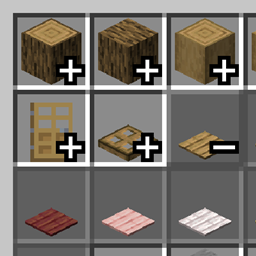
This mod adds item groups to the Creative mode menu. It's based on a feature from the Bedrock edition.

Usage
To use the mod, simply install it in the mods folder. In Creative mode, press the plus sign to open a group and the minus sign to close it.
The mod has a configuration option. It allows you to customize item sorting within groups and create your own custom item groups that can be used without the default ones.
To add a group to a specific menu tab, find the menu tab IDs on the group settings page, copy the desired one, and enter it in the "Tab ID" field. To add items to this group, enter the item ID displayed in the tooltip (when F3+H is enabled) or part of the ID contained in the item.
Below is an example of adding an item group to the blocks tab in the Cobllemon mod:

Configuration Settings

If desired, you can completely disable the default groups by unchecking the "Add all groups" option.
Another customization option is item sorting within a group. Currently, there are two modes: default and alphabetical.
You can translate the created group. The "Translate Groups" option must be enabled. To do this, create a resource pack and write a translation using the translation key from the example, then change the group name and ID to your own.
Translation example

File path: assets\minecraft\lang\en_us.json
{ "group_name.inventory_item_groups.random_items": "Randoms" }
Other
- The Fabric API is required so that the game displays the translation keys instead of their values. This is because Fabric Loader doesn't load mod resources by default.
Inventory Item Groups nasıl kurulur
With Millida Launcher
Install Millida Launcher
The launcher is free: download it at millida.net/launcher and sign in with any nickname.
Click “Install” on this page
The launcher opens and installs the mod for Minecraft 26.3 on Fabric, Forge, NeoForge or Quilt automatically.
Launch the game
A profile with it appears in the launcher: click “Play”.
Manually
Install Fabric, Forge, NeoForge or Quilt
The loader must match the game version of the mod file, for example Minecraft 26.3. After installing it, a separate profile appears in your launcher.
Download the file for your version
In the version list above, pick the file inventory-item-groups-1.5.2-neoforge+26.3.jar (55 KB) for your game version and loader.
Put it in the mods folder
The folder is inside .minecraft (Windows: %appdata%\.minecraft\mods). If it does not exist, create it.
Launch the loader profile
Open “Mods” in the main menu: Inventory Item Groups should be in the list.
Sürümler
Bağımlılıklarla
| Minecraft | Yükleyici | Dosya | Tarih | İşlemler |
|---|---|---|---|---|
| 26.3 | NeoForge | Inventory Item Groups Neoforge 26.3 v1.5.255.4 KB | ||
| 26.3 | Forge | Inventory Item Groups Forge 26.3 v1.5.255.7 KB | ||
| 26.3 | Fabric, Quilt | Inventory Item Groups Fabric 26.3 v1.5.256.6 KB 2 |
Yorumlar
Inventory Item Groups için ilk puanı sen ver


