
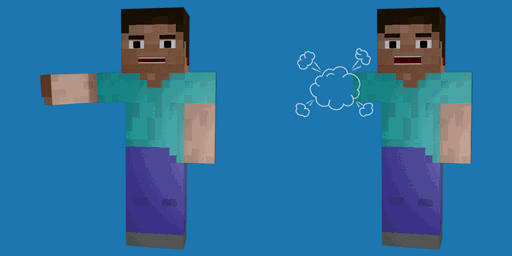
Minecraft 26.3 için Hide Hands Mod
🙌 [İstemci] Birinci şahısta yan elinizi ve/veya ana elinizi gizleyin, isteğe bağlı olarak meşale, ölümsüzlük totemi veya kalkan gibi belirli eşyaları tutarken.
 Fabric
 Forge
Forge NeoForge
 Quilt
QuiltHide Hands modu hakkında
Hide Hands is a minimalistic client-side configurable mod which allows you to hide your offhand and/or main hand. This can be set to always hide or only when holding specific items. By default the mod hides the offhand when holding a torch or a totem of undying and the empty player's hand will be hidden, unless swung.
All available config options:
alwaysHideMainHand default false If enabled, always hides the main hand. If disabled, hides the main hand when holding the items defined in hideMainHandWithItems.
alwaysHideEmptyMainHand default true If enabled, always hides the main hand if it's empty. Will still be visible when swung empty.
hideMainHandWithItems default "" The items which when held will hide the main hand if alwaysHideMainHand is disabled.
alwaysHideOffhand default false If enabled, always hides the offhand. If disabled, hides the offhand when holding the items defined in hideOffhandWithItems.
hideOffhandWithItems default "minecraft:totem_of_undying,minecraft:torch" The items which when held will hide the offhand if alwaysHideOffhand is disabled.
A gif which shows the offhand being hidden when holding a torch or totem of undying:
You may freely use this mod in any modpack, as long as the download remains hosted within the CurseForge or Modrinth ecosystem.
Serilum.com contains an overview and more information on all mods available.
Comments are disabled as I'm unable to keep track of them across so many separate mod pages. For issues, ideas, suggestions or anything else there is the Github repo. Thanks!
Hide Hands nasıl kurulur
With Millida Launcher
Install Millida Launcher
The launcher is free: download it at millida.net/launcher and sign in with any nickname.
Click “Install” on this page
The launcher opens and installs the mod for Minecraft 1.19.3–26.3 on Fabric, Forge, NeoForge or Quilt automatically.
Launch the game
A profile with it appears in the launcher: click “Play”.
Manually
Install Fabric, Forge, NeoForge or Quilt
The loader must match the game version of the mod file, for example Minecraft 26.3. After installing it, a separate profile appears in your launcher.
Download the file for your version
In the version list above, pick the file hidehands-26.3.0-4.6.jar (33 KB) for your game version and loader.
Put it in the mods folder
The folder is inside .minecraft (Windows: %appdata%\.minecraft\mods). If it does not exist, create it.
Launch the loader profile
Open “Mods” in the main menu: Hide Hands should be in the list.
Sürümler
Bağımlılıklarla
| Minecraft | Yükleyici | Dosya | Tarih | İşlemler |
|---|---|---|---|---|
| 26.3 | Fabric, Forge, NeoForge, Quilt | [Fabric/Forge/Neo] 26.3.0-4.6 | Hide Hands32.6 KB 1 | ||
| 1.19.3 | Forge | hidehands_1.19.3-3.0.jar8.1 KB |
SSS
Which Minecraft versions does Hide Hands work on?
There are files for 26.3, 1.19.3. The newest is 26.3.
Is Hide Hands for Forge or Fabric?
There are files for Fabric: 26.3, for Forge: 1.19.3–26.3, for NeoForge: 26.3 and for Quilt: 26.3.
Does Hide Hands need other mods?
The author lists no required dependencies: the Fabric, Forge, NeoForge or Quilt loader is enough.
Where can I download Hide Hands safely?
On this page: the file hidehands-26.3.0-4.6.jar (33 KB) is stored on Millida’s server, with no link shorteners. SHA-1 checksum: 5701f68efe22aa49301c931114f32d4c87fb7482.
Yorumlar
Hide Hands için ilk puanı sen ver


