
Minecraft 26.3 için Global Narration Toggle Mod
🗣️ Anlatıcı ayarını otomatik olarak tüm örnekler arasında genel yapar. Ekranı kapatıp açar.
 Fabric
 Forge
Forge NeoForge
 Quilt
QuiltGlobal Narration Toggle modu hakkında
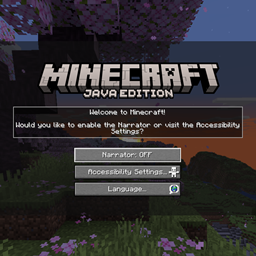
Global Narration Toggle is a client-side mod that makes the start-up experience better, for everyone. While most don't need the narrator, some do. Disabling it entirely is not a good solution. How this mod works, is it checks for the narration setting in the global .minecraft folder. If it's disabled there, the accessibility onboarding screen won't be shown when the game starts in a new instance.
When the narrator is enabled in any instance, the global setting is updated as well. Anyone who needs it, has access to it on start-up. For others, it'll be a one-time setting. The options file is updated automatically from in-game.
The .minecraft folder in ./AppData/Roaming/ is used. If it doesn't exist, the folder will be created with an options.txt file containing only 'narrator:0'. This still allows any new instances to be created, or the current to be used.
Before the mod on startup:
When the mod is installed, and continue is clicked once:
You may freely use this mod in any modpack, as long as the download remains hosted within the CurseForge or Modrinth ecosystem.
Serilum.com contains an overview and more information on all mods available.
Comments are disabled as I'm unable to keep track of them across so many separate mod pages. For issues, ideas, suggestions or anything else there is the Github repo. Thanks!
Global Narration Toggle nasıl kurulur
With Millida Launcher
Install Millida Launcher
The launcher is free: download it at millida.net/launcher and sign in with any nickname.
Click “Install” on this page
The launcher opens and installs the mod for Minecraft 26.3 on Fabric, Forge, NeoForge or Quilt automatically.
Launch the game
A profile with it appears in the launcher: click “Play”.
Manually
Install Fabric, Forge, NeoForge or Quilt
The loader must match the game version of the mod file, for example Minecraft 26.3. After installing it, a separate profile appears in your launcher.
Download the file for your version
In the version list above, pick the file globalnarrationtoggle-26.3.0-1.4.jar (38 KB) for your game version and loader.
Put it in the mods folder
The folder is inside .minecraft (Windows: %appdata%\.minecraft\mods). If it does not exist, create it.
Launch the loader profile
Open “Mods” in the main menu: Global Narration Toggle should be in the list.
Sürümler
Bağımlılıklarla
| Minecraft | Yükleyici | Dosya | Tarih | İşlemler |
|---|---|---|---|---|
| 26.3 | Fabric, Forge, NeoForge, Quilt | [Fabric/Forge/Neo] 26.3.0-1.4 | Global Narration Toggle38.5 KB |
SSS
Which Minecraft versions does Global Narration Toggle work on?
Only Minecraft 26.3: there are no files for other versions.
Is Global Narration Toggle for Forge or Fabric?
There are files for Fabric: 26.3, for Forge: 26.3, for NeoForge: 26.3 and for Quilt: 26.3.
Does Global Narration Toggle need other mods?
The author lists no required dependencies: the Fabric, Forge, NeoForge or Quilt loader is enough.
Where can I download Global Narration Toggle safely?
On this page: the file globalnarrationtoggle-26.3.0-1.4.jar (38 KB) is stored on Millida’s server, with no link shorteners. SHA-1 checksum: ea0d4a9fc4e515a8da00288423f2ee3c8298a165.
Yorumlar
Global Narration Toggle için ilk puanı sen ver


