
Minecraft 1.20.1, 1.21.1 için Gliders Mod
Planörler: araziyi geçmek ve düşmeleri önlemek için olmazsa olmaz
 NeoForge
 Forge
Forge Fabric
Gliders
Welcome to the world of Gliders!
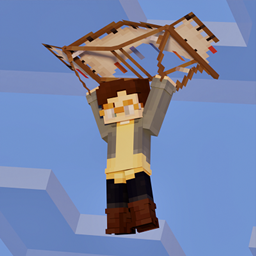
Gliders are the first mod in a vanilla-friendly mod pack designed to enhance the adventure and exploration aspect of Minecraft. These gliders can be crafted from basic materials like wood, iron, and gold, as well as more advanced materials like diamond and netherite. They were introduced to prevent players from rushing to The End to get Elytra.
A good player/server experience was the main focus while designing these Gliders. They were created to be a balanced item, not feeling as overpowered as elytra but with several upgrades to stop the need to rush to go get wings. These gliders will help you navigate the world, explore caves, and prevent falling off cliffs.
With countless hours of development, this excellent early to mid-game alternative to the Elytra offers an immersive single and multiplayer experience, including first and third-person animations designed to enhance the player's Minecraft experience. Try it out and glide through the skies of Minecraft!
Features
Tiers
When it comes to Gliders, you have a variety of options to choose from. You can opt for a wooden glider, which is perfect if you're just starting out and want to get a feel for gliding. If you're looking for something that's more durable, you might want to consider an Iron or Gold Glider. If you're willing to splurge, then Diamond Gliders are a great choice as they are very durable and offer a significant increase in flight time. And for those who want the ultimate gliding experience, Netherite Gliders are the way to go. These gliders are incredibly durable and offer the longest flight time of all the Glider tiers.
To craft a Glider, you'll need to start by creating reinforced paper, a new type of paper that is used in the construction of these amazing flying machines. Reinforced paper is a unique material that is made by combining conventional paper with other materials such as leather, iron, gold, diamond, or netherite scrap depending on the desired strength of the glider. The crafting process is relatively straightforward and involves combining standard paper with the appropriate materials in a crafting table. Once you have the reinforced paper, you can then use it to craft the glider of your choice.
Updrafts
When utilizing gliders in Minecraft, it's important to note that fire and magma are not typically friendly elements. However, there is a way to utilize these elements to your advantage. By using a Glider, you'll notice wind particles emanating from heat sources. These updrafts of heat can provide you with a substantial boost in height, allowing you to glide over treacherous terrain with ease. However, it's essential to exercise caution when using gliders in other HOT dimensions, as the conditions may be too intense for the glider to handle without the proper upgrades.
The Right Kind Of Charge
When using Glider, it is important to keep a few things in mind. Gliders are made using metal components, and unfortunately, when flying in an open space in the rain, it means you are a prime target for lightning. Therefore, it is not advised to fly in the rain or during a storm. If you want to risk it, you may hear the glider start tingling with a static charge until you are inevitably struck by lighting, dropping you out of the sky and probably breaking your glider. Thankfully, you may be able to replace the metal on your Glider and pared with curtain crystals there may be a modification that can turn the lightning into a useful upgrade instead of a pesky nuisance.
Glider Repair
When using a glider, it's important to be cautious and aware of its delicate structure and using the Glider incorrectly may break it. But don't worry, there is still hope for your beloved Glider. To repair it, you can use a new piece of reinforced paper that matches the material of the original Glider.
To start the repair process, use an Anvil and use the damaged Glider along with the newly crafted reinforced paper to repair it. But be careful and use the Glider in moderation, as even with upgrades, if its durability eventually reaches zero, it will be lost forever.
Upgrades
Glider technology has come a long way, with many upgrades available to extend the life of this amazing invention before moving on to the Elytra. These upgrades are designed to allow glider users to explore new environments and terrains that were once impossible to navigate. With these upgrades, the glider becomes a more versatile tool for everyday adventuring the smithing table will come in handy for some of these upgrades. In addition, you can enchant your glider with Mending and Unbreaking enchantments to ensure it lasts as long as possible. With all these upgrades and enchantments, your glider will become an indispensable companion on all your adventures.
Perspective Changes
If you're using gliders in Minecraft, you may find that certain situations are easier to navigate in F5 mode. With this in mind, we've added a new feature that allows you to toggle your camera to switch to F5 mode when using a glider.
This feature is especially useful when you're trying to explore new environments. Gliding with a glider can be a lot of fun and very cinematic, but it can also be challenging to get the right perspective when you're trying to dodge obstacles or maneuver through tight spaces. By switching to F5 mode, you'll be able to see everything around you more clearly, which will make it easier to avoid obstacles and stay on course.
To activate this feature, simply go to the Controls panel within the Minecraft pause menu and look for the Glider Perspective option. Once you've found it, you can toggle it on or off depending on your preferences. This feature is currently turned off by default, but it worth trying to see what you prefer, If you're new to gliding, you may want to leave this feature turned off until you get more comfortable with the basics of gliding. However, if you're an experienced glider pilot, you may find that this feature is a must-have for your adventures.
Pause > Options > Controls > Glider Perspective
Compatibility
One of the best things about these gliders is their compatibility with other mods like Create and Curios. Gliders are stylized to work well with the Create Mod . Create is a mod that allows players to build complex contraptions and machinery using gears, belts, and other components. The Glider mod is designed to work seamlessly with Create, allowing players to incorporate gliders into their machinery and contraptions. This means that players can use their gliders in a variety of ways, such as creating glider launchers or incorporating them into their transportation systems.
In addition, Gliders are designed to work with Curios. Curios is a mod that allows players to equip items in their inventory as accessories. This means that players can equip their Glider as an accessory, allowing them to glide through the skies without having to worry about taking up valuable inventory space like a chest pieces slot.
Overall, gliders are an excellent addition to Minecraft, providing players with a unique and exciting means of transportation. With their impressive durability and a variety of tier options available, players can customize their glider to suit their specific needs. So why not give gliders a try and soar through the skies of Minecraft today?
Gliders nasıl kurulur
With Millida Launcher
Install Millida Launcher
The launcher is free: download it at millida.net/launcher and sign in with any nickname.
Click “Install” on this page
The launcher opens and installs the mod for Minecraft 1.20.1–1.21.1 on Fabric, Forge or NeoForge automatically.
Launch the game
A profile with it appears in the launcher: click “Play”.
Manually
Install Fabric, Forge or NeoForge
The loader must match the game version of the mod file, for example Minecraft 1.21.1. After installing it, a separate profile appears in your launcher.
Download the file for your version
In the version list above, pick the file gliders-1.21.1-neoforge-1.1.8.jar (662 KB) for your game version and loader.
Put it in the mods folder
The folder is inside .minecraft (Windows: %appdata%\.minecraft\mods). If it does not exist, create it.
Launch the loader profile
Open “Mods” in the main menu: Gliders should be in the list.
Minecraft 1.21.1 runs on Java 21: with a different Java version the game may close right after launch.
Sürümler
Bağımlılıklarla
| Minecraft | Yükleyici | Dosya | Tarih | İşlemler |
|---|---|---|---|---|
| 1.20.1 | Forge | 🍂 [Forge] - Gliders - 1.20.1-v1.2.0728 KB 6 | ||
| 1.20.1 | Fabric | 🍂 [Fabric] - Gliders - 1.20.1-v1.2.0820 KB 2 | ||
| 1.21.1 | NeoForge | 🍂 [Neoforge] - Gliders - 1.21.1-v1.1.8662 KB 7 |
Yorumlar
Gliders için ilk puanı sen ver


