
Minecraft 26.3 için Entity Information Mod
ℹ️ Information Stick ile vurulduğunda varlık bilgilerini gösterir. Hata ayıklama ve geliştirme için kullanışlıdır.
 Fabric
 Forge
Forge NeoForge
 Quilt
QuiltEntity Information modu hakkında
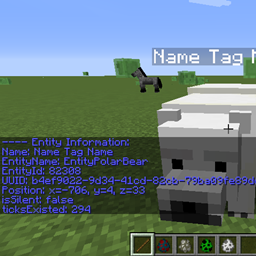
Entity Information adds displaying entity information by using the Information Stick. It gives a mod developer an easy way of getting information on an entity, both from the vanilla game and other mods.
The Information Stick may be received by entering the command /informationstick or /ist
After hitting an entity with the stick, various useful information will be sent. It can be used for debugging or developing other mods.
Explanation of variables: (Entity entity = e.getEntity()); Name (1.12): entity.getName(); Name (1.13+): entity.getName().getString(); EntityName: entity.toString().split("\\[")[0]; EntityId: entity.getEntityId(); UUID: entity.getUniqueID(); Position: entity.getPosition().toString().replace("BlockPos{", "").replace("}", ""); isSilent: entity.isSilent(); ticksExisted: entity.ticksExisted;
You may freely use this mod in any modpack, as long as the download remains hosted within the CurseForge or Modrinth ecosystem.
Serilum.com contains an overview and more information on all mods available.
Comments are disabled as I'm unable to keep track of them across so many separate mod pages. For issues, ideas, suggestions or anything else there is the Github repo. Thanks!
Entity Information nasıl kurulur
With Millida Launcher
Install Millida Launcher
The launcher is free: download it at millida.net/launcher and sign in with any nickname.
Click “Install” on this page
The launcher opens and installs the mod for Minecraft 1.19.3–26.3 on Fabric, Forge, NeoForge or Quilt automatically.
Launch the game
A profile with it appears in the launcher: click “Play”.
Manually
Install Fabric, Forge, NeoForge or Quilt
The loader must match the game version of the mod file, for example Minecraft 26.3. After installing it, a separate profile appears in your launcher.
Download the file for your version
In the version list above, pick the file entityinformation-26.3.0-3.9.jar (40 KB) for your game version and loader.
Put it in the mods folder
The folder is inside .minecraft (Windows: %appdata%\.minecraft\mods). If it does not exist, create it.
Launch the loader profile
Open “Mods” in the main menu: Entity Information should be in the list.
Sürümler
Bağımlılıklarla
| Minecraft | Yükleyici | Dosya | Tarih | İşlemler |
|---|---|---|---|---|
| 26.3 | Fabric, Forge, NeoForge, Quilt | [Fabric/Forge/Neo] 26.3.0-3.9 | Entity Information39.6 KB | ||
| 1.19.3 | Forge | entityinformation_1.19.3-1.9.jar8.7 KB |
SSS
Which Minecraft versions does Entity Information work on?
There are files for 26.3, 1.19.3. The newest is 26.3.
Is Entity Information for Forge or Fabric?
There are files for Fabric: 26.3, for Forge: 1.19.3–26.3, for NeoForge: 26.3 and for Quilt: 26.3.
Does Entity Information need other mods?
The author lists no required dependencies: the Fabric, Forge, NeoForge or Quilt loader is enough.
Where can I download Entity Information safely?
On this page: the file entityinformation-26.3.0-3.9.jar (40 KB) is stored on Millida’s server, with no link shorteners. SHA-1 checksum: 6044a37c2adfed43be58d39878f7748dd3acda91.
Yorumlar
Entity Information için ilk puanı sen ver


