

Minecraft 1.20.1, 1.21.1 için EMI Ores Mod
EMI içinden cevher oluşumu bilgilerini kolayca görüntüle.
 NeoForge
 Fabric
 Forge
ForgeEMI Ores
Easily view ore generation information from inside EMI.
EMI Ores is a plugin for the recipe viewer EMI that displays information about how ores generate in the world, including:
- Y-level distribution
- Vein size
- Vein count per chunk
- Biome restrictions
The mod is required on both client and server in order to function; if present on only one side it will silently disable itself.
Owing to the fact that this mod gathers its data from data pack configured/placed features, modded ores should display correctly without additional configuration in the vast majority of cases.

Screenshots
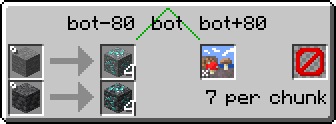
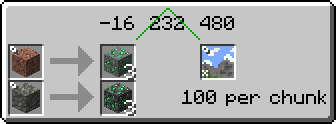
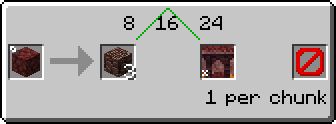
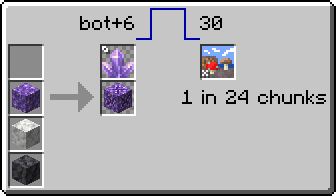
Comparison with existing ore generation recipe viewer plugins
Feature - EMI Ores - Just Enough Resources - Roughly Enough Resources
Display ore generation information - ✅ - ✅ - ✅ Display non-ore world generation information - ❌ - ❌ - ✅ Automatic modded ore support - ✅ - ❌ - ✅ Display biome restrictions - ✅ - ✅ - ❌ Combine stone and deepslate ores - ✅ - ✅ - ❌ Data source - Data pack placed/configured features - Hard-coded - Scanned chunks Recipe viewer support - EMI - JEI, EMI (via JEI) - REI Display loot tables - ❌[^1] - ✅ - ✅ Display villager trades - ❌[^2] - ✅ - ❌ Display enchantments available on items - ⭕[^3] - ✅ - ❌
Vanilla biome icons licensed CC BY-NC-SA 3.0 by the Minecraft Wiki contributors, taken from the Biome wiki page.
[^1]: See EMI Loot. [^2]: See EMI Trades. [^3]: Basic functionality available in EMI, also see EMI Enchanting.

EMI Ores nasıl kurulur
With Millida Launcher
Install Millida Launcher
The launcher is free: download it at millida.net/launcher and sign in with any nickname.
Click “Install” on this page
The launcher opens and installs the mod for Minecraft 1.19.2–1.21.1 on Fabric, Forge or NeoForge automatically, together with its dependencies: Fabric API, EMI.
Launch the game
A profile with it appears in the launcher: click “Play”.
Manually
Install Fabric, Forge or NeoForge
The loader must match the game version of the mod file, for example Minecraft 1.21.1. After installing it, a separate profile appears in your launcher.
Download the file for your version
In the version list above, pick the file emi_ores-1.3+1.21.1+neoforge.jar (114 KB) for your game version and loader.
Put it in the mods folder
The folder is inside .minecraft (Windows: %appdata%\.minecraft\mods). If it does not exist, create it. Required dependencies go there too: Fabric API, EMI.
Launch the loader profile
Open “Mods” in the main menu: EMI Ores should be in the list.
On a server
A server on Fabric, Forge or NeoForge
The mod only works on a server with the same loader and game version, for example 1.21.1.
File goes into the server’s mods folder
Stop the server, put the mod file into the mods folder and start the server again.
Use the “To server” button
On Millida Hosting, the button at the top of the page uploads the file to your server and restarts it for you.
Minecraft 1.21.1 runs on Java 21: with a different Java version the game may close right after launch.
Sürümler
Bağımlılıklarla
| Minecraft | Yükleyici | Dosya | Tarih | İşlemler |
|---|---|---|---|---|
| 1.21.1 | NeoForge | 1.21.1114 KB 3 | ||
| 1.21.1 | Fabric | 1.21.1112 KB 1 | ||
| 1.20.1 | Forge | 1.20.1117 KB 1 | ||
| 1.20.1 | Fabric | 1.20.1113 KB | ||
| 1.19.2 | Forge | 1.19.2118 KB 1 | ||
| 1.19.2 | Fabric | 1.19.2115 KB | ||
| 1.21.1 | NeoForge | 1.21.1109 KB | ||
| 1.21.1 | Fabric | 1.21.1107 KB |
Çalışması için gerekenler
- Fabric APIzorunlu
- EMIzorunlu
Yorumlar
EMI Ores için ilk puanı sen ver


