

Minecraft 1.12.2, 26.3 için ElevatorMod Mod
OpenBlocks'teki asansörün 1.8+ sürümüne basit portu
 Fabric
 NeoForge
 Forge
ForgeElevatorMod
Port of the elevator from OpenBlocks to Minecraft 1.8+.

Crafting
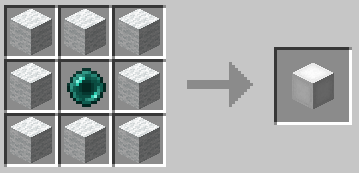
The default recipe is the same as in OpenBlocks.
Example of the white elevator recipe:
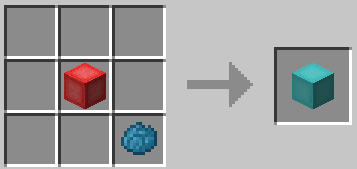
You can also re-dye any elevator:
Usage
To use them place two or more elevators in the same X and Z coordinates, to move between them simply jump to go to the elevator above or sneak to go to the one below.
You can configure the range of the elevators and if they should require XP to teleport in the configuration file.

Options Interface
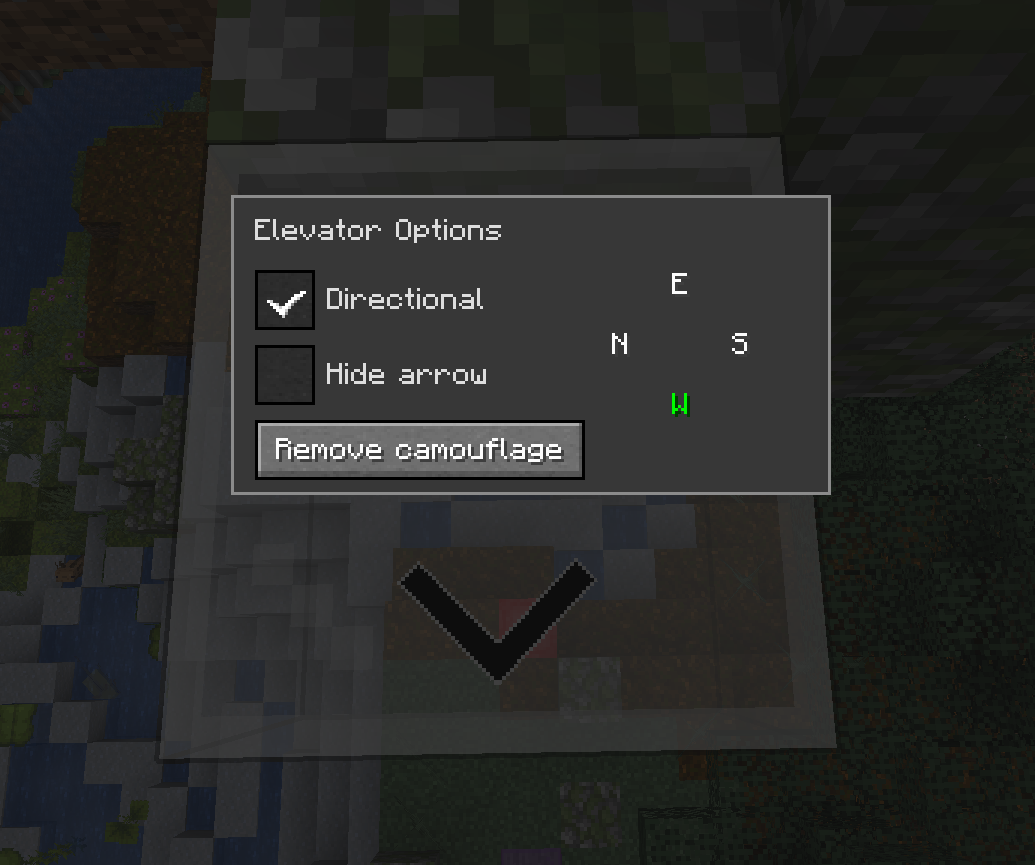
You can access the options interface by right-clicking on the elevator with an empty hand.
Directional
When the Directional checkbox is enabled, the elevator will adjust the yaw rotation of players who teleport to it based on the configured direction.
You can change the direction by clicking on the desired direction button. _The display order of the buttons will match the current direction the player is facing._
It will also show an arrow on the elevator to indicate the direction it is facing. You can hide it by selecting the Hide arrow checkbox.
Note: This has nothing to do with horizontal movement, it only changes the direction the player is facing.
Camouflage
You can use any solid block to camouflage the elevator, just right-click on the elevator with the desired block on your hand.
Most blocks can be used as camouflage with some exceptions. For example, you can't use a chest because it uses a different rendering method.
Configuration
The configuration file is per-world and is located at /serverconfig/elevatorid-server.toml.
Here are the default values:
[General] #Should elevators have the same color in order to teleport ? sameColor = false
#Elevator range #Range: 3 ~ 4064 range = 384
#Realign players to the center of elevator ? precisionTarget = true
#Can mobs spawn on elevators ? mobSpawn = false
#Reset pitch to 0 when teleporting to normal elevators ? resetPitchNormal = false
#Reset pitch to 0 when teleporting to directional elevators ? resetPitchDirectional = true
#Should teleporting require XP ? useXP = false
#Amount of XP points to use when useXP is enabled #Note this is NOT experience levels #Range: > 1 XPPointsAmount = 1
Thanks
- OpenBlocks Team
- All contributors on GitHub
Modpacks
Feel free to use this in any modpack.
ElevatorMod nasıl kurulur
With Millida Launcher
Install Millida Launcher
The launcher is free: download it at millida.net/launcher and sign in with any nickname.
Click “Install” on this page
The launcher opens and installs the mod for Minecraft 1.12.2–26.3 on Fabric, Forge or NeoForge automatically, together with its dependencies: Fabric API.
Launch the game
A profile with it appears in the launcher: click “Play”.
Manually
Install Fabric, Forge or NeoForge
The loader must match the game version of the mod file, for example Minecraft 26.3. After installing it, a separate profile appears in your launcher.
Download the file for your version
In the version list above, pick the file elevatorid-fabric-26.3-1.16.6.jar (762 KB) for your game version and loader.
Put it in the mods folder
The folder is inside .minecraft (Windows: %appdata%\.minecraft\mods). If it does not exist, create it. Required dependencies go there too: Fabric API.
Launch the loader profile
Open “Mods” in the main menu: ElevatorMod should be in the list.
On a server
A server on Fabric, Forge or NeoForge
The mod only works on a server with the same loader and game version, for example 26.3.
File goes into the server’s mods folder
Stop the server, put the mod file into the mods folder and start the server again.
Use the “To server” button
On Millida Hosting, the button at the top of the page uploads the file to your server and restarts it for you.
Sürümler
Bağımlılıklarla
| Minecraft | Yükleyici | Dosya | Tarih | İşlemler |
|---|---|---|---|---|
| 26.3 | Fabric | 26.3762 KB 2 | ||
| 26.3 | NeoForge | 26.3193 KB | ||
| 26.3 | NeoForge | 26.3193 KB | ||
| 26.3 | Fabric | 26.3762 KB | ||
| 1.12.2 | Forge | 1.12.2111 KB 1 | — |
Çalışması için gerekenler
- Fabric APIzorunlu
- Forge Config API Portzaten dahil
Yorumlar
ElevatorMod için ilk puanı sen ver


