
Minecraft 1.20.1, 1.21.1 için Create: Ranged Mod
Create ile uçlu ok otomasyonu.
 NeoForge
 Fabric
 Quilt
Quilt Forge
ForgeCreate: Ranged modu hakkında
This was a mod request from @TheBiBirb
About
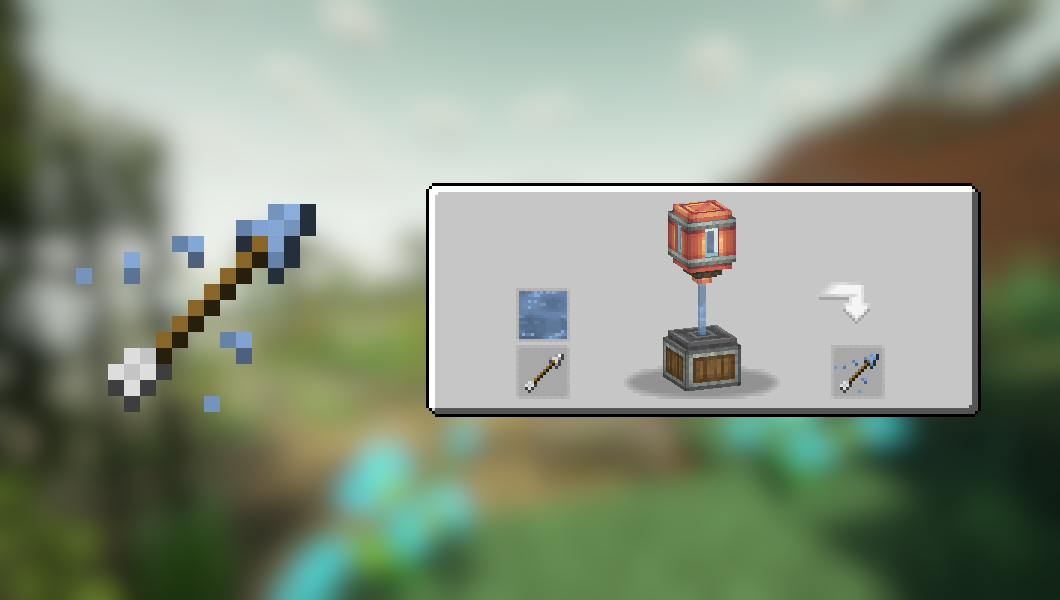
Create introduces interesting potion-crafting mechanics using in-game fluids, but doesn't provide many practical uses for them. This mod aims to fix that by adding recipes for all types of Tipped Arrows, using Create's Spout.
You can now fully automate your ranged arsenal!
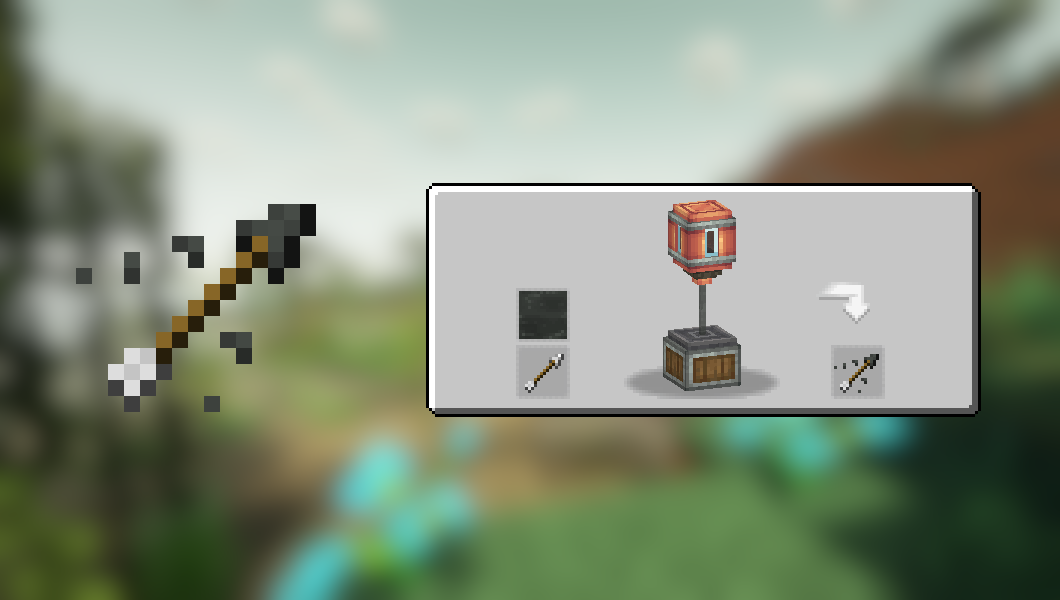
Preview (Tipped Arrows Recipes)
Other features
Cheaper Spectral Arrows using Create's Deployer
Clean any undesired arrows with water in a Spout to revert them to standard arrows
Dependencies
Only the base Create mod is required for the above recipes to work.
JEI is recommended but not required.
Installation
Add the .jar mod file into your mods folder.
Alternatively, you can browse the CurseForge launcher for the mod (if it doesn't show up, try typing the autor's name). Once found, click "Install" to add it to your modpack.
Permissions
You are free to include this mod in any modpack, public or private.
Support my work
Download my projects on CurseForge
Download my projects on Modrinth
Donate on Paypal
Create: Ranged nasıl kurulur
With Millida Launcher
Install Millida Launcher
The launcher is free: download it at millida.net/launcher and sign in with any nickname.
Click “Install” on this page
The launcher opens and installs the mod for Minecraft 1.20–1.21.1 on Fabric, Forge, NeoForge or Quilt automatically.
Launch the game
A profile with it appears in the launcher: click “Play”.
Manually
Install Fabric, Forge, NeoForge or Quilt
The loader must match the game version of the mod file, for example Minecraft 1.21.1. After installing it, a separate profile appears in your launcher.
Download the file for your version
In the version list above, pick the file create_ranged-1.2.0-neoforge-1.21.1.jar (225 KB) for your game version and loader.
Put it in the mods folder
The folder is inside .minecraft (Windows: %appdata%\.minecraft\mods). If it does not exist, create it.
Launch the loader profile
Open “Mods” in the main menu: Create: Ranged should be in the list.
Minecraft 1.21.1 runs on Java 21: with a different Java version the game may close right after launch.
Sürümler
Bağımlılıklarla
| Minecraft | Yükleyici | Dosya | Tarih | İşlemler |
|---|---|---|---|---|
| 1.21 | NeoForge | create_ranged-1.2.0-neoforge-1.21.1.jar225 KB 1 | ||
| 1.20.1 | Fabric, Quilt | create_ranged-1.1.0-fabric-1.20.1.jar219 KB | ||
| 1.20.1 | Forge, NeoForge | create_ranged-1.1.0-forge-1.20.1.jar220 KB 1 |
SSS
Which Minecraft versions does Create: Ranged work on?
There are files for 1.21.1, 1.21, 1.20.1, 1.20. The newest is 1.21.1.
Is Create: Ranged for Forge or Fabric?
There are files for Fabric: 1.20–1.20.1, for Forge: 1.20–1.20.1, for NeoForge: 1.20–1.21.1 and for Quilt: 1.20–1.20.1.
Does Create: Ranged need other mods?
The author lists no required dependencies: the Fabric, Forge, NeoForge or Quilt loader is enough.
Which Java does Create: Ranged need?
Minecraft 1.21.1 runs on Java 21. If the game closes right after launch, the usual cause is the wrong Java version in the profile settings.
Where can I download Create: Ranged safely?
On this page: the file create_ranged-1.2.0-neoforge-1.21.1.jar (225 KB) is stored on Millida’s server, with no link shorteners. SHA-1 checksum: 3f81cce79b336575ca78ffd2e04dc44889d75dd4.
Yorumlar
Create: Ranged için ilk puanı sen ver


