
Minecraft 1.20.1, 1.21.1 için Construction Sticks Mod
İnşaatı kolaylaştıran çubuklar
 NeoForge
 Forge
ForgeConstruction Sticks modu hakkında
Construction Sticks, karşıya baktığınız yönde yapınızı genişleterek tek seferde 1024 bloğa kadar birden fazla blok yerleştirmenizi sağlar. Yapıyı daha hızlı ve verimli hale getirmek için çubuğunuzu yükselterek yeteneklerini geliştirebilirsiniz.
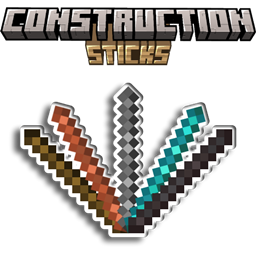
Çubuklar
Beş farklı Construction Sticks kademesi vardır: Wood, Copper, Iron, Diamond ve Netherite. Her kademe daha iyi dayanıklılık ve blok yerleştirme yetenekleri sunar ve şablonlarla daha da yükseltilebilir.
Çubuk Dayanıklılık Maks. Blok Yükseltilebilir Angel Mesafe Maks. Blok (Yok Etme)
Wood 59 3 Evet 1 1
Copper 131 9 Evet 2 3
Iron 250 27 Evet 4 9
Diamond 1561 128 Evet 8 25
Netherite 2031 1024 Evet 16 81
Yükseltme Şablonları
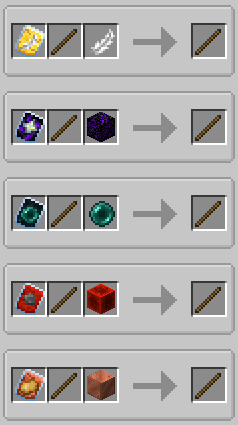
Şablonlar Construction Sticks'inize özel yükseltmeler ekler. Bir şablonu uygulamak için çubuğu, şablonu ve ek bir eşyayı Smithing Table'da birleştirin.
Mevcut Şablonlar:
- Angel: Karşıya baktığınız blokların arkasına veya havada blok yerleştirin.
- Destruction: Blokları hızlı ve verimli bir şekilde kaldırın.
- Unbreakable: Dayanıklılık tüketimini kaldırarak sonsuz blok yerleştirmeye olanak tanır.
- Battery: Çubuğun dayanıklılık yerine RF kullanmasını sağlar.
Ek Özellikler
- Shulker Boxes, Bundles ve Diğer Kaplar: Bunları yapı blokları için kaynak olarak kullanın.
- Offhand Placement: Baktığınız el yerine diğer elinizden blok yerleştirin.
Sorumluluk Reddi
Bu, MIT lisanslı orijinal ConstructionWand modunun bir forkudur. Yeni kademeler, şablonlar ve işlevler dahil olmak üzere yeni özellikler ve iyileştirmeler eklemek için değiştirilmiştir. Orijinal mod Theta-Dev tarafından oluşturulmuştur.
Sunucu mu lazım? "mrbysco" promosyon kodunu kullanarak ilk ayınızda %20 indirim kazanın.
Sorularınız için Discord'uma katılmaktan çekinmeyin.
Bizi desteklemek ister misiniz?
-Mrbysco
-ShyNieke
Construction Sticks nasıl kurulur
With Millida Launcher
Install Millida Launcher
The launcher is free: download it at millida.net/launcher and sign in with any nickname.
Click “Install” on this page
The launcher opens and installs the mod for Minecraft 1.20.1–26.1.2 on Forge or NeoForge automatically.
Launch the game
A profile with it appears in the launcher: click “Play”.
Manually
Install Forge or NeoForge
The loader must match the game version of the mod file, for example Minecraft 26.1.2. After installing it, a separate profile appears in your launcher.
Download the file for your version
In the version list above, pick the file ConstructionSticks-26.1.2-3.2.1.jar (264 KB) for your game version and loader.
Put it in the mods folder
The folder is inside .minecraft (Windows: %appdata%\.minecraft\mods). If it does not exist, create it.
Launch the loader profile
Open “Mods” in the main menu: Construction Sticks should be in the list.
Sürümler
Bağımlılıklarla
| Minecraft | Yükleyici | Dosya | Tarih | İşlemler |
|---|---|---|---|---|
| 26.1.2 | NeoForge | ConstructionSticks-26.1.2-3.2.1.jar264 KB | ||
| 1.21.1 | NeoForge | ConstructionSticks-1.21.1-1.5.0.jar259 KB 4 | ||
| 1.20.1 | Forge, NeoForge | ConstructionSticks-1.20.1-1.2.7.jar253 KB 5 | ||
| 1.20.1 | Forge, NeoForge | ConstructionSticks-1.20.1-1.2.6.jar253 KB | ||
| 1.21.1 | NeoForge | ConstructionSticks-1.21.1-1.0.0.jar189 KB |
SSS
Which Minecraft versions does Construction Sticks work on?
There are files for 26.1.2, 1.21.1, 1.20.1. The newest is 26.1.2.
Is Construction Sticks for Forge or Fabric?
There are files for Forge: 1.20.1 and for NeoForge: 1.20.1–26.1.2. There are no files for Fabric: a mod for another loader will not start.
Does Construction Sticks need other mods?
The author lists no required dependencies: the Forge or NeoForge loader is enough.
Where can I download Construction Sticks safely?
On this page: the file ConstructionSticks-26.1.2-3.2.1.jar (264 KB) is stored on Millida’s server, with no link shorteners. SHA-1 checksum: 145147e476b514d63faaaf2801421f22bc68eb0d.
Yorumlar
Construction Sticks için ilk puanı sen ver


