
Minecraft 1.20.1, 1.16.5 için Boosted Brightness Mod
Parlaklığınızı varsayılan seviyelerin ötesine ayarlamanıza olanak tanır.
- görüntülenme
- 3 görüntülenme
- Güncellendi
- Güncellendi 18.10.2026
- 1.16.4 — 1.20.1
 Fabric
Boosted Brightness
Boosted Brightness is a simple clientside mod that allows you to set your brightness beyond default levels to your liking. It makes use of Fabric (not Forge) and is compatible with Minecraft 1.19.
Check out the v2 changelog for details about new features! Mod Menu is optional but needed to view the custom brightness levels screen.
Features
New Brightness Slider
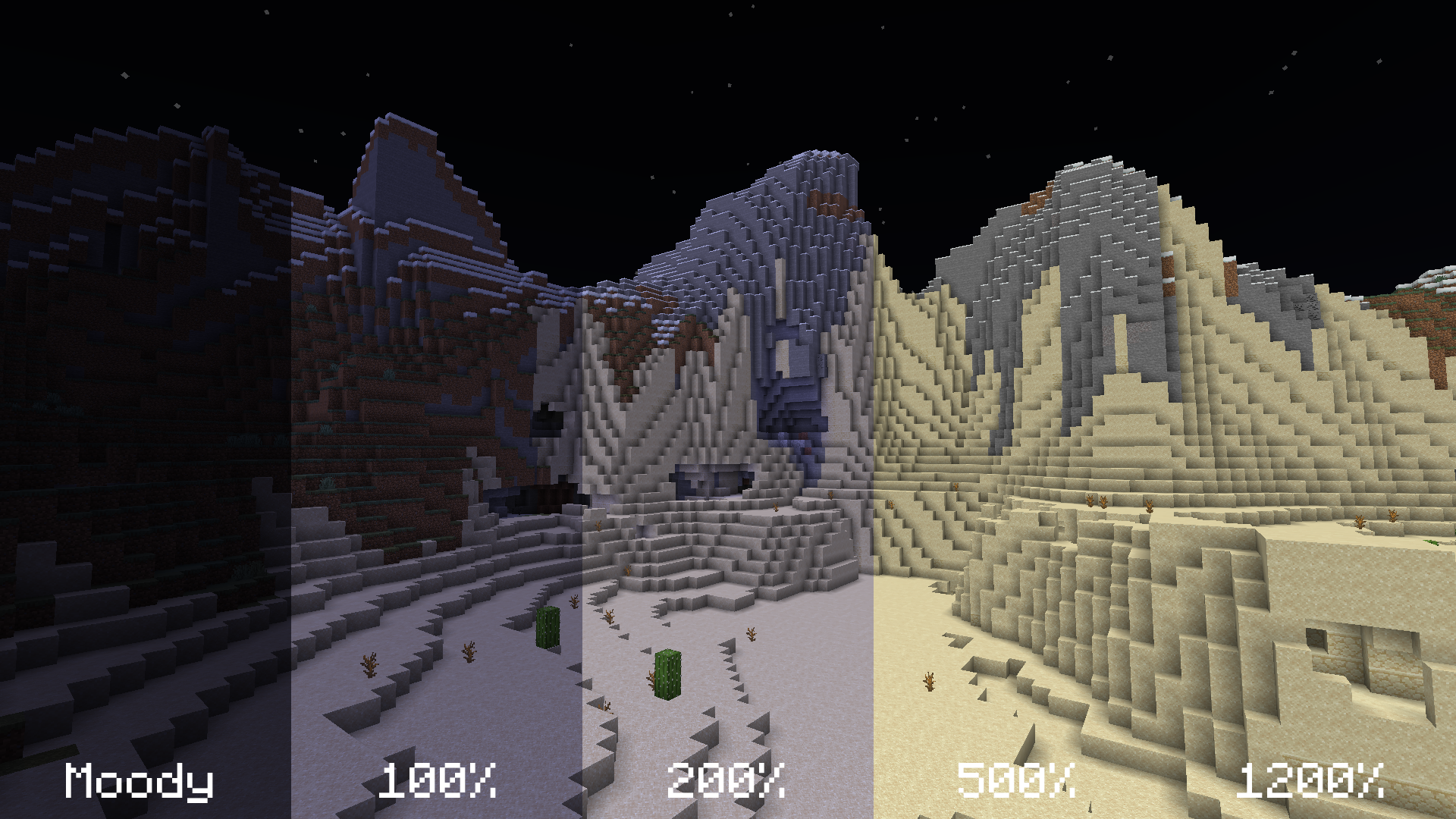
The mod modifies the brightness slider in video settings, extending brightness range from 0% through 100% to -100% through 1200%.
200% to 500% gives a great balance between seeing differences in lighting and seeing well in the dark.
-50% to -100% is great for a more challenging caving experience.
1200% is full-bright.
Up to 5 Custom Brightness Levels
By default, there are 2 brightness levels: your existing brightness and 1200%. Add up to 3 additional brightness levels for every situation: caving, nighttime, full-bright, or super-dark.
Access these sliders using Mod Menu.
New Keybinds
Use keybinds to select particular brightness levels. If you press the keybind of the currently selected brightness level, the brightness is switched to the last used brightness level.
Use the raise/lower keybinds enable quick brightness changes in-game.
If you have two brightness levels, the "Select Next Brightness" works just like a toggle between the two brightnesses.
Screenshots
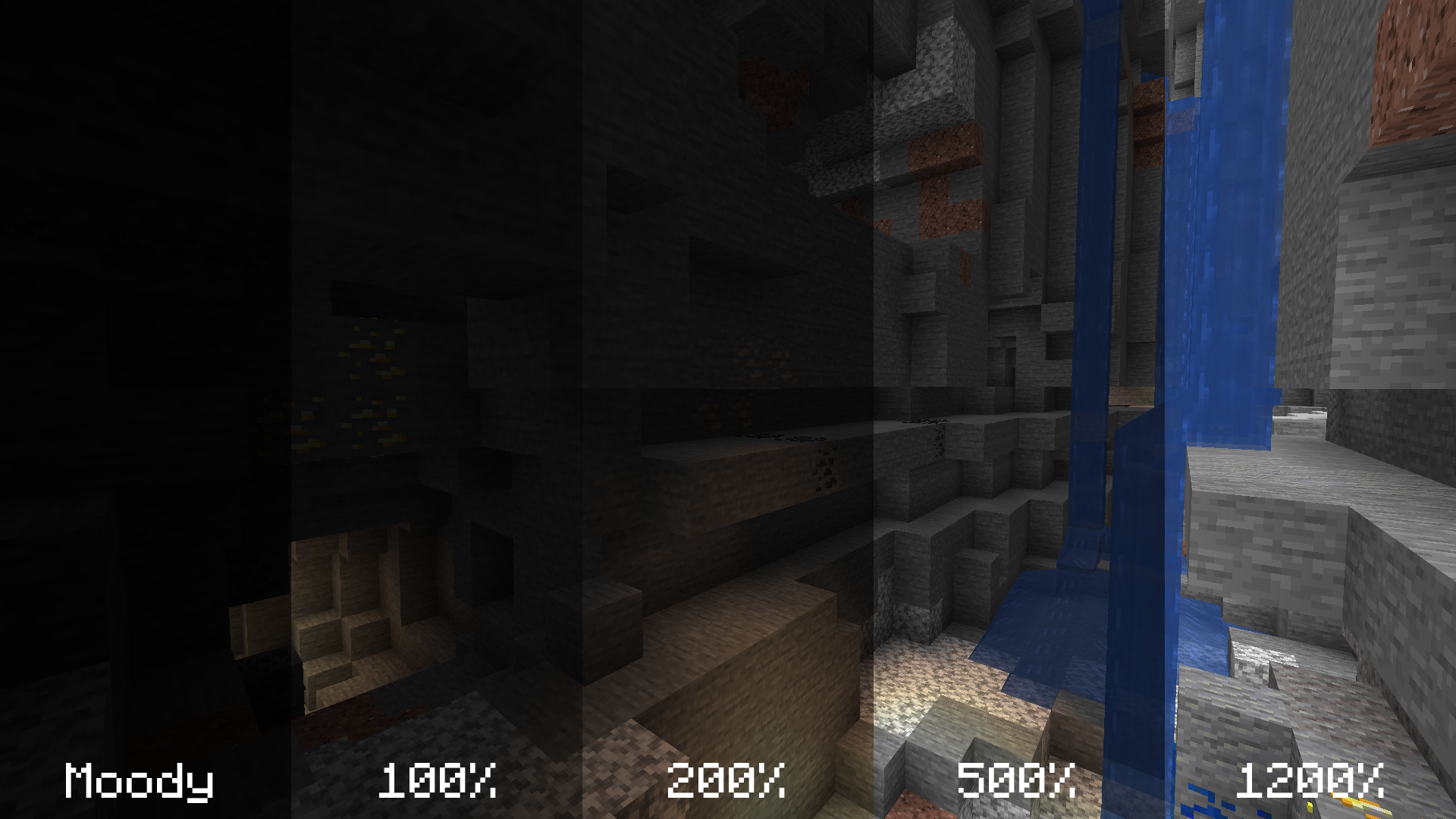
The screenshots below compare various brightness settings in different situations.
Cave brightness comparison
Underwater brightness comparison
Video (<1-Minute)
Missing v2 features but still useful!
Installation
- Install Fabric
- Drop the Fabric API jar into the mods folder
- Drop the Boosted Brightness and Mod Menu jars into the mods folder
Compatibility
Works with Optifine and Sodium. Let me know if you find any compatibility issues.
License
MIT. Feel free to use this mod in any modpack.
Boosted Brightness nasıl kurulur
With Millida Launcher
Install Millida Launcher
The launcher is free: download it at millida.net/launcher and sign in with any nickname.
Click “Install” on this page
The launcher opens and installs the mod for Minecraft 1.16.4–1.20.1 on Fabric automatically.
Launch the game
A profile with it appears in the launcher: click “Play”.
Manually
Install Fabric
The loader must match the game version of the mod file, for example Minecraft 1.20.1. After installing it, a separate profile appears in your launcher.
Download the file for your version
In the version list above, pick the file boosted-brightness-2.2.0+1.20.1.jar (43 KB) for your game version.
Put it in the mods folder
The folder is inside .minecraft (Windows: %appdata%\.minecraft\mods). If it does not exist, create it.
Launch the loader profile
Open “Mods” in the main menu: Boosted Brightness should be in the list.
Minecraft 1.20.1 runs on Java 17: with a different Java version the game may close right after launch.
Sürümler
Bağımlılıklarla
| Minecraft | Yükleyici | Dosya | Tarih | İşlemler |
|---|---|---|---|---|
| 1.20.1 | Fabric | [1.20.1] Boosted Brightness v2.2.042.9 KB | ||
| 1.16.5 | — | [1.16.4/5] Boosted Brightness v2.0.037.2 KB |
Yorumlar
Boosted Brightness için ilk puanı sen ver


