
Minecraft 1.20.1, 1.21.1 için Blue Flame Burning Mod
Ruh ateşinin varlıkları normal alevler yerine mavi bir alevle yakmasını sağlar
 NeoForge
 Forge
ForgeBlue Flame Burning modu hakkında
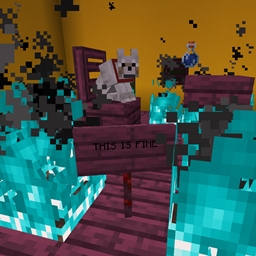
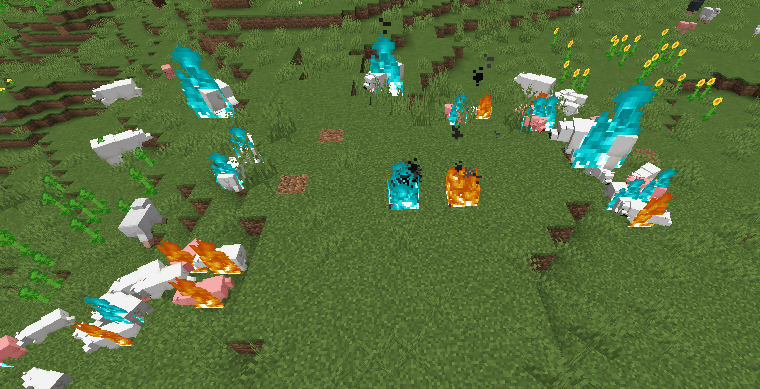
Soul fire, bir varlığı tutuşturduğunda normal sıkıcı sarı alevler yerine mavi alevle yanmasını sağlar.
- Soul Fire, oyuncuyu veya bir varlığı tutuşturduğunda varlığın mavi alevle yanmasını sağlar
- Mavi alevle yanan bir Zombie başka varlıkları tutuşturursa, o varlıklar da mavi yanar
- Oyuncuyu tutuşturan modlu sıvılar için destek
Bu modun eklediği değişiklik tamamen görseldir.
Modun her iki tarafta da kurulu olması gerekir.
Yardıma ihtiyacın olursa veya soruların varsa Discord'a gel: https://discord.gg/69YVMbvhTC
Bu modun yapımı sırasında birçok kutup ayısı zarar gördü
Blue Flame Burning nasıl kurulur
With Millida Launcher
Install Millida Launcher
The launcher is free: download it at millida.net/launcher and sign in with any nickname.
Click “Install” on this page
The launcher opens and installs the mod for Minecraft 1.18.2–1.21.1 on Forge or NeoForge automatically.
Launch the game
A profile with it appears in the launcher: click “Play”.
Manually
Install Forge or NeoForge
The loader must match the game version of the mod file, for example Minecraft 1.21.1. After installing it, a separate profile appears in your launcher.
Download the file for your version
In the version list above, pick the file blueflame-1.21.1-1.1.1.jar (18 KB) for your game version and loader.
Put it in the mods folder
The folder is inside .minecraft (Windows: %appdata%\.minecraft\mods). If it does not exist, create it.
Launch the loader profile
Open “Mods” in the main menu: Blue Flame Burning should be in the list.
Minecraft 1.21.1 runs on Java 21: with a different Java version the game may close right after launch.
Sürümler
Bağımlılıklarla
| Minecraft | Yükleyici | Dosya | Tarih | İşlemler |
|---|---|---|---|---|
| 1.21.1 | NeoForge | blueflame-1.21.1-1.1.1.jar17.5 KB 1 | ||
| 1.20.1 | NeoForge, Forge | blueflame-1.20.0-1.0.3.jar26 KB | ||
| 1.18.2 | Forge | blueflame-1.18.2-0.1.0.0.jar26.2 KB |
SSS
Which Minecraft versions does Blue Flame Burning work on?
There are files for 1.21.1, 1.20.1, 1.20, 1.18.2. The newest is 1.21.1.
Is Blue Flame Burning for Forge or Fabric?
There are files for Forge: 1.18.2–1.20.1 and for NeoForge: 1.20–1.21.1. There are no files for Fabric: a mod for another loader will not start.
Does Blue Flame Burning need other mods?
The author lists no required dependencies: the Forge or NeoForge loader is enough.
Which Java does Blue Flame Burning need?
Minecraft 1.21.1 runs on Java 21. If the game closes right after launch, the usual cause is the wrong Java version in the profile settings.
Where can I download Blue Flame Burning safely?
On this page: the file blueflame-1.21.1-1.1.1.jar (18 KB) is stored on Millida’s server, with no link shorteners. SHA-1 checksum: 0e78defafd6cf08759c656a54f8a33315e3ab924.
Yorumlar
Blue Flame Burning için ilk puanı sen ver


