

Minecraft 1.20.1, 1.21.1 için Alex's Delight Mod
Alex's Mobs ve Farmer's Delight arasında uyumluluk ekler
 NeoForge
 Forge
Alex's Delight modu hakkında
Alex's Mobs ile Farmer's Delight arasında uyumluluk ekler
Bu modlar açıkça gereklidir. 1.18 ve altı sürümler artık desteklenmiyor
Ayrıca Alex's Abnormalities'e de göz atın
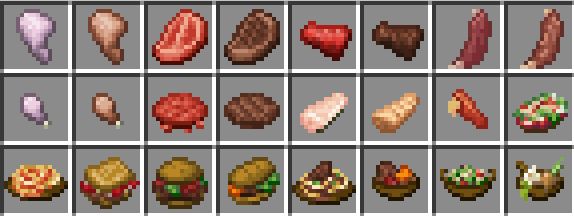
Mevcut Eşyalar:
Kangaroo Shanks
Loose Moose Ribs
Bison Meat
Bison Patties
Bunfungus Meat
Bunfungus Drumsticks
Catfish Slices
Kangaroo Stew
Moose Ribs ile Barbecue on a Stick tarifi
Maggot Salad
Lobster Pasta
Acacia Blossom Soup
Gongylidia Bruschetta
Bison Burger
Bunfungus Sandwich
Kangaroo Pasta
Yeni Kangaroo Burger tarifi veya Bison/Bunfungus ganimet tabloları çalışmazsa, Alex's Delight veri paketini ve ardından Alex's Mobs veri paketini devre dışı bırakıp yeniden etkinleştirin
20.000.000'dan fazla indirme için teşekkürler!
Herhangi bir sorununuz, öneriniz varsa veya dahil edilmek istiyorsanız, discord'a katılın!
Özellik önermekten çekinmeyin
İsterseniz bu modu herhangi bir mod paketinde veya videoda kullanabilirsiniz.
Bu bağlantıyı kullanarak ilk ayınızda %15 indirim kazanabilirsiniz! Ödeme işlemi sırasında kodu eklediğinizden emin olun
Alex's Delight nasıl kurulur
With Millida Launcher
Install Millida Launcher
The launcher is free: download it at millida.net/launcher and sign in with any nickname.
Click “Install” on this page
The launcher opens and installs the mod for Minecraft 1.18.2–1.21.1 on Forge or NeoForge automatically.
Launch the game
A profile with it appears in the launcher: click “Play”.
Manually
Install Forge or NeoForge
The loader must match the game version of the mod file, for example Minecraft 1.21.1. After installing it, a separate profile appears in your launcher.
Download the file for your version
In the version list above, pick the file alexsdelight-1.6.jar (87 KB) for your game version and loader.
Put it in the mods folder
The folder is inside .minecraft (Windows: %appdata%\.minecraft\mods). If it does not exist, create it.
Launch the loader profile
Open “Mods” in the main menu: Alex's Delight should be in the list.
Minecraft 1.21.1 runs on Java 21: with a different Java version the game may close right after launch.
Sürümler
Bağımlılıklarla
| Minecraft | Yükleyici | Dosya | Tarih | İşlemler |
|---|---|---|---|---|
| 1.21.1 | NeoForge | alexsdelight-1.6.jar87.3 KB 59 | ||
| 1.20.1 | Forge | alexsdelight-1.5.jar54.1 KB 90 | ||
| 1.18.2 | Forge | alexsdelight-1.18.2-1.2.3.jar28.4 KB 6 |
SSS
Which Minecraft versions does Alex's Delight work on?
There are files for 1.21.1, 1.20.1, 1.18.2. The newest is 1.21.1.
Is Alex's Delight for Forge or Fabric?
There are files for Forge: 1.18.2–1.20.1 and for NeoForge: 1.21.1. There are no files for Fabric: a mod for another loader will not start.
Does Alex's Delight need other mods?
The author lists no required dependencies: the Forge or NeoForge loader is enough.
Which Java does Alex's Delight need?
Minecraft 1.21.1 runs on Java 21. If the game closes right after launch, the usual cause is the wrong Java version in the profile settings.
Where can I download Alex's Delight safely?
On this page: the file alexsdelight-1.6.jar (87 KB) is stored on Millida’s server, with no link shorteners. SHA-1 checksum: 19e8d1e255c431b706e79412be92d8448c668f4c.
Yorumlar
Alex's Delight için ilk puanı sen ver


