

Minecraft 1.20.1, 1.21.1 için Aether Addon: Emissivity Mod
The Aether için çeşitli dokulara ışıma özelliği ekleyen bir eklenti.
 NeoForge
 Fabric
 Forge
Forge💡 About this Addon 💡
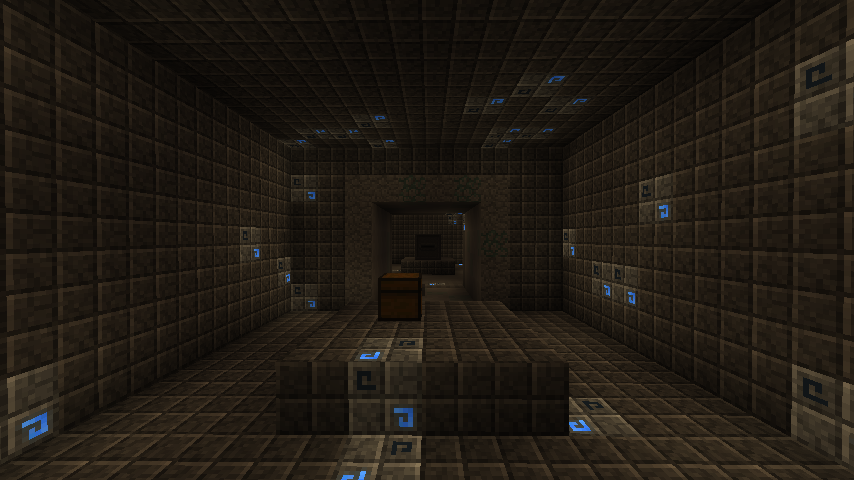
The Emissivity addon applies emissive textures to various items, blocks, and equipment found in the Aether mod. This means that these textures will appear bright regardless of the light level when they are in the world.
These changes apply to things made from Ambrosium, Phoenix equipment, dungeon stone runes, and even the Shield of Repulsion. All items and blocks have emissive textures handled through the mod's data pack files, while emissive equipment is toggleable within the mod's config options.
☁️ More from The Aether Team ☁️
If you have a question about the addon or are just interested in other projects developed by The Aether Team, you can join The Aether Project Discord! Our friendly staff and welcoming community will make sure you feel at home with us!
You can also support The Aether Team by pledging on Patreon! Every pledge goes directly towards development and enables us to continue doing what we love most.
Aether Addon: Emissivity nasıl kurulur
With Millida Launcher
Install Millida Launcher
The launcher is free: download it at millida.net/launcher and sign in with any nickname.
Click “Install” on this page
The launcher opens and installs the mod for Minecraft 1.20.1–1.21.1 on Fabric, Forge or NeoForge automatically.
Launch the game
A profile with it appears in the launcher: click “Play”.
Manually
Install Fabric, Forge or NeoForge
The loader must match the game version of the mod file, for example Minecraft 1.21.1. After installing it, a separate profile appears in your launcher.
Download the file for your version
In the version list above, pick the file aether_emissivity-1.21.1-1.0.2-neoforge.jar (172 KB) for your game version and loader.
Put it in the mods folder
The folder is inside .minecraft (Windows: %appdata%\.minecraft\mods). If it does not exist, create it.
Launch the loader profile
Open “Mods” in the main menu: Aether Addon: Emissivity should be in the list.
Minecraft 1.21.1 runs on Java 21: with a different Java version the game may close right after launch.
Sürümler
Bağımlılıklarla
| Minecraft | Yükleyici | Dosya | Tarih | İşlemler |
|---|---|---|---|---|
| 1.21.1 | NeoForge | Emissivity - 1.21.1-1.0.2-neoforge172 KB | ||
| 1.21.1 | Fabric | Emissivity - 1.21.1-1.0.2-fabric754 KB | ||
| 1.20.1 | NeoForge, Forge | Emissivity - 1.20.1-1.0.0-neoforge180 KB 2 |
SSS
Which Minecraft versions does Aether Addon: Emissivity work on?
There are files for 1.21.1, 1.20.1. The newest is 1.21.1.
Is Aether Addon: Emissivity for Forge or Fabric?
There are files for Fabric: 1.21.1, for Forge: 1.20.1 and for NeoForge: 1.20.1–1.21.1.
Does Aether Addon: Emissivity need other mods?
The author lists no required dependencies: the Fabric, Forge or NeoForge loader is enough.
Which Java does Aether Addon: Emissivity need?
Minecraft 1.21.1 runs on Java 21. If the game closes right after launch, the usual cause is the wrong Java version in the profile settings.
Where can I download Aether Addon: Emissivity safely?
On this page: the file aether_emissivity-1.21.1-1.0.2-neoforge.jar (172 KB) is stored on Millida’s server, with no link shorteners. SHA-1 checksum: 4dc432970e91ce9c4642655f220abddff40e679d.
Yorumlar
Aether Addon: Emissivity için ilk puanı sen ver


