
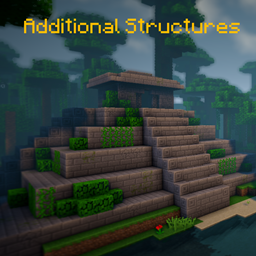
Minecraft 1.20.1, 1.12.2 için Additional Structures Mod
Dünyanıza mükemmel şekilde entegre olan 250'den fazla yeni yapı ekler!
 NeoForge
 Forge
Forge📖 Açıklama
Bu mod, dünyanızı genişletmek için oyuna yaklaşık 250 yeni küçük ve orta boy yapı ekler!
- Terralith, Traverse, Biomes O' Plenty, Biome Bundle ve daha fazlası gibi biyom oluşturma modlarını destekler!
- Mystcraft entegrasyonu (MC 1.12)
- her yapı türünün doğma değerlerini değiştirmek için yapılandırma seçenekleriyle! (MC 1.12)
- /locate komutuyla çalışır
- güncelleme denetleyicisiyle
- overworld ve end'de vanilla ve modlu biyomlarda farklı yapılar oluşur!
- Yapılandırma Veri Paketi
1.18+ sürümünde bazı yapı değerlerini değiştirmek veya düzenlemek mi istiyorsunuz? İşte nasıl yapılacağı!
Burada mevcut sürümün tüm yapılarını bulabilirsiniz!
Fabric veya Quilt mi kullanıyorsunuz? O zaman bu sürümü kullanın!
📷 Sunum
🗃️ Bağımlılıklar
Gerekli:
- Magma Core [≥ MC 1.21.5]
- Güncelleme denetleyicisi gibi temel kod ve özellikleri sağlar
- CurseForge | Modrinth
Desteklenen:
- Mystcraft [MC 1.12]
- AS yapılarının özellik sembolleri eklendi
- CurseForge | Modrinth
- Antique Atlas [≥ MC 1.21]
- Haritada bazı yapılar için harita işaretçisi
- CurseForge | Modrinth
Additional Structures nasıl kurulur
With Millida Launcher
Install Millida Launcher
The launcher is free: download it at millida.net/launcher and sign in with any nickname.
Click “Install” on this page
The launcher opens and installs the mod for Minecraft 1.12–1.21.10 on Forge or NeoForge automatically.
Launch the game
A profile with it appears in the launcher: click “Play”.
Manually
Install Forge or NeoForge
The loader must match the game version of the mod file, for example Minecraft 1.21.10. After installing it, a separate profile appears in your launcher.
Download the file for your version
In the version list above, pick the file AdditionalStructures-1.21.10-(v.8.1.1-NEO).jar (1.5 MB) for your game version and loader.
Put it in the mods folder
The folder is inside .minecraft (Windows: %appdata%\.minecraft\mods). If it does not exist, create it.
Launch the loader profile
Open “Mods” in the main menu: Additional Structures should be in the list.
Minecraft 1.21.10 runs on Java 21: with a different Java version the game may close right after launch.
Sürümler
Bağımlılıklarla
| Minecraft | Yükleyici | Dosya | Tarih | İşlemler |
|---|---|---|---|---|
| 1.21.9 | NeoForge | AdditionalStructures v.8.1.1-NEO1.5 MB 1 | ||
| 1.20.2 | Forge | Additional Structures v.4.2.21.5 MB 23 | ||
| 1.12.1 | — | Additional Structures v.2.2.2782 KB 5 |
SSS
Which Minecraft versions does Additional Structures work on?
There are files for 1.12–1.21.10, 12 versions in total. The newest is 1.21.10.
Is Additional Structures for Forge or Fabric?
There are files for Forge: 1.20–1.20.6 and for NeoForge: 1.21.9–1.21.10. There are no files for Fabric: a mod for another loader will not start.
Does Additional Structures need other mods?
The author lists no required dependencies: the Forge or NeoForge loader is enough.
Which Java does Additional Structures need?
Minecraft 1.21.10 runs on Java 21. If the game closes right after launch, the usual cause is the wrong Java version in the profile settings.
Where can I download Additional Structures safely?
On this page: the file AdditionalStructures-1.21.10-(v.8.1.1-NEO).jar (1.5 MB) is stored on Millida’s server, with no link shorteners. SHA-1 checksum: 05bfd35a858149e7e18e7eecd841f14dee9e504b.
Yorumlar
Additional Structures için ilk puanı sen ver


