

Minecraft 1.20.1, 1.16.5 için Seeded Grass Veri paketi
Toprak ve tohumlardan çim blokları yapma yeteneği ekler
- görüntülenme
- 27 görüntülenme
- Güncellendi
- Güncellendi 10.03.2025
- 1.13 — 1.20.6
 Veri paketi
- İstemci ve sunucu
Seeded Grass Datapack
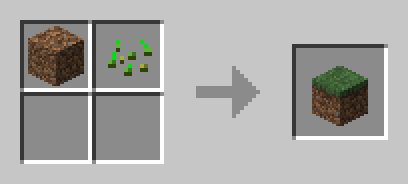
Transform your Minecraft world with the Seeded Grass Datapack! No more waiting for grass to spread—now you can craft grass blocks easily with just dirt and wheat seeds.
Crafting Recipe Example:
Dirt + Wheat Seeds = Grass Block
How to Use:
- Download the Seeded Grass Datapack.
- Place the downloaded file into the "datapacks" folder in your Minecraft world save.
- Start crafting and bring life to barren landscapes instantly!
Compatibility:
- No additional dependencies required.
Revive Your World:
Perfect for builders and survival players, this simple yet effective datapack helps you create lush environments without waiting for natural grass spread. Whether you're landscaping or just need a quick fix, Seeded Grass makes greenery more accessible than ever!
Download now and start crafting a greener world in Minecraft!
Seeded Grass nasıl kurulur
With Millida Launcher
Install Millida Launcher
The launcher is free: download it at millida.net/launcher and sign in with any nickname.
Click “Install” on this page
The launcher opens and installs the data pack for Minecraft 1.13–1.20.6 automatically.
Launch the game
A profile with it appears in the launcher: click “Play”.
Manually
Download the archive
Pick the file Seeded Grass.zip (1019 B) for your game version.
New world: “Data Packs”
When creating a world, click “Data Packs”, drag the archive into the window, then move it to “Selected”.
Existing world: the datapacks folder
Put the archive into saves/<world>/datapacks and type /reload in game.
On a server
Archive goes into the server world’s datapacks
The world/datapacks folder on the server; players do not need to install anything.
Reload the data
Type /reload in the server console or restart the server.
Or use the “To hosting” button
On Millida Hosting, the button at the top of the page uploads the file to your server and restarts it for you.
Sürümler
Bağımlılıklarla
| Minecraft | Yükleyici | Dosya | Tarih | İşlemler |
|---|---|---|---|---|
| 1.18.2 | Veri paketi | 1.18.21019 B | ||
| 1.17.1 | Veri paketi | 1.17.11019 B | ||
| 1.16.5 | Veri paketi | 1.16.51019 B | ||
| 1.15.2 | Veri paketi | 1.15.21019 B | ||
| 1.14.4 | Veri paketi | 1.14.41019 B |
Yorumlar
Seeded Grass için ilk puanı sen ver


