

Minecraft 26.3 için Fast Craft Veri paketi
Üretim deneyimini iyileştiren basit bir veri paketi/mod
- indirme
- 2 indirme
- görüntülenme
- 23 görüntülenme
- Güncellendi
- Güncellendi 30.09.2026
- 1.21.11 — 26.3
 Veri paketi
- İstemci ve sunucu
FastCraft Datapack
A simple datapack for some crafting recipes
Tired of the process of crafting a tons of in-the-middle recipes for items you need?
FastCraft is a datapack/mod (the 'datapack') you are looking for
This datapack added some fast crafting recipes for you
Supported version: Minecraft 1.21.X and up

How to apply the datapack
Download the pack in the Releases tab (on Github) or in the Versions tab (on Modrinth) and put it in your world's datapacks folder
There is also a packaged mod on Modrinth. With this being a mod means that you don't need to add the datapack every time you create a new world

Example Recipes
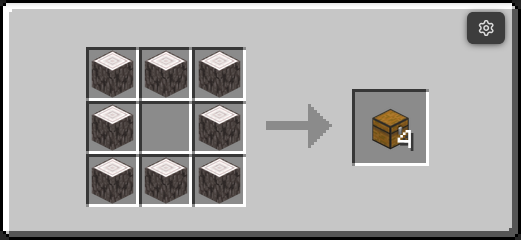
Craft 4 chest without crafting any planks, straight from the logs
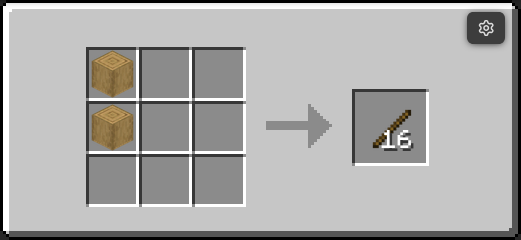
You can also craft sticks from the logs, faster emerald trading
This recipe appear also appear a lot in some old modpacks, I think this is one of the best thing to be able to fast craft
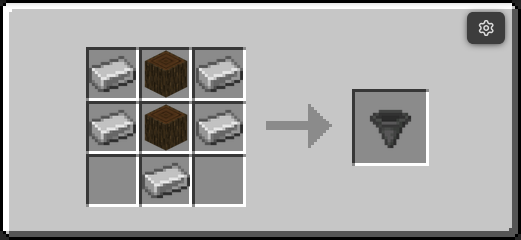
More in the example folder on Github or Gallery tab on Modrinth
Fast Craft nasıl kurulur
With Millida Launcher
Install Millida Launcher
The launcher is free: download it at millida.net/launcher and sign in with any nickname.
Click “Install” on this page
The launcher opens and installs the data pack for Minecraft 1.21.11–26.3 automatically.
Launch the game
A profile with it appears in the launcher: click “Play”.
Manually
Download the archive
Pick the file FastCraft-v3.0.0-mc26.3.zip (11 KB) for your game version.
New world: “Data Packs”
When creating a world, click “Data Packs”, drag the archive into the window, then move it to “Selected”.
Existing world: the datapacks folder
Put the archive into saves/<world>/datapacks and type /reload in game.
On a server
Archive goes into the server world’s datapacks
The world/datapacks folder on the server; players do not need to install anything.
Reload the data
Type /reload in the server console or restart the server.
Use the “To server” button
On Millida Hosting, the button at the top of the page uploads the file to your server and restarts it for you.
Sürümler
Bağımlılıklarla
| Minecraft | Yükleyici | Dosya | Tarih | İşlemler |
|---|---|---|---|---|
| 26.3 | Veri paketi | 26.311 KB 1 | ||
| 26.2 | Veri paketi | 26.211.3 KB | ||
| 26.1 | Veri paketi | 26.111.2 KB | ||
| 1.21.11 | Veri paketi | 1.21.1111.2 KB 1 |
SSS
Which Minecraft versions does Fast Craft work on?
There are files for 26.3, 26.2, 26.1.2, 26.1.1, 26.1, 1.21.11. The newest is 26.3.
Does Fast Craft work on a server?
Yes: the data pack goes into the datapacks folder of the server world, and players do not need to install anything.
Where can I download Fast Craft safely?
On this page: the file FastCraft-v3.0.0-mc26.3.zip (11 KB) is stored on Millida’s server, with no link shorteners. SHA-1 checksum: a924614782f249cfaba2d739aceaa80d0a1a7939.
Yorumlar
Fast Craft için ilk puanı sen ver


