

 Veri paketi
ENTITY HEALTH BARS
This Datapack adds health bars and damage/heal/absorption indicators to all entities in the world.\ You have to be within 20 Blocks of the entity before they take damage/heal in order to activate the health bars and indicators.
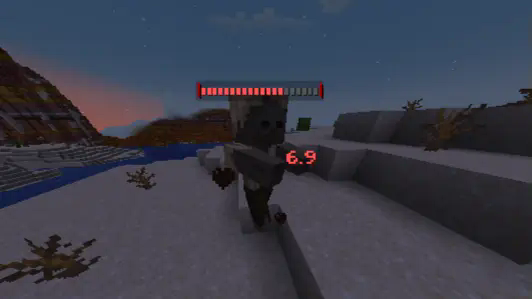
Indicator colors:
- Red: Damage
- Green: Heal
- Yellow: Gained Absorption
- Dark Purple: Lost Absorption
Size of the health bars scale with entity max health, up to 40 segments for entities with 40HP or higher.
Using a mod like Player Ladder allows the Health Bar to appear on players (Number Indicators still work on players regardless of whether or not this mod is installed)
Health Bars and Indicators will not show up on entities under the effects of Invisibility
Toggle if health bars and damage numbers are visible through walls via:\ /scoreboard players set #aolu_hb aolu_hb_see_through x
- set x to 1 or below for see through (default setting)
- set x to 2 or above for not see-through
Entity Health Bars nasıl kurulur
With Millida Launcher
Install Millida Launcher
The launcher is free: download it at millida.net/launcher and sign in with any nickname.
Click “Install” on this page
The launcher opens and installs the data pack for Minecraft 1.21.4–1.21.11 automatically.
Launch the game
A profile with it appears in the launcher: click “Play”.
Manually
Download the archive
Pick the file aolu-Health_Bars.zip (63 KB) for your game version.
New world: “Data Packs”
When creating a world, click “Data Packs”, drag the archive into the window, then move it to “Selected”.
Existing world: the datapacks folder
Put the archive into saves/<world>/datapacks and type /reload in game.
On a server
Archive goes into the server world’s datapacks
The world/datapacks folder on the server; players do not need to install anything.
Reload the data
Type /reload in the server console or restart the server.
Use the “To server” button
On Millida Hosting, the button at the top of the page uploads the file to your server and restarts it for you.
Sürümler
Bağımlılıklarla
| Minecraft | Yükleyici | Dosya | Tarih | İşlemler |
|---|---|---|---|---|
| 1.21.11 | Veri paketi | 1.21.1162.6 KB 1 |
Yorumlar
Entity Health Bars için ilk puanı sen ver


